未知的 IP 配置

问题

You have followed Network Configuration and can still not discover the camera. This can happen if you don't know the IP address or hostname of the camera, and the camera has previously been configured to a non-default IP address and hostname. The camera can also be configured for DHCP, while the interfacing network card on the PC is configured for static IP.

备注

If the Ethernet Link LED at the back of the camera is off, see Zivid Studio 中未找到相机 instead.

解决方案

小技巧

If you can, power cycle the camera and read the IP address from the splash screen projection.

升级到 SDK 2.11 并运行 CLI 工具 ZividListCameras

From SDK 2.11, the Zivid SDK detects all Zivid cameras on the network and reports their status. If you are unable to upgrade to SDK 2.11, do a network reset:

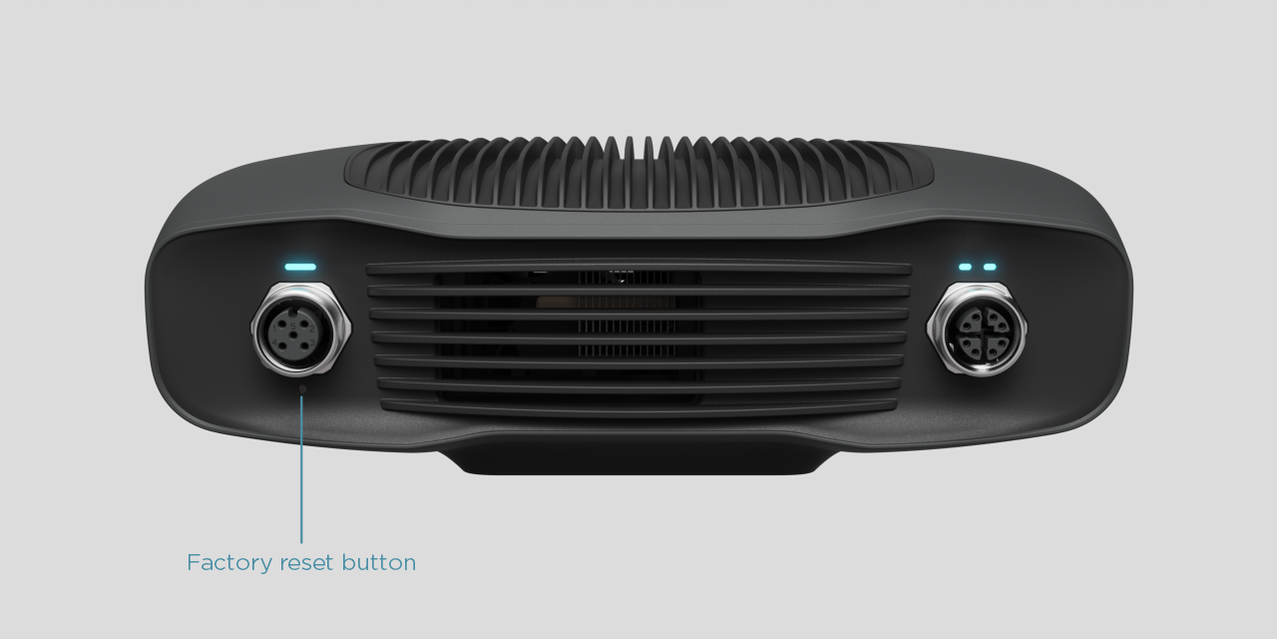
  1. 找到电源连接器下方的重置按钮。

  2. Use the pointed end of a paper clip to press and hold the button for 5 to 10 seconds until the Power LED turns green.

  3. 相机将恢复其出厂默认IP 172.28.60.5

../../_images/factory-reset-button.png

警告

Holding the reset button too long (more than 10 seconds) will reset the camera firmware to the factory default. If the firmware is reset, a 固件升级 can be required.

警告

This solution refers to the factory reset button which has a known issue listed in the Zivid Errata. Please refer to 重置按钮无法重置网络配置 if you encounter issues with the factory reset button.

You can now connect to the camera after following Static IP Network Configuration.