OpenCL 相关的问题
本页介绍常见的 OpenCL 错误代码(CL_INVALID_BINARY、CL_PLATFORM_NOT_FOUND_KHR、CL_OUT_OF_RESOURCES 等)以及如何解决这些问题。
错误 |
说明 |
解决办法 |
CL_INVALID_BINARY |
This indicates a problem with your OpenCL device (CPU/GPU) or driver. |
|
CL_INVALID_QUEUE_PROPERTIES |
||
CL_PLATFORM_NOT_FOUND_KHR |
Your system is missing OpenCL drivers. |
|
CL_OUT_OF_RESOURCES |
This indicates a problem with your OpenCL device (CPU/GPU) or driver. |
|
CL_MEM_OBJECT_ALLOCATION_FAILURE |
||
CL_OUT_OF_HOST_MEMORY |
Your computer does not have enough memory to execute the current task. |
|
CL_INVALID_BINARY
您可以使用 clinfo 检查您的 OpenCL 驱动程序是否高于所需版本。
Windows
下载 clinfo Windows 二进制文件。
按键盘上的 Win + R 键启动命令提示符,然后输入
cmd并按 Enter。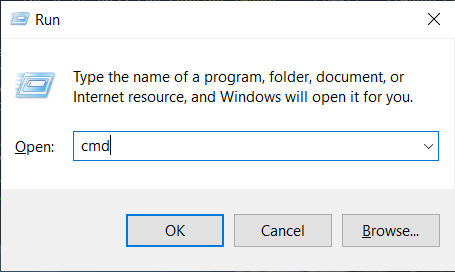
导航到包含下载文件 (clinfo.exe) 的目录并执行以下命令:
如需检查 OpenCL 驱动程序版本,请使用
clinfo并搜索 OpenCL 平台版本:clinfo.exe | findstr "Platform\ Version"
如果版本低于 OpenCL 1.2,则需要 更新您的图形驱动程序 。

Ubuntu
按键盘上的 Ctrl + Alt + T 键打开终端窗口并安装
clinfo。sudo apt install -y clinfo
运行
clinfo -l来列出所有 OpenCL 平台。sudo /usr/bin/clinfo -l
这将打印有关系统上所有 OpenCL 平台及其公开的设备的所有可用信息。
如果您的 GPU 未列出,您可能需要 安装 OpenCL 驱动程序和/或图形驱动程序 。
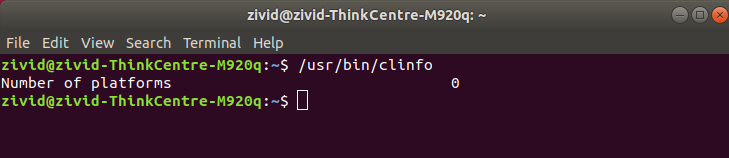
如需检查 OpenCL 驱动程序版本,请使用
clinfo并搜索 OpenCL 平台版本:sudo /usr/bin/clinfo | grep "Platform Version"
如果版本低于 OpenCL 1.2,您需要 更新您的 OpenCL 驱动程序和/或图形驱动程序 。
CL_PLATFORM_NOT_FOUND_KHR
在 Ubuntu 上,您可能需要将您的用户添加为 render 和/或 video 组的一部分,OpenCL 才能正常工作。
Ubuntu 26.04
如果您的用户不属于 render 和 video 组,OpenCL 将无法工作。
按键盘上的 Ctrl + Alt + T 键打开终端窗口,然后将您的用户添加到正确的组:
sudo gpasswd -a $USER render
sudo gpasswd -a $USER video
Ubuntu 24.04
如果您的用户不属于 render 和 video 组,OpenCL 将无法工作。
按键盘上的 Ctrl + Alt + T 键打开终端窗口,然后将您的用户添加到正确的组:
sudo gpasswd -a $USER render
sudo gpasswd -a $USER video
Ubuntu 22.04
如果您的用户不属于 render 和 video 组,OpenCL 将无法工作。
按键盘上的 Ctrl + Alt + T 键打开终端窗口,然后将您的用户添加到正确的组:
sudo gpasswd -a $USER render
sudo gpasswd -a $USER video
Ubuntu 20.04
如果您的用户不属于 render 组,OpenCL 将无法工作。
按键盘上的 Ctrl + Alt + T 键打开终端窗口,然后将您的用户添加到正确的组:
sudo gpasswd -a $USER render
Ubuntu 18.04
备注
Support for Ubuntu 18.04 was removed in SDK 2.10. To view its setup instructions, switch the Knowledge Base to a previous version in the top left corner; they are also preserved in Knowledge Base versions for SDK 2.9 and earlier.
重新启动您的电脑:
sudo reboot