clinfo 不打印任何内容
If clinfo prints nothing on Ubuntu, add your user to the required groups, then run clinfo -l again; if it still reports zero platforms, install the OpenCL drivers.
备注
这只是一个 Ubuntu 系统里的问题。
要求
在 Ubuntu 上,您可能需要将用户添加为 render 和/或 video 组的一部分,OpenCL 才能正常工作。
Ubuntu 26.04
如果您的用户不属于 render 组和 video video 组,OpenCL 将无法工作。
按下键盘上的 Ctrl + Alt + T 键打开终端窗口,然后将您的用户添加到正确的组:
sudo gpasswd -a $USER render
sudo gpasswd -a $USER video
Ubuntu 24.04
如果您的用户不属于 render 组和 video video 组,OpenCL 将无法工作。
按下键盘上的 Ctrl + Alt + T 键打开终端窗口,然后将您的用户添加到正确的组:
sudo gpasswd -a $USER render
sudo gpasswd -a $USER video
Ubuntu 22.04
如果您的用户不属于 render 组和 video video 组,OpenCL 将无法工作。
按下键盘上的 Ctrl + Alt + T 键打开终端窗口,然后将您的用户添加到正确的组:
sudo gpasswd -a $USER render
sudo gpasswd -a $USER video
Ubuntu 20.04
如果您的用户不属于 render 组,OpenCL 将无法工作。
按下键盘上的 Ctrl + Alt + T 键打开终端窗口,然后将您的用户添加到正确的组:
sudo gpasswd -a $USER render
Ubuntu 18.04
备注
Support for Ubuntu 18.04 was removed in SDK 2.10. To view its setup instructions, switch the Knowledge Base to a previous version in the top left corner; they are also preserved in Knowledge Base versions for SDK 2.9 and earlier.
重启你的电脑:
sudo reboot
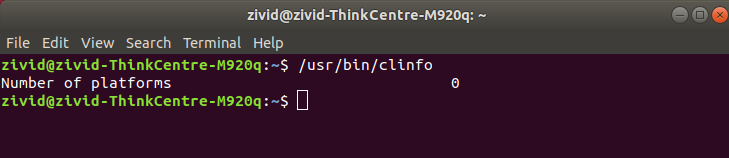
按下键盘上的 Ctrl + Alt + T 键打开终端窗口,然后执行以下命令:
/usr/bin/clinfo -l
这将打印有关系统上所有 OpenCL 平台及其公开的设备的所有可用信息。
Alternatively, if you do not want to add your user to the render/video groups, you can use sudo:
sudo /usr/bin/clinfo -l
如果平台数量等于 0,则需要 安装 OpenCL 驱动程序 。