No cameras found in Zivid Studio
Problem
Zivid Studio가 카메라를 찾지 못하고 다음 메시지를 출력합니다.
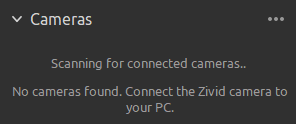
Solution
Ensure that the camera is powered on and properly connected by looking at the Ethernet Link LED at the back of the camera. Also check the link LED at the PC (or switch) end of the cable. If either link LED is off, the link layer is down. Replace the cable or try a different port before continuing.
Power-cycle the camera and look at the projection. For about 60 seconds after boot, the camera projects its IP address and link status as a splash screen. This lets you confirm the camera’s own view of its state without any SDK connection.
Confirm your Network Configuration.
… 누른 다음 Scan for connected cameras 하거나 Zivid Studio를 다시 시작합니다.
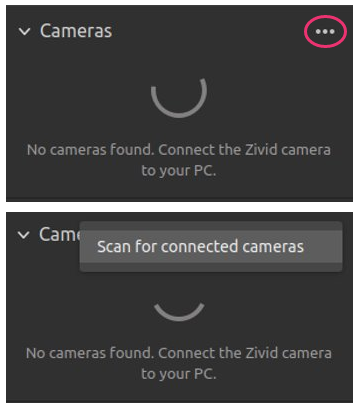
여전히 카메라를 찾을 수 없는 경우 다음 중 하나를 시도해 보세요.
Check that you do not have a
Cameras.ymlconfiguration file on your system. This file will restrict which cameras you can connect to based on IP addresses or hostnames. You can read more about this in Restrict Discoverable Cameras with Cameras.yml.If you are configuring a camera with firmware from SDK 2.9 and below, the IP of the PC must first be in the local subnet range of the camera. Go to Static IP Network Configuration to do this.
카메라를 기본 IP 주소인
172.28.60.5로 공장 초기화하세요. Zivid SDK는 이 IP 주소를 가진 모든 카메라를 자동으로 검색합니다. 이 작업을 수행하려면 Factory Reset Button 를 방문하세요. 공장 초기화 버튼에 문제가 발생하면 Reset Button Fails to Reset Network Configuration 을 참조하세요.If you need to monitor link-speed changes programmatically (for example to detect intermittent cable issues), see Detect Ethernet Link Changes.
If the camera was previously working and now disconnects or restarts repeatedly during operation rather than failing to be found at all, see Camera disconnects or restarts repeatedly during operation.
여전히 카메라를 찾을 수 없는 경우 customersuccess@zivid.com 로 문의하세요.