Production Preparation Processes

Zivid SDK에는 시스템 설정 및 운영 준비에 도움이 되는 다양한 프로세스와 도구가 포함되어 있습니다. 배포 전에 반드시 수행해야 할 필수 사항은 다음과 같습니다.

  • warm-up

  • infield correction

  • hand-eye calibration

이러한 프로세스를 사용하여 생산 조건을 모방하여 작업 온도, 거리, 그리고 FOV 맞춰 카메라를 최적화하고자 합니다. 생산 중 처리 시간을 단축하고 피킹 속도를 극대화하는 데 도움이 되는 다른 도구는 다음과 같습니다.

  • downsampling

  • transforming and ROI box filtering

Robot Calibration

생산을 시작하기 전에 로봇이 제대로 칼리브레이션되어 위치 정확도가 우수한지 확인해야 합니다. 로봇 운동학 교정 및 로봇 마스터링/영점 조정에 대한 자세한 내용은 로봇 공급업체에 문의하십시오.

Warm-up

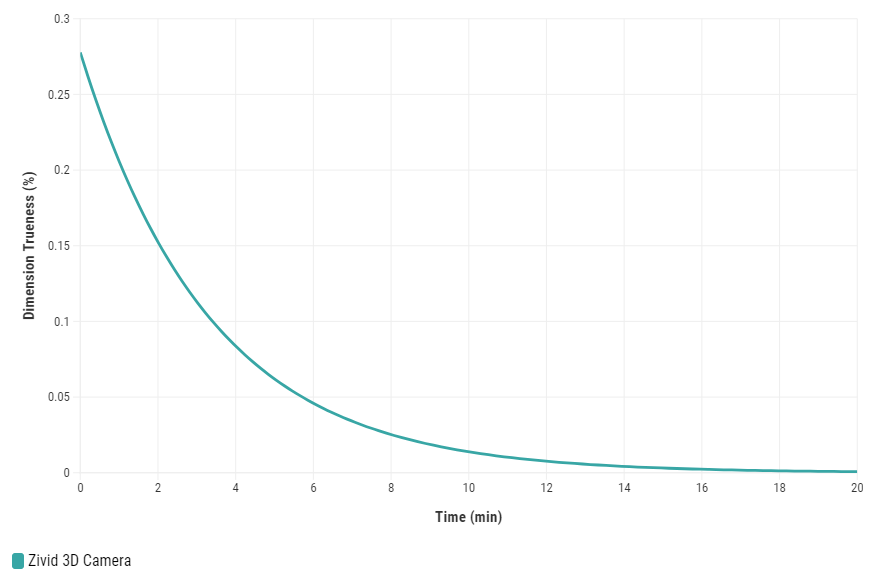
Zivid 3D 카메라를 예열하고 열 평형에 도달하도록 하면 애플리케이션의 전반적인 정확도와 성공률을 향상시킬 수 있습니다. 이는 카메라와의 거리 1미터당 허용 오차가 5mm 미만인 피킹 애플리케이션과 같이 엄격한 허용 오차가 요구되는 애플리케이션에 권장됩니다. 예열된 카메라는 현장 보정 및 핸드-아이 칼리브레이션 결과를 모두 향상시킵니다.
Warmup

카메라를 예열하려면 코드 샘플을 실행하여 사이클 시간과 카메라 설정 경로를 제공하세요.

Sample: warmup.py

python /path/to/warmup.py --settings-path /path/to/settings.yml --capture-cycle 6.0

워밍업이 왜 필요한지, SDK를 사용하여 워밍업을 수행하는 방법을 더 잘 알아보려면 Warm-up 문서를 읽어보세요.

카메라가 10분 이상 사진을 찍지 못하는 시간이 길어지는 경우, Thermal Stabilization 활성화해 놓는 것이 매우 좋습니다.

Infield Correction

Infield Correction은 Zivid 카메라의 Dimension Trueness을 검증하고 보정하도록 설계된 유지보수 도구입니다. 사용자는 시야(FOV) 내 여러 지점에서 포인트 클라우드의 Dimension Trueness를 확인하고 해당 용도에 적합한지 판단할 수 있습니다. 검증 결과 카메라가 해당 용도에 충분히 정확하지 않은 것으로 나타나면, 포인트 클라우드의 Dimension Trueness을 높이기 위한 보정을 수행할 수 있습니다. 여러 측정값의 평균 Dimension Trueness 오차는 0에 가까울 것으로 예상됩니다(<0.1%).

Why is this necessary?

저희 카메라는 산업 작업 환경을 견딜 수 있도록 제작되었으며, 고품질 포인트 클라우드를 지속적으로 생성합니다. 하지만 대부분의 고정밀 전자 장비와 마찬가지로, 최상의 성능을 유지하기 위해 약간의 조정이 필요할 수 있습니다. 카메라가 환경에 큰 변화를 겪거나 무리하게 사용하는 경우, 새로운 환경에서 최적의 성능을 발휘하기 위해 조정이 필요할 수 있습니다.

처음으로 해보는 거라면 Infield Correction 에 대해 자세히 알아보세요.

현장 검증을 실행할 때는 빈 상단과 하단 모두 Dimension Trueness가 양호한지 확인하십시오. 팔에 장착하는 애플리케이션의 경우, 현장 검증 시 로봇을 캡처 포즈로 이동하십시오. 검증 결과가 양호하면 현장 보정을 실행할 필요가 없습니다.
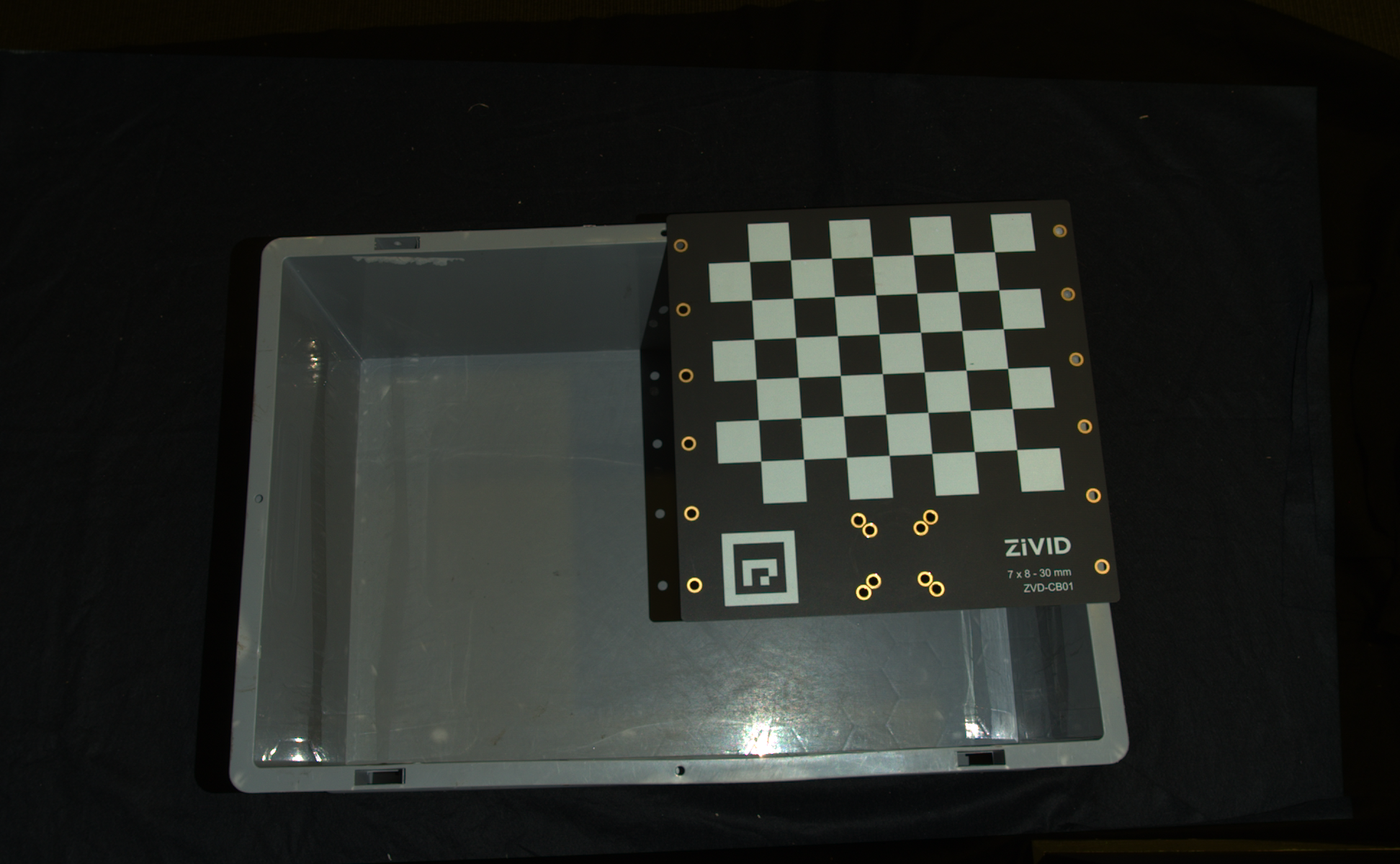
Calibration board at bin top for infield verification Calibration board at bin top for infield verification
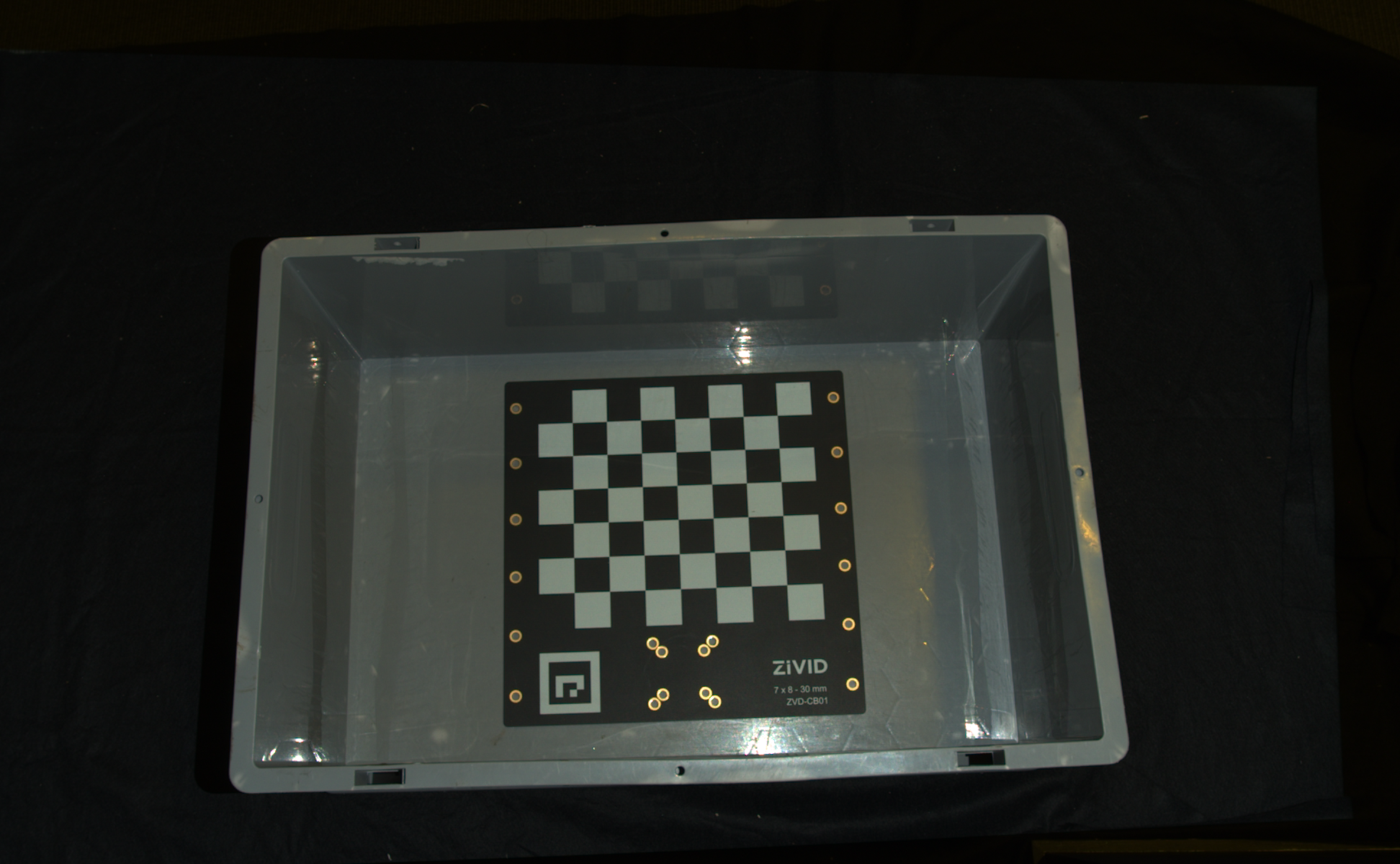
Calibration board at bin bottom for infield verification Calibration board at bin bottom for infield verification

Infield Correction이 필요한 경우 최적의 결과를 얻으려면 전체 작업 공간에 걸쳐 보정해야 합니다. 즉, Zivid calibration board 주어진 거리에 대해 여러 위치에 배치하고, 보드 전체가 FOV 에 있도록 각기 다른 거리에서 보정을 수행해야 합니다. 보정 보드를 전체 작업 공간에 분산합니다. 자세한 내용은 Guidelines for Performing Infield Correction 을 참조하십시오.

카메라에서 Infield 내 verification 및/또는 Correction을 실행하려면 다음을 사용할 수 있습니다.

  • Zivid Studio

  • CLI tool

  • SDK

처음으로 Infield Correction을 실행하는 경우 Zivid Studio를 사용하는 것이 좋습니다.

Infield Correction을 실행하는 방법에 대한 단계별 가이드는 Running Infield Correction 을 확인하세요.

Hand-Eye Calibration

Picking accuracy depends on:

  • Camera calibration

  • Hand-eye calibration

  • Machine vision software

  • Robot positioning

Robots are repeatable but not inherently accurate due to the factors such as temperature, joint friction, payload, manufacturing tolerances.

Recommendations:

  • Perform mastering (zeroing) to teach the robot the exact zero position of each joint.

  • Calibrate the robot for improved pose accuracy.

  • Repeat hand-eye calibration if:

    • robot loses calibration.

    • camera is dismounted and remounted.

  • Perform regular recalibration (robot and/or hand-eye) to maintain system performance.

참고

저희는 핸드-아이 칼리브레이션 문서에서 6자유도 로봇에 중점을 두고 있지만, 저희 API와 도구는 (디)팔레타이징 애플리케이션에 자주 사용되는 갠트리 시스템과 같은 더 낮은 자유도 로봇도 지원합니다.

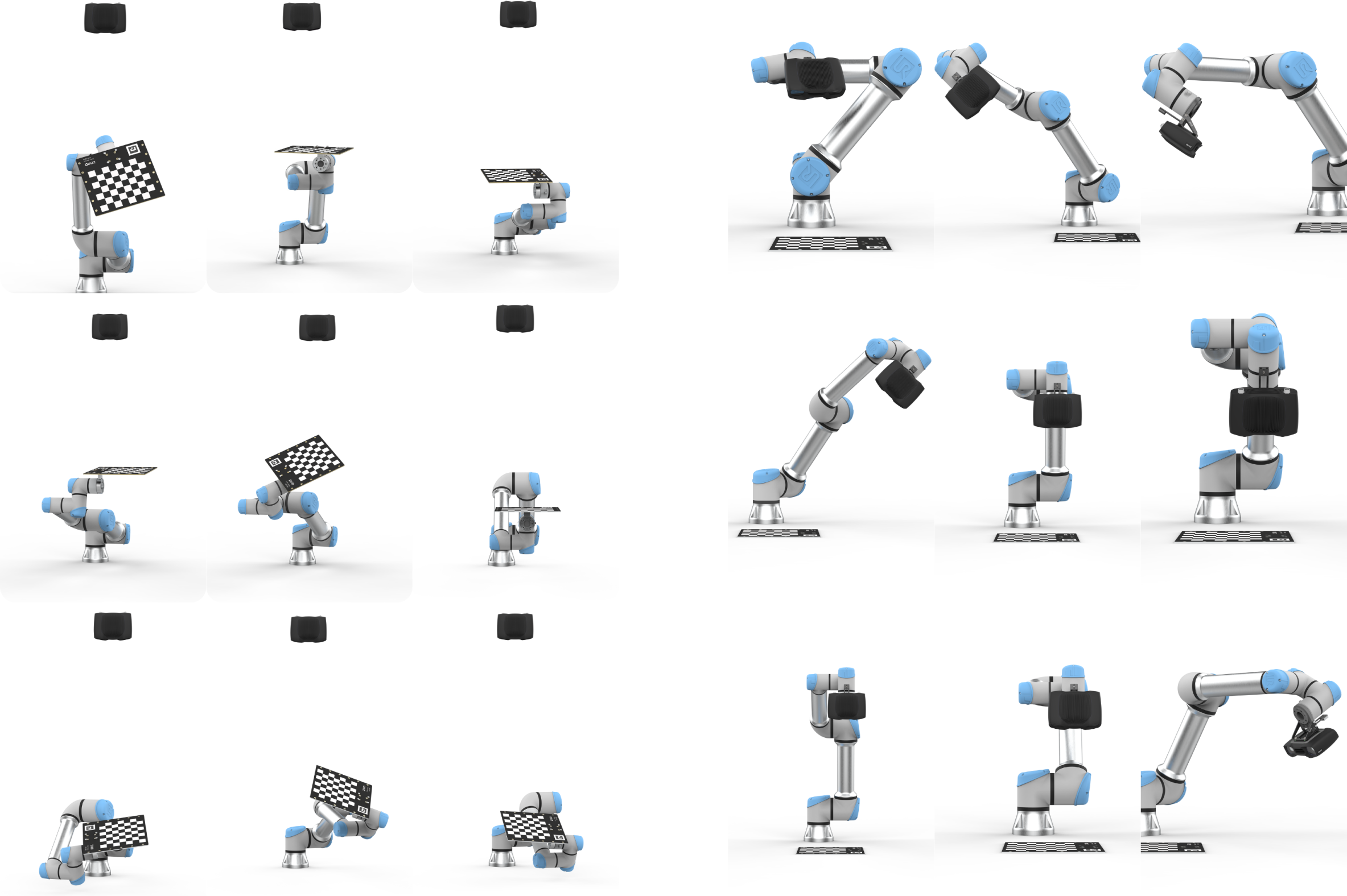
../../../_images/hand-eye-poses.png

Alternative methods

다른 워크플로나 시스템과의 긴밀한 통합을 선호하는 경우 다음과 같은 몇 가지 대안을 사용할 수 있습니다.

Custom integration

더욱 맞춤화된 통합을 선호하는 경우(예: 손과 눈의 보정 기능을 자체 솔루션에 직접 내장하는 경우) 아래에 설명된 단계별 프로세스를 따르고 대화형 코드 샘플을 살펴볼 수 있습니다.

핸드-아이 칼리브레이션 프로세스 단계:

  1. 로봇을 새로운 자세로 옮기세요

  2. 엔드 이펙터 포즈 등록

  3. 교정 객체를 이미지화합니다 (포즈를 얻습니다)

  4. 1~3단계를 여러 번 반복합니다. (예:10~20)

  5. 핸드-아이 변환 계산합니다.

솔루션에 핸드아이 보정을 통합하는 방법을 알아보려면 대화형 코드 샘플을 확인하세요.

소스로 이동

source

/*
Perform Hand-Eye calibration.
*/

#include <Zivid/Application.h>
#include <Zivid/Calibration/Detector.h>
#include <Zivid/Calibration/HandEye.h>
#include <Zivid/Calibration/Pose.h>
#include <Zivid/Exception.h>
#include <Zivid/Zivid.h>

#include <clipp.h>
#include <iostream>
#include <stdexcept>

namespace
{
    std::string presetPath(const Zivid::Camera &camera)
    {
        const std::string presetsPath = std::string(ZIVID_SAMPLE_DATA_DIR) + "/Settings";

        switch(camera.info().model().value())
        {
            case Zivid::CameraInfo::Model::ValueType::zividTwo:
            {
                return presetsPath + "/Zivid_Two_M70_ManufacturingSpecular.yml";
            }
            case Zivid::CameraInfo::Model::ValueType::zividTwoL100:
            {
                return presetsPath + "/Zivid_Two_L100_ManufacturingSpecular.yml";
            }
            case Zivid::CameraInfo::Model::ValueType::zivid2PlusM130:
            {
                return presetsPath + "/Zivid_Two_Plus_M130_ConsumerGoodsQuality.yml";
            }
            case Zivid::CameraInfo::Model::ValueType::zivid2PlusM60:
            {
                return presetsPath + "/Zivid_Two_Plus_M60_ConsumerGoodsQuality.yml";
            }
            case Zivid::CameraInfo::Model::ValueType::zivid2PlusL110:
            {
                return presetsPath + "/Zivid_Two_Plus_L110_ConsumerGoodsQuality.yml";
            }
            case Zivid::CameraInfo::Model::ValueType::zivid2PlusMR130:
            {
                return presetsPath + "/Zivid_Two_Plus_MR130_ConsumerGoodsQuality.yml";
            }
            case Zivid::CameraInfo::Model::ValueType::zivid2PlusMR60:
            {
                return presetsPath + "/Zivid_Two_Plus_MR60_ConsumerGoodsQuality.yml";
            }
            case Zivid::CameraInfo::Model::ValueType::zivid2PlusLR110:
            {
                return presetsPath + "/Zivid_Two_Plus_LR110_ConsumerGoodsQuality.yml";
            }
            case Zivid::CameraInfo::Model::ValueType::zivid3XL250:
            {
                return presetsPath + "/Zivid_Three_XL250_DepalletizationQuality.yml";
            }
            case Zivid::CameraInfo::Model::ValueType::zividOnePlusSmall:
            case Zivid::CameraInfo::Model::ValueType::zividOnePlusMedium:
            case Zivid::CameraInfo::Model::ValueType::zividOnePlusLarge: break;

            default: throw std::runtime_error("Unhandled enum value '" + camera.info().model().toString() + "'");
        }
        throw std::invalid_argument("Invalid camera model");
    }

    enum class CommandType
    {
        AddPose,
        Calibrate,
        Unknown
    };

    std::string getInput()
    {
        std::string command;
        std::getline(std::cin, command);
        return command;
    }

    CommandType enterCommand()
    {
        std::cout << "Enter command, p (to add robot pose) or c (to perform calibration): ";
        const auto command = getInput();

        if(command == "P" || command == "p")
        {
            return CommandType::AddPose;
        }
        if(command == "C" || command == "c")
        {
            return CommandType::Calibrate;
        }
        return CommandType::Unknown;
    }

    Zivid::Calibration::Pose enterRobotPose(size_t index)
    {
        std::cout << "Enter pose with id (a line with 16 space separated values describing 4x4 row-major matrix) : "
                  << index << std::endl;
        std::stringstream input(getInput());
        float element{ 0 };
        std::vector<float> transformElements;
        for(size_t i = 0; i < 16 && input >> element; ++i)
        {
            transformElements.emplace_back(element);
        }

        const auto robotPose{ Zivid::Matrix4x4{ transformElements.cbegin(), transformElements.cend() } };
        std::cout << "The following pose was entered: \n" << robotPose << std::endl;

        return robotPose;
    }

    std::string markersToString(const std::vector<int> &markerIds)
    {
        std::ostringstream oss;
        for(const auto &id : markerIds)
        {
            oss << id << " ";
        }
        return oss.str();
    }

    void handleAddPose(
        size_t &currentPoseId,
        std::vector<Zivid::Calibration::HandEyeInput> &handEyeInput,
        Zivid::Camera &camera,
        const std::string &calibrationObject,
        const Zivid::Settings &settings)
    {
        const auto robotPose = enterRobotPose(currentPoseId);

        std::cout << "Detecting calibration object in point cloud" << std::endl;
        if(calibrationObject == "c")
        {
            const auto frame = camera.capture2D3D(settings);
            const auto detectionResult = Zivid::Calibration::detectCalibrationBoard(frame);

            if(detectionResult.valid())
            {
                std::cout << "Calibration board detected " << std::endl;
                handEyeInput.emplace_back(robotPose, detectionResult);
                currentPoseId++;
            }
            else
            {
                std::cout << "Failed to detect calibration board. " << detectionResult.statusDescription() << std::endl;
            }
        }
        else if(calibrationObject == "m")
        {
            const auto frame = camera.capture2D3D(settings);

            auto markerDictionary = Zivid::Calibration::MarkerDictionary::aruco4x4_50;
            std::vector<int> markerIds = { 1, 2, 3 };

            std::cout << "Detecting arUco marker IDs " << markersToString(markerIds) << "from the dictionary "
                      << markerDictionary << std::endl;
            auto detectionResult = Zivid::Calibration::detectMarkers(frame, markerIds, markerDictionary);

            if(detectionResult.valid())
            {
                std::cout << "ArUco marker(s) detected: " << detectionResult.detectedMarkers().size() << std::endl;
                handEyeInput.emplace_back(robotPose, detectionResult);
                currentPoseId++;
            }
            else
            {
                std::cout
                    << "Failed to detect any ArUco markers, ensure that at least one ArUco marker is in the view of the camera"
                    << std::endl;
            }
        }
    }

    std::vector<Zivid::Calibration::HandEyeInput> readHandEyeInputs(
        Zivid::Camera &camera,
        const Zivid::Settings &settings)
    {
        size_t currentPoseId{ 0 };
        bool calibrate{ false };

        std::string calibrationObject;
        while(true)
        {
            std::cout
                << "Enter calibration object you are using, m (for ArUco marker(s)) or c (for Zivid checkerboard): "
                << std::endl;
            calibrationObject = getInput();
            if(calibrationObject == "m" || calibrationObject == "c")
            {
                break;
            }
        }

        std::cout << "Zivid primarily operates with a (4x4) transformation matrix. To convert" << std::endl;
        std::cout << "from axis-angle, rotation vector, roll-pitch-yaw, or quaternion, check out" << std::endl;
        std::cout << "our PoseConversions sample." << std::endl;

        std::vector<Zivid::Calibration::HandEyeInput> handEyeInput;
        do
        {
            switch(enterCommand())
            {
                case CommandType::AddPose:
                {
                    try
                    {
                        handleAddPose(currentPoseId, handEyeInput, camera, calibrationObject, settings);
                    }
                    catch(const std::exception &e)
                    {
                        std::cout << "Error: " << Zivid::toString(e) << std::endl;
                        continue;
                    }
                    break;
                }
                case CommandType::Calibrate:
                {
                    calibrate = true;
                    break;
                }
                case CommandType::Unknown:
                {
                    std::cout << "Error: Unknown command" << std::endl;
                    break;
                }
                default: throw std::runtime_error{ "Unhandled command type" };
            }
        } while(!calibrate);
        return handEyeInput;
    }

    Zivid::Calibration::HandEyeOutput performCalibration(
        const std::vector<Zivid::Calibration::HandEyeInput> &handEyeInput)
    {
        while(true)
        {
            std::cout << "Enter type of calibration, eth (for eye-to-hand) or eih (for eye-in-hand): ";
            const auto calibrationType = getInput();
            if(calibrationType == "eth" || calibrationType == "ETH")
            {
                std::cout << "Performing eye-to-hand calibration with " << handEyeInput.size() << " dataset pairs"
                          << std::endl;
                std::cout << "The resulting transform is the camera pose in robot base frame" << std::endl;
                return Zivid::Calibration::calibrateEyeToHand(handEyeInput);
            }
            if(calibrationType == "eih" || calibrationType == "EIH")
            {
                std::cout << "Performing eye-in-hand calibration with " << handEyeInput.size() << " dataset pairs"
                          << std::endl;
                std::cout << "The resulting transform is the camera pose in flange (end-effector) frame" << std::endl;
                return Zivid::Calibration::calibrateEyeInHand(handEyeInput);
            }
            std::cout << "Entered uknown method" << std::endl;
        }
    }
} // namespace

int main(int argc, char *argv[])
{
    try
    {
        std::string settingsPath;
        bool showHelp = false;

        auto cli =
            (clipp::option("-h", "--help").set(showHelp) % "Show help message",
             clipp::option("--settings-path")
                 & clipp::value("path", settingsPath) % "Path to the camera settings YML file");

        if(!clipp::parse(argc, argv, cli) || showHelp)
        {
            auto fmt = clipp::doc_formatting{}.alternatives_min_split_size(1).surround_labels("\"", "\"");
            std::cout << "USAGE:" << std::endl;
            std::cout << clipp::usage_lines(cli, argv[0], fmt) << std::endl;
            std::cout << "OPTIONS:" << std::endl;
            std::cout << clipp::documentation(cli) << std::endl;
            return showHelp ? EXIT_SUCCESS : EXIT_FAILURE;
        }

        Zivid::Application zivid;

        std::cout << "Connecting to camera" << std::endl;
        auto camera{ zivid.connectCamera() };

        if(settingsPath.empty())
        {
            settingsPath = presetPath(camera);
        }
        const auto settings = Zivid::Settings(settingsPath);

        const auto handEyeInput{ readHandEyeInputs(camera, settings) };

        const auto calibrationResult{ performCalibration(handEyeInput) };

        std::cout << "Zivid primarily operates with a (4x4) transformation matrix. To convert" << std::endl;
        std::cout << "to axis-angle, rotation vector, roll-pitch-yaw, or quaternion, check out" << std::endl;
        std::cout << "our PoseConversions sample." << std::endl;

        if(calibrationResult.valid())
        {
            std::cout << "Hand-Eye calibration OK\n"
                      << "Result:\n"
                      << calibrationResult << std::endl;
        }
        else
        {
            std::cout << "Hand-Eye calibration FAILED" << std::endl;
            return EXIT_FAILURE;
        }
    }
    catch(const std::exception &e)
    {
        std::cerr << "\nError: " << Zivid::toString(e) << std::endl;
        std::cout << "Press enter to exit." << std::endl;
        std::cin.get();
        return EXIT_FAILURE;
    }

    return EXIT_SUCCESS;
}
소스로 이동

source

/*
Perform Hand-Eye calibration.
*/

using System;
using System.Collections.Generic;
using System.IO;
using System.Linq;
using Zivid.NET.Calibration;
using Duration = Zivid.NET.Duration;

class Program
{
    static int Main(string[] args)
    {
        try
        {
            var userOptions = ParseOptions(args);
            if (userOptions.ShowHelp)
            {
                ShowHelp();
                return 0;
            }

            var zivid = new Zivid.NET.Application();

            Console.WriteLine("Connecting to camera");
            var camera = zivid.ConnectCamera();

            var settingsPath = userOptions.SettingsPath;
            if (string.IsNullOrEmpty(settingsPath))
            {
                settingsPath = PresetPath(camera);
            }
            var settings = new Zivid.NET.Settings(settingsPath);

            var handEyeInput = readHandEyeInputs(camera, settings);

            var calibrationResult = performCalibration(handEyeInput);

            Console.WriteLine("Zivid primarily operates with a (4x4) transformation matrix. To convert");
            Console.WriteLine("to axis-angle, rotation vector, roll-pitch-yaw, or quaternion, check out");
            Console.WriteLine("our PoseConversions sample.");

            if (calibrationResult.Valid())
            {
                Console.WriteLine("{0}\n{1}\n{2}", "Hand-Eye calibration OK", "Result: ", calibrationResult);
            }
            else
            {
                Console.WriteLine("Hand-Eye calibration FAILED");
                return 1;
            }
        }
        catch (Exception ex)
        {
            Console.WriteLine("Error: {0}", ex.ToString());
            return 1;
        }
        return 0;
    }

    static (string SettingsPath, bool ShowHelp) ParseOptions(string[] args)
    {
        string settingsPath = "";
        bool showHelp = false;
        foreach (var arg in args)
        {
            if (arg.StartsWith("--settings-path="))
            {
                settingsPath = arg.Substring("--settings-path=".Length);
            }
            else if (arg.StartsWith("-h") || arg.StartsWith("--help"))
            {
                showHelp = true;
            }
        }

        return (settingsPath, showHelp);
    }

    static List<HandEyeInput> readHandEyeInputs(Zivid.NET.Camera camera, Zivid.NET.Settings settings)
    {
        var handEyeInput = new List<HandEyeInput>();
        var currentPoseId = 0U;
        var beingInput = true;

        var calibrationObject = "";
        while (true)
        {
            Console.WriteLine("Enter calibration object you are using, m (for ArUco marker(s)) or c (for Zivid checkerboard): ");
            calibrationObject = Console.ReadLine();

            if (calibrationObject.Equals("m", StringComparison.CurrentCultureIgnoreCase) ||
                calibrationObject.Equals("c", StringComparison.CurrentCultureIgnoreCase))
            {
                break;
            }
        }


        Interaction.ExtendInputBuffer(2048);

        Console.WriteLine("Zivid primarily operates with a (4x4) transformation matrix. To convert");
        Console.WriteLine("from axis-angle, rotation vector, roll-pitch-yaw, or quaternion, check out");
        Console.WriteLine("our PoseConversions sample.");

        do
        {
            switch (Interaction.EnterCommand())
            {
                case CommandType.AddPose:
                    try
                    {
                        HandleAddPose(ref currentPoseId, ref handEyeInput, camera, calibrationObject, settings);
                    }
                    catch (Exception ex)
                    {
                        Console.WriteLine("Error: {0}", ex.ToString());
                        continue;
                    }
                    break;

                case CommandType.Calibrate: beingInput = false; break;

                case CommandType.Unknown: Console.WriteLine("Error: Unknown command"); break;
            }
        } while (beingInput);
        return handEyeInput;
    }

    public static void HandleAddPose(ref uint currentPoseId, ref List<HandEyeInput> handEyeInput, Zivid.NET.Camera camera, string calibrationObject, Zivid.NET.Settings settings)
    {
        var robotPose = Interaction.EnterRobotPose(currentPoseId);

        Console.Write("Detecting calibration object in point cloud");
        if (calibrationObject.Equals("c", StringComparison.CurrentCultureIgnoreCase))
        {
            using (var frame = camera.Capture2D3D(settings))
            {
                var detectionResult = Detector.DetectCalibrationBoard(frame);

                if (detectionResult.Valid())
                {
                    Console.WriteLine("Calibration board detected");
                    handEyeInput.Add(new HandEyeInput(robotPose, detectionResult));
                    ++currentPoseId;
                }
                else
                {
                    Console.WriteLine("Failed to detect calibration board, ensure that the entire board is in the view of the camera");
                }
            }
        }
        else if (calibrationObject.Equals("m", StringComparison.CurrentCultureIgnoreCase))
        {
            using (var frame = camera.Capture2D3D(settings))
            {
                var markerDictionary = Zivid.NET.MarkerDictionary.Aruco4x4_50;
                var markerIds = new List<int> { 1, 2, 3 };

                Console.WriteLine("Detecting arUco marker IDs " + string.Join(", ", markerIds));
                var detectionResult = Detector.DetectMarkers(frame, markerIds, markerDictionary);

                if (detectionResult.Valid())
                {
                    Console.WriteLine("ArUco marker(s) detected: " + detectionResult.DetectedMarkers().Length);
                    handEyeInput.Add(new HandEyeInput(robotPose, detectionResult));
                    ++currentPoseId;
                }
                else
                {
                    Console.WriteLine("Failed to detect any ArUco markers, ensure that at least one ArUco marker is in the view of the camera");
                }
            }
        }
    }

    static string PresetPath(Zivid.NET.Camera camera)
    {
        var presetsPath = Environment.GetFolderPath(Environment.SpecialFolder.CommonApplicationData)
            + "/Zivid/Settings/";

        switch (camera.Info.Model)
        {
            case Zivid.NET.CameraInfo.ModelOption.ZividTwo:
                {
                    return presetsPath + "Zivid_Two_M70_ManufacturingSpecular.yml";
                }
            case Zivid.NET.CameraInfo.ModelOption.ZividTwoL100:
                {
                    return presetsPath + "Zivid_Two_L100_ManufacturingSpecular.yml";
                }
            case Zivid.NET.CameraInfo.ModelOption.Zivid2PlusM130:
                {
                    return presetsPath + "Zivid_Two_Plus_M130_ConsumerGoodsQuality.yml";
                }
            case Zivid.NET.CameraInfo.ModelOption.Zivid2PlusM60:
                {
                    return presetsPath + "Zivid_Two_Plus_M60_ConsumerGoodsQuality.yml";
                }
            case Zivid.NET.CameraInfo.ModelOption.Zivid2PlusL110:
                {
                    return presetsPath + "Zivid_Two_Plus_L110_ConsumerGoodsQuality.yml";
                }
            case Zivid.NET.CameraInfo.ModelOption.Zivid2PlusMR130:
                {
                    return presetsPath + "Zivid_Two_Plus_MR130_ConsumerGoodsQuality.yml";
                }
            case Zivid.NET.CameraInfo.ModelOption.Zivid2PlusMR60:
                {
                    return presetsPath + "Zivid_Two_Plus_MR60_ConsumerGoodsQuality.yml";
                }
            case Zivid.NET.CameraInfo.ModelOption.Zivid2PlusLR110:
                {
                    return presetsPath + "Zivid_Two_Plus_LR110_ConsumerGoodsQuality.yml";
                }
            case Zivid.NET.CameraInfo.ModelOption.Zivid3XL250:
                {
                    return presetsPath + "Zivid_Three_XL250_DepalletizationQuality.yml";
                }
            default: throw new System.InvalidOperationException("Unhandled camera model: " + camera.Info.Model.ToString());
        }
        throw new System.InvalidOperationException("Invalid camera model");
    }

    static Zivid.NET.Calibration.HandEyeOutput performCalibration(List<HandEyeInput> handEyeInput)
    {
        while (true)
        {
            Console.WriteLine("Enter type of calibration, eth (for eye-to-hand) or eih (for eye-in-hand): ");
            var calibrationType = Console.ReadLine();
            if (calibrationType.Equals("eth", StringComparison.CurrentCultureIgnoreCase))
            {
                Console.WriteLine("Performing eye-to-hand calibration with " + handEyeInput.Count + " dataset pairs");
                Console.WriteLine("The resulting transform is the camera pose in robot base frame");
                return Calibrator.CalibrateEyeToHand(handEyeInput);
            }
            if (calibrationType.Equals("eih", StringComparison.CurrentCultureIgnoreCase))
            {
                Console.WriteLine("Performing eye-in-hand calibration with " + handEyeInput.Count + " dataset pairs");
                Console.WriteLine("The resulting transform is the camera pose in flange (end-effector) frame");
                return Calibrator.CalibrateEyeInHand(handEyeInput);
            }
            Console.WriteLine("Entered unknown method");
        }
    }

    static void ShowHelp()
    {
        Console.WriteLine("Usage: HandEyeCalibration.exe [options]");
        Console.WriteLine("Options:");
        Console.WriteLine("  --settings-path=<path>   Path to the camera settings YML file (default: based on camera model)");
        Console.WriteLine("  -h, --help               Show this help message");
    }
}

enum CommandType
{
    AddPose,
    Calibrate,
    Unknown
}

class Interaction
{
    // Console.ReadLine only supports reading 256 characters, by default. This limit is modified
    // by calling ExtendInputBuffer with the maximum length of characters to be read.
    public static void ExtendInputBuffer(int size)
    {
        Console.SetIn(new StreamReader(Console.OpenStandardInput(), Console.InputEncoding, false, size));
    }

    public static CommandType EnterCommand()
    {
        Console.Write("Enter command, p (to add robot pose) or c (to perform calibration): ");
        var command = Console.ReadLine().ToLower();

        switch (command)
        {
            case "p": return CommandType.AddPose;
            case "c": return CommandType.Calibrate;
            default: return CommandType.Unknown;
        }
    }

    public static Pose EnterRobotPose(ulong index)
    {
        var elementCount = 16;
        Console.WriteLine(
            "Enter pose with id (a line with {0} space separated values describing 4x4 row-major matrix) : {1}",
            elementCount,
            index);
        var input = Console.ReadLine();

        var elements = input.Split().Where(x => !string.IsNullOrEmpty(x.Trim())).Select(x => float.Parse(x)).ToArray();

        var robotPose = new Pose(elements); Console.WriteLine("The following pose was entered: \n{0}", robotPose);
        return robotPose;
    }
}
소스로 이동

소스

"""
Perform Hand-Eye calibration.

"""

import argparse
from pathlib import Path
from typing import List, Tuple

import numpy as np
import zivid
from zividsamples.paths import get_sample_data_path
from zividsamples.save_load_matrix import assert_affine_matrix_and_save


def _options() -> argparse.Namespace:
    """Function to read user arguments.

    Returns:
        Arguments from user

    """
    parser = argparse.ArgumentParser(description=__doc__)

    parser.add_argument(
        "--settings-path",
        required=False,
        type=Path,
        help="Path to the camera settings YML file",
    )

    return parser.parse_args()


def _preset_path(camera: zivid.Camera) -> Path:
    """Get path to preset settings YML file, depending on camera model.

    Args:
        camera: Zivid camera

    Raises:
        ValueError: If unsupported camera model for this code sample

    Returns:
        Path: Zivid 2D and 3D settings YML path

    """
    presets_path = get_sample_data_path() / "Settings"

    if camera.info.model == zivid.CameraInfo.Model.zivid3XL250:
        return presets_path / "Zivid_Three_XL250_DepalletizationQuality.yml"
    if camera.info.model == zivid.CameraInfo.Model.zivid2PlusMR60:
        return presets_path / "Zivid_Two_Plus_MR60_ConsumerGoodsQuality.yml"
    if camera.info.model == zivid.CameraInfo.Model.zivid2PlusMR130:
        return presets_path / "Zivid_Two_Plus_MR130_ConsumerGoodsQuality.yml"
    if camera.info.model == zivid.CameraInfo.Model.zivid2PlusLR110:
        return presets_path / "Zivid_Two_Plus_LR110_ConsumerGoodsQuality.yml"
    if camera.info.model == zivid.CameraInfo.Model.zivid2PlusM60:
        return presets_path / "Zivid_Two_Plus_M60_ConsumerGoodsQuality.yml"
    if camera.info.model == zivid.CameraInfo.Model.zivid2PlusM130:
        return presets_path / "Zivid_Two_Plus_M130_ConsumerGoodsQuality.yml"
    if camera.info.model == zivid.CameraInfo.Model.zivid2PlusL110:
        return presets_path / "Zivid_Two_Plus_L110_ConsumerGoodsQuality.yml"
    if camera.info.model == zivid.CameraInfo.Model.zividTwo:
        return presets_path / "Zivid_Two_M70_ManufacturingSpecular.yml"
    if camera.info.model == zivid.CameraInfo.Model.zividTwoL100:
        return presets_path / "Zivid_Two_L100_ManufacturingSpecular.yml"

    raise ValueError("Invalid camera model")


def _enter_robot_pose(index: int) -> zivid.calibration.Pose:
    """Robot pose user input.

    Args:
        index: Robot pose ID

    Returns:
        robot_pose: Robot pose

    """
    inputted = input(
        f"Enter pose with id={index} (a line with 16 space separated values describing 4x4 row-major matrix): "
    )
    elements = inputted.split(maxsplit=15)
    data = np.array(elements, dtype=np.float64).reshape((4, 4))
    robot_pose = zivid.calibration.Pose(data)
    print(f"The following pose was entered:\n{robot_pose}")
    return robot_pose


def _perform_calibration(hand_eye_input: List[zivid.calibration.HandEyeInput]) -> zivid.calibration.HandEyeOutput:
    """Hand-Eye calibration type user input.

    Args:
        hand_eye_input: Hand-Eye calibration input

    Returns:
        hand_eye_output: Hand-Eye calibration result

    """
    while True:
        calibration_type = input("Enter type of calibration, eth (for eye-to-hand) or eih (for eye-in-hand): ").strip()
        if calibration_type.lower() == "eth":
            print(f"Performing eye-to-hand calibration with {len(hand_eye_input)} dataset pairs")
            print("The resulting transform is the camera pose in robot base frame")
            hand_eye_output = zivid.calibration.calibrate_eye_to_hand(hand_eye_input)
            return hand_eye_output
        if calibration_type.lower() == "eih":
            print(f"Performing eye-in-hand calibration with {len(hand_eye_input)} dataset pairs")
            print("The resulting transform is the camera pose in flange (end-effector) frame")
            hand_eye_output = zivid.calibration.calibrate_eye_in_hand(hand_eye_input)
            return hand_eye_output
        print(f"Unknown calibration type: '{calibration_type}'")


def _handle_add_pose(
    current_pose_id: int,
    hand_eye_input: List,
    camera: zivid.Camera,
    calibration_object: str,
    settings: zivid.Settings,
) -> Tuple[int, List]:
    """Acquire frame and keeps track of the robot's pose id.

    Args:
        current_pose_id: Counter of the current pose in the hand-eye calibration dataset
        hand_eye_input: List of hand-eye calibration dataset pairs (poses and point clouds)
        camera: Zivid camera
        calibration_object: m (for ArUco marker(s)) or c (for Zivid checkerboard)
        settings: Zivid camera settings

    Returns:
        Tuple[int, List]: Updated current_pose_id and hand_eye_input

    """

    robot_pose = _enter_robot_pose(current_pose_id)

    print("Detecting calibration object in point cloud")

    if calibration_object == "c":

        frame = zivid.calibration.capture_calibration_board(camera)
        detection_result = zivid.calibration.detect_calibration_board(frame)

        if detection_result.valid():
            print("Calibration board detected")
            hand_eye_input.append(zivid.calibration.HandEyeInput(robot_pose, detection_result))
            current_pose_id += 1
        else:
            print(f"Failed to detect calibration board. {detection_result.status_description()}")
    elif calibration_object == "m":
        frame = camera.capture_2d_3d(settings)

        marker_dictionary = zivid.calibration.MarkerDictionary.aruco4x4_50
        marker_ids = [1, 2, 3]

        print(f"Detecting arUco marker IDs {marker_ids} from the dictionary {marker_dictionary}")
        detection_result = zivid.calibration.detect_markers(frame, marker_ids, marker_dictionary)

        if detection_result.valid():
            print(f"ArUco marker(s) detected: {len(detection_result.detected_markers())}")
            hand_eye_input.append(zivid.calibration.HandEyeInput(robot_pose, detection_result))
            current_pose_id += 1
        else:
            print(
                "Failed to detect any ArUco markers, ensure that at least one ArUco marker is in the view of the camera"
            )
    return current_pose_id, hand_eye_input


def _main() -> None:
    user_options = _options()
    app = zivid.Application()

    print("Connecting to camera")
    camera = app.connect_camera()

    if user_options.settings_path is None:
        user_options.settings_path = _preset_path(camera)
    settings = zivid.Settings.load(user_options.settings_path)

    current_pose_id = 0
    hand_eye_input = []
    calibrate = False
    while True:
        calibration_object = input(
            "Enter calibration object you are using, m (for ArUco marker(s)) or c (for Zivid checkerboard): "
        ).strip()
        if calibration_object.lower() == "m" or calibration_object.lower() == "c":
            break

    print(
        "Zivid primarily operates with a (4x4) transformation matrix. To convert\n"
        "from axis-angle, rotation vector, roll-pitch-yaw, or quaternion, check out\n"
        "our pose_conversions sample."
    )

    while not calibrate:
        command = input("Enter command, p (to add robot pose) or c (to perform calibration): ").strip()
        if command == "p":
            try:
                current_pose_id, hand_eye_input = _handle_add_pose(
                    current_pose_id, hand_eye_input, camera, calibration_object, settings
                )
            except ValueError as ex:
                print(ex)
        elif command == "c":
            calibrate = True
        else:
            print(f"Unknown command '{command}'")

    calibration_result = _perform_calibration(hand_eye_input)
    transform = calibration_result.transform()
    transform_file_path = Path(Path(__file__).parent / "transform.yaml")
    assert_affine_matrix_and_save(transform, transform_file_path)

    print(
        "Zivid primarily operates with a (4x4) transformation matrix. To convert\n"
        "to axis-angle, rotation vector, roll-pitch-yaw, or quaternion, check out\n"
        "our pose_conversions sample."
    )

    if calibration_result.valid():
        print("Hand-Eye calibration OK")
        print(f"Result:\n{calibration_result}")
    else:
        print("Hand-Eye calibration FAILED")


if __name__ == "__main__":
    _main()

핸드-아이 칼리브레이션을 완료한 후, 변환 행렬 결과가 정확하고 정확도 요구 사항을 충족하는지 확인할 수 있습니다. 두 가지 옵션이 있습니다.

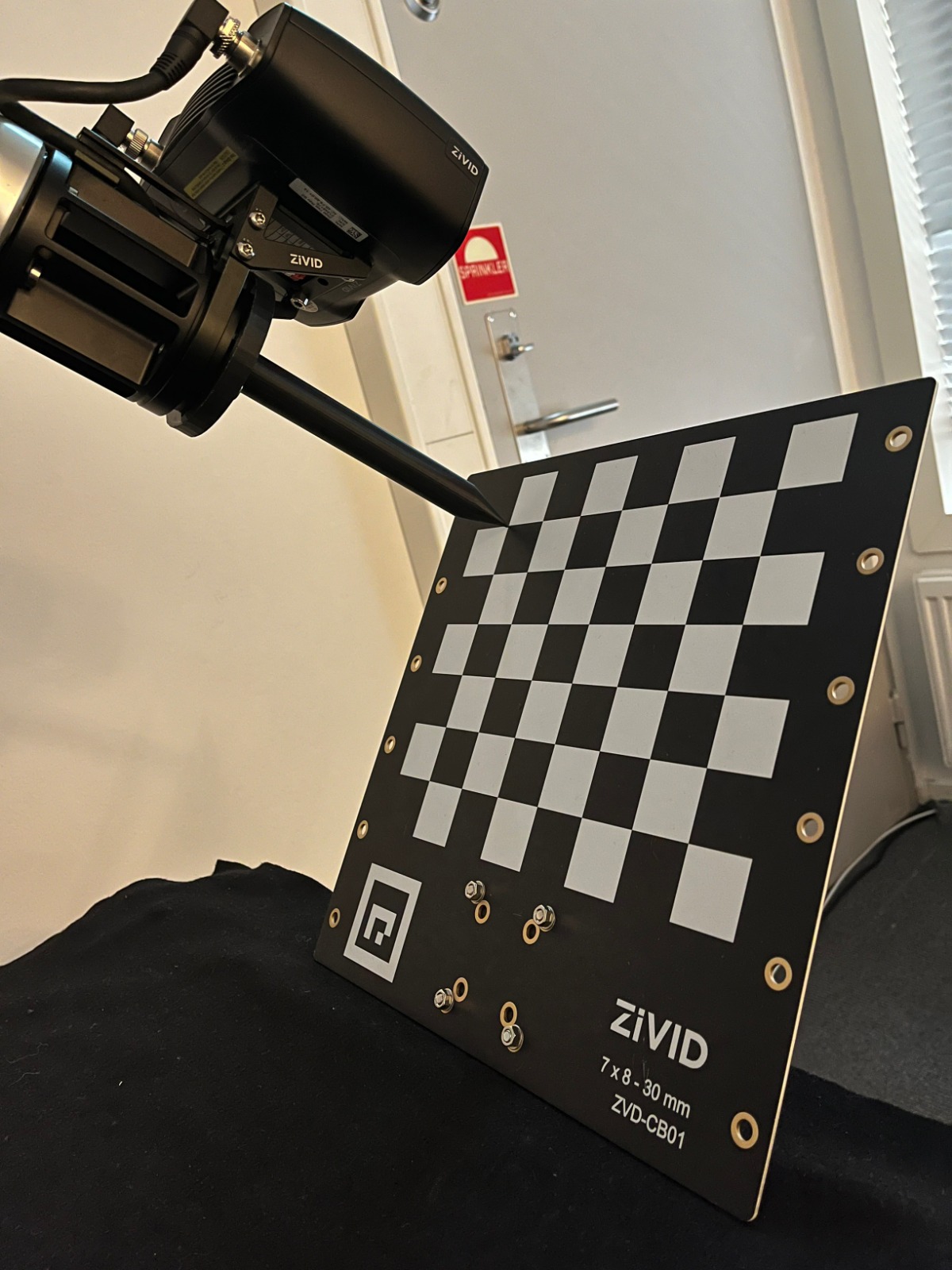
터치 테스트의 예상 결과.

해당 주제에 대해 자세히 알아보려면 Hand-Eye Calibration 을 확인하세요.

Color Balance

SDK에는 빨간색, 녹색, 파란색 색상 채널의 색상 균형 값을 조정하는 기능이 있습니다. 그러나 Camera Selector based on Scene Volume 에서 볼 수 있듯이 (디)팔레타이징에 권장되는 카메라는 고유한 색상 균형을 가지고 있습니다. 매우 강하고 완벽한 흰색이 아닌 주변광은 컬러 이미지의 RGB 값에 최소한의 영향을 미칩니다. 따라서 카메라에서 추가적인 색상 균형 알고리즘을 실행할 필요가 없습니다.

아래 이미지는 Zivid 2+ MR130으로 다양한 주변광 조건에서 촬영한 2D 컬러 이미지의 세부 정보를 보여줍니다.

300 LUX

1000 LUX

2000 LUX

3200K

2d_images_mr130_lux_kelvins

5000K

6500K

color Inconsistency in form of random green or pink tint in your color images 이 발견되면 해당 지역의 그리드 주파수(50Hz 또는 60Hz)에 맞는 Presets을 선택하세요.

ROI Box Filtering

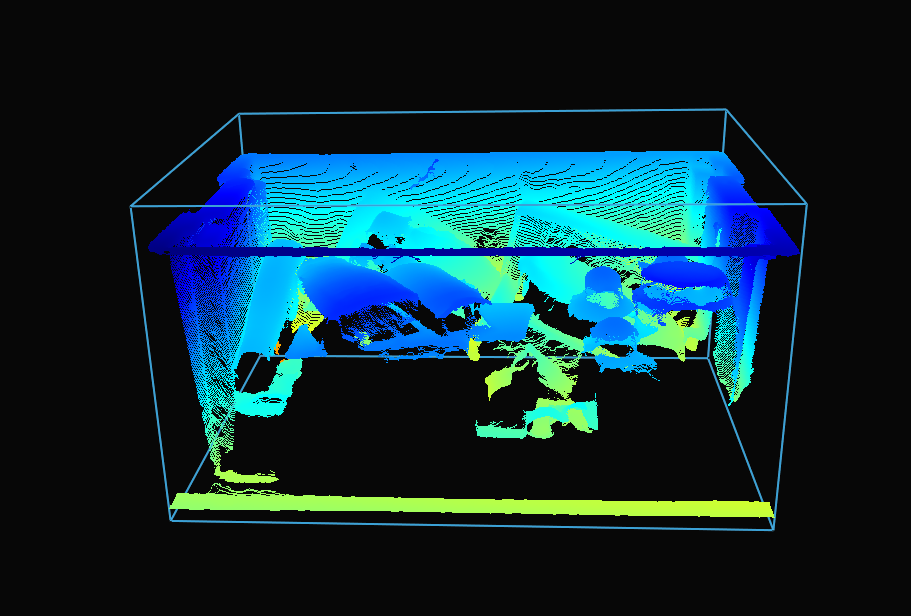
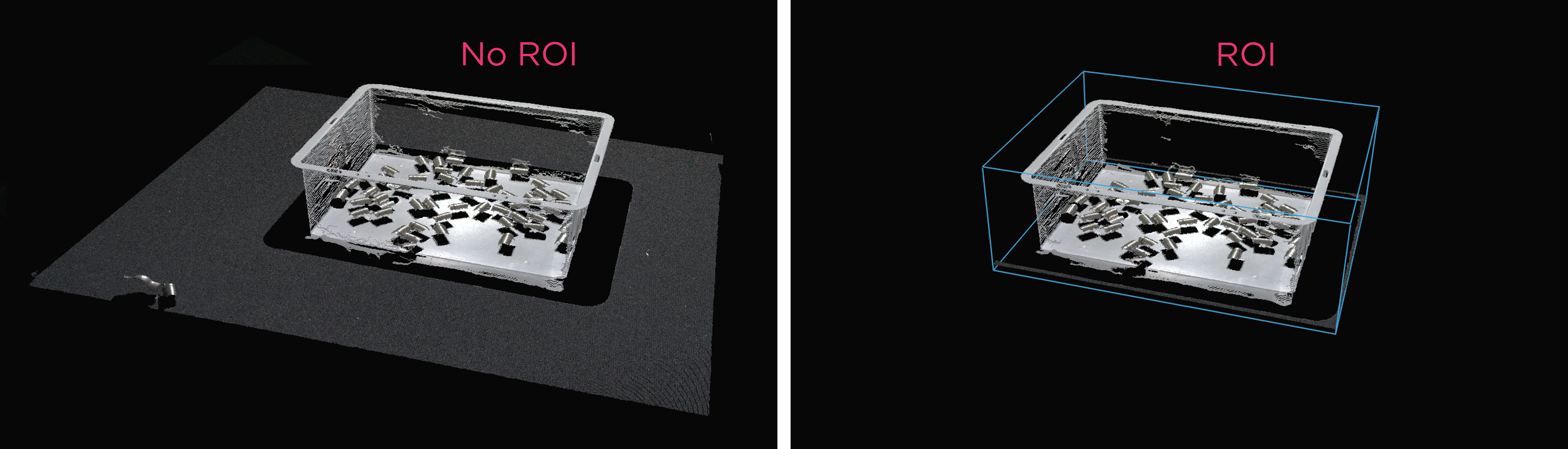
카메라 시야는 종종 Region of Interest (ROI)보다 큽니다. 데이터 처리를 최적화하기 위해 팔레트 주변에 ROI 상자를 설정하고 포인트 클라우드를 적절히 잘라 팔레트의 내용만 캡처할 수 있습니다. ROI 상자 필터링은 캡처 시간을 단축할 뿐만 아니라 알고리즘에서 사용하는 데이터 포인트 수를 줄여 결과적으로 속도와 효율성을 향상시킵니다.

작은 포인트 클라우드는 캡처 속도가 빠르고, 감지 속도도 빨라지며 전체 피킹 주기도 단축됩니다.
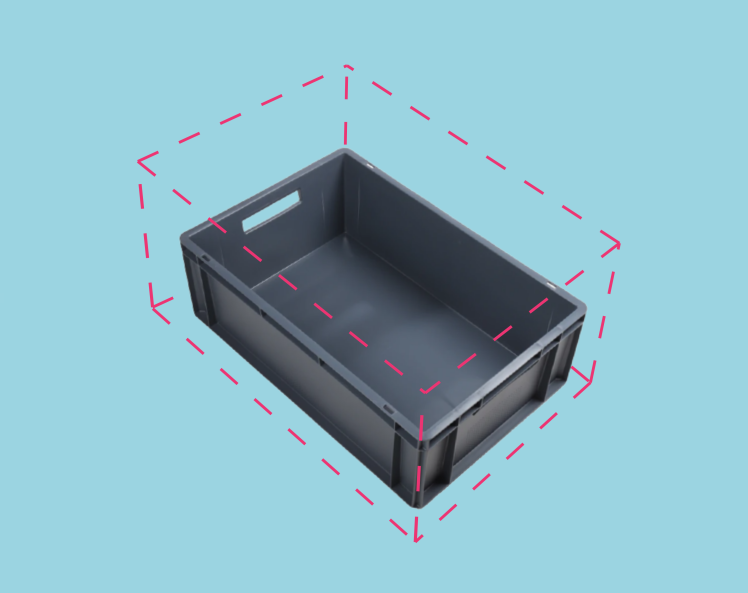
Bin coordinate system

구현 예시는 ROI Box via Checkerboard 에서 확인할 수 있습니다. 이 튜토리얼에서는 체커보드를 기준으로 주어진 ROI 박스를 기반으로 Zivid calibration board 를 사용하여 포인트 클라우드를 필터링하는 방법을 보여줍니다.
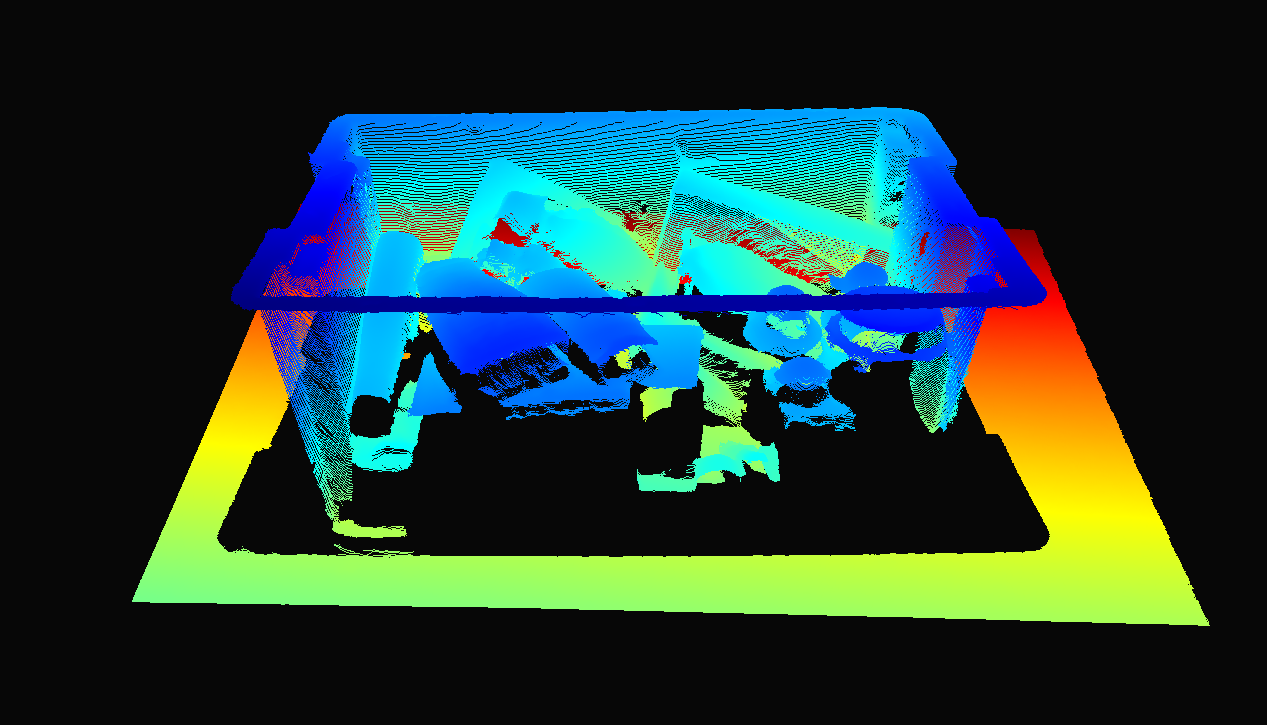
Point cloud before ROI cropping Point cloud before ROI cropping
Point cloud after ROI cropping Point cloud after ROI cropping
Example and Performance

다음은 ROI 박스 필터링이 유용한 저사양 PC(Intel Iris Xe 통합 노트북 GPU 및 1G 네트워크 카드)를 사용한 대규모 포인트 클라우드 처리의 예입니다.

고정형 Zivid 2+ MR130 카메라를 장착한 로봇이 600 x 400 x 300mm 크기의 통에서 물건을 집어 올리는 모습을 상상해 보세요. 로봇과의 충분한 간격을 확보하기 위해 카메라는 통 상단에서 1700mm 거리에 설치되어 약 1000 x 800mm의 시야각(FOV)을 제공합니다. 이 거리에 카메라를 설치하면 시야각(FOV)의 상당 부분이 ROI(관심 영역) 밖에 위치하게 되어 각 면에서 픽셀 열/행의 약 20/25%를 잘라낼 수 있습니다. 아래 표에서 볼 수 있듯이 ROI 박스 필터링을 사용하면 캡처 시간을 크게 단축할 수 있습니다.
../../../_images/roi_example_bin_picking.png

Presets

Acquisition Time

Capture Time

No ROI

ROI

No ROI

ROI

Consumer Goods Quality

0.15 s

0.15 s

0.9 s

0.35 s

Downsampling

참고

프리셋을 선택하면 다운샘플링도 선택됩니다. 하지만 이것이 무엇을 의미하는지 이해하려면 Sampling (3D) 을 참조하세요.

일부 애플리케이션은 고밀도 포인트 클라우드 데이터를 필요로 하지 않습니다. 예를 들어, 평면을 상자 표면에 맞춰 상자 감지를 수행하거나, CAD 매칭을 수행하는 경우 객체가 뚜렷하고 쉽게 식별 가능한 특징을 가지고 있습니다. 또한, 이러한 데이터 양은 머신 비전 알고리즘이 애플리케이션에 필요한 속도로 처리하기에는 너무 큰 경우가 많습니다. 바로 이러한 애플리케이션에서 포인트 클라우드 다운샘플링이 중요한 역할을 합니다.

포인트 클라우드 환경에서 다운샘플링은 동일한 3D 표현을 유지하면서 공간 해상도를 낮추는 것을 의미합니다. 일반적으로 데이터를 관리하기 쉬운 크기로 변환하여 저장 및 처리 요구 사항을 줄이는 데 사용됩니다.

Zivid SDK를 사용하여 포인트 클라우드를 다운샘플링하는 방법에는 두 가지가 있습니다.

  1. Settings::Processing::Resampling (Resampling) 설정을 통해 캡처 설정을 통해 제어됩니다.

  2. API PointCloud::downsample 을 통해.

두 경우 모두 포인트 클라우드에 동일한 작업이 적용됩니다. API 버전을 통해 그 자리에서 다운샘플링하거나 다운샘플링된 데이터로 새로운 포인트 클라우드 인스턴스를 생성할 수 있습니다.
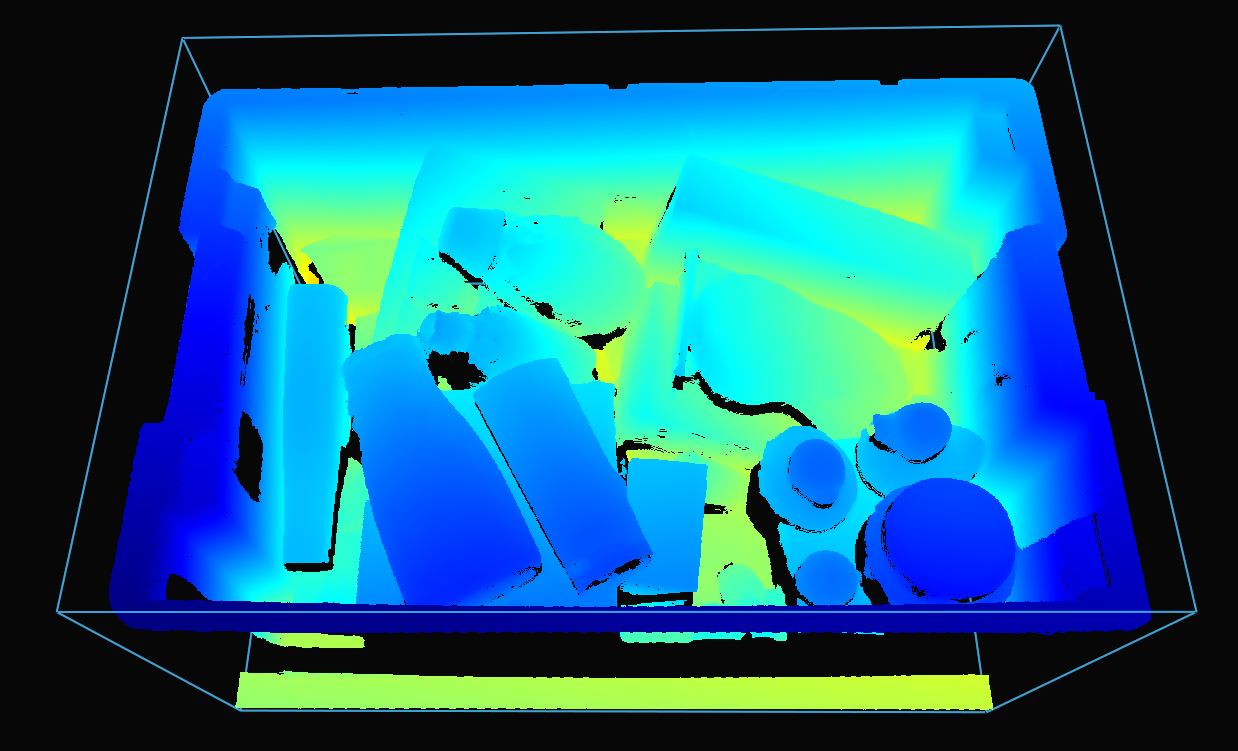
ROI cropped point cloud before downsampling ROI cropped point cloud before downsampling
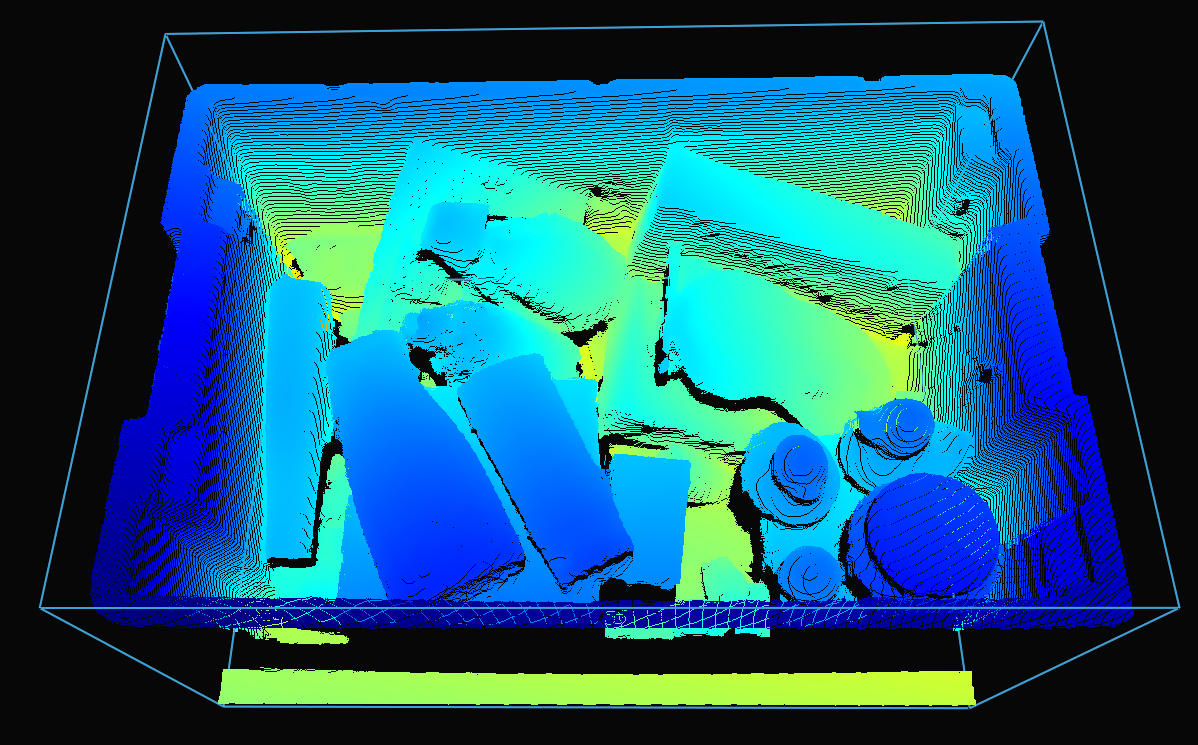
ROI cropped point cloud after downsampling ROI cropped point cloud after downsampling

다운샘플링은 현재 포인트 클라우드를 수정하는 방식으로 현장에서 수행할 수 있습니다.

소스로 이동

소스

pointCloud.downsample(Zivid::PointCloud::Downsampling::by2x2);
소스로 이동

소스

pointCloud.Downsample(Zivid.NET.PointCloud.Downsampling.By2x2);
소스로 이동

source

point_cloud.downsample(zivid.PointCloud.Downsampling.by2x2)

기존 포인트 클라우드를 변경하지 않고 다운샘플링된 포인트 클라우드를 새로운 포인트 클라우드 인스턴스로 가져오는 것도 가능합니다.

소스로 이동

소스

auto downsampledPointCloud = pointCloud.downsampled(Zivid::PointCloud::Downsampling::by2x2);
소스로 이동

소스

var downsampledPointCloud = pointCloud.Downsampled(Zivid.NET.PointCloud.Downsampling.By2x2);
소스로 이동

source

downsampled_point_cloud = point_cloud.downsampled(zivid.PointCloud.Downsampling.by2x2)

Zivid SDK는 by2x2 , by3x3 , by4x4 의 다운샘플링 속도를 지원하며, 다운샘플링을 여러 번 수행할 수도 있습니다.

포인트 클라우드를 다운샘플링하려면 다음 코드 샘플을 실행하면 됩니다.

Sample: downsample.py

python /path/to/downsample.py --zdf-path /path/to/file.zdf

ZDF 파일이 없으면 다음 코드 샘플을 실행하세요. 이 코드는 설정에 따라 캡처된 Zivid 포인트 클라우드를 파일에 저장합니다.

Sample: capture_with_settings_from_yml

python /path/to/capture_with_settings_from_yml.py --settings-path /path/to/settings.yml

다운샘플링에 대해 자세히 알아보려면 Downsample 으로 이동하세요.

축하합니다! Zivid와 함께 (디)팔레타이징 시스템을 생산에 투입할 준비를 완료하셨습니다. 다음 섹션은 Maintenance 로, (디)팔레타이징 셀이 안정적으로 작동하고 가동 중단 시간을 최소화하기 위해 수행할 것을 권장하는 구체적인 프로세스를 다룹니다.