在 Windows 中安装 Zivid + HALCON
Zivid 提供两种与 HALCON 接口的方式:
直接使用 Zivid 软件 附带的 GenICam GenTL producer 。
要选择第二种方案,请按照以下步骤操作。要开始使用推荐方案,请按照您首选编程语言的示例进行操作。
安装 Zivid SDK
按照此页面上的说明安装 Zivid SDK: 软件安装。
备注
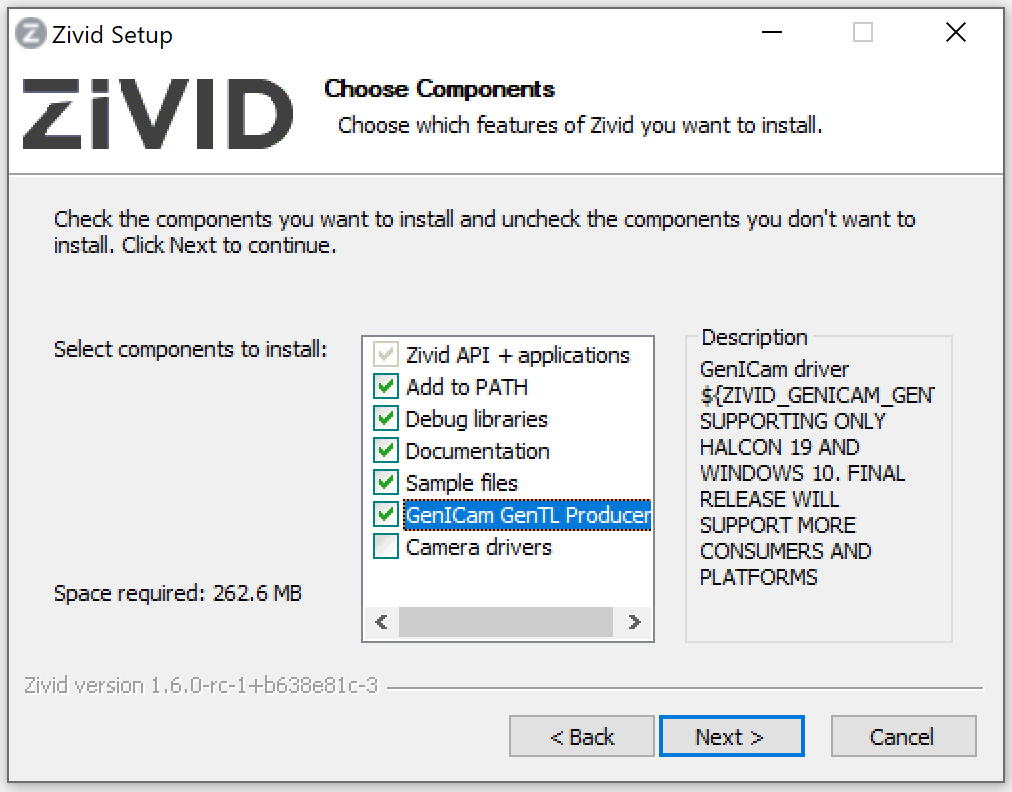
在选择要安装的组件时,请确保勾选 GenICam GenTL Producers 选项框。这将安装 HALCON 识别相机所需的 GenTL Producer。
安装 HALCON
访问 MVTec download page 并登录以下载 MVTec Software Manager。使用 Software Manager 选择 HALCON,挑选一个版本,并为 Windows 安装。我们建议您使用 经过 Zivid 测试的HALCON版本。
重要
在 Software Manager 中选择 GenICamTL 图像采集软件包(GenTL Consumer)。该软件包是可选的,安装较新版本的 HALCON 时不会从旧版本中自动携带该软件包。如果没有它,HALCON 只能检测到 File 和 DirectFile 接口,Zivid 相机将保持隐藏。请参阅 只检测到File和DirectFile接口。
开始吧!
您现在已经做好准备工作,可以去测试一些我们 的 HALCON示例 !
警告
不要 在使用 HALCON 图像采集助手时通过 USB3Vision 接口连接到 Zivid 相机。这将安装通用 HALCON USB 驱动程序并覆盖 Zivid USB 驱动程序。请使用 GenICamTL 接口连接。