在 HALCON 中调试
在输出控制台中查看详细错误消息
在 Hdevelop 中调试程序可能具有挑战性,因为错误消息并不总是容易理解。在这种情况下, Output Console 可能能够提供更多详细信息。
例如,如果您将 Zivid Two M70 相机的 SamplingPixel 设置为 blueSubsample4x4 ,您将收到以下错误消息:
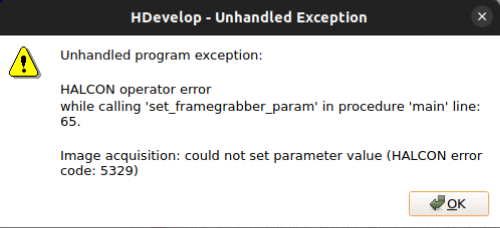
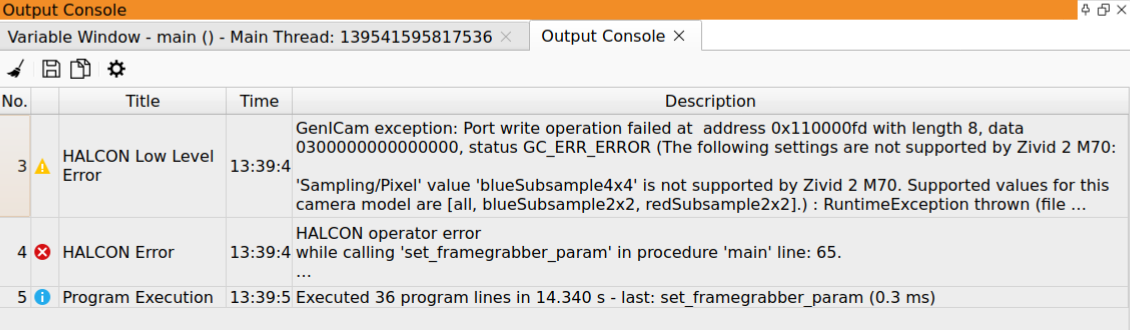
并非所有人都能直观地理解该错误是因为 blueSubsample4x4 不被 Zivid 2 M70 支持。然而,查看 Output Console 可以获得更详细的错误信息:
Zivid 相机未在 HALCON 中列出
将 Zivid 相机连接到 HALCON 需要两个组件,分别来自两个不同的供应商。
供应商 |
组件 |
安装方式 |
|---|---|---|
Zivid |
GenTL Producer |
Zivid SDK 安装程序, GenICam GenTL Producers 组件 |
HALCON |
GenTL Consumer |
HALCON 安装程序, GenICamTL 图像采集包 |
这两个组件都是必需的。缺少任何一个,相机都不会显示在 HALCON 中。
只检测到 File 和 DirectFile 接口
在 HALCON Image Acquisition Assistant 中,自动接口检测只返回 File 和 DirectFile。 GenICamTL 接口不存在,因此无法选择 Zivid 相机。
这意味着未安装 HALCON 的 GenICamTL 图像采集包。该包是 HALCON 安装的可选组件。安装较新版本的 HALCON 不会自动携带旧版本中的该包。
要解决此问题,请从 MVTec Software Manager 添加 GenICamTL 图像采集接口。无需完全重新安装 HALCON。重启 HDevelop 并重新运行接口检测。
备注
此现象指向集成中 HALCON 一侧的问题。如果在同一台机器上、使用相同的 Zivid SDK 版本,同一相机在另一个 HALCON 版本中可以正常工作,则说明 Zivid GenTL Producer 已正确安装。