ステッチング
重要
ステッチングの例の サンプルデータ データセットと参照ファイルをダウンロードして、手順に沿って進めるか、サンプルを実行してください。
導入
この記事は、Zivid の整理されていない点群を結合する方法について詳細に解説したチュートリアルです。
問題の本質を理解するために、まずアプリケーションについて簡単に見ていきましょう。他のカメラや人間の目と同様に、Zivid カメラは物体を透過したり、周囲を見渡したりすることはできず、一度に片面しか観察できません。そのため、物体の完全な 3D モデルを取得するには、物体を回転させたり、カメラの位置を変えたりして、複数の視点から撮影する必要があります。
問題
Zivid SDK によって返される点群は カメラ座標系 で表現されます。この座標系の原点はカメラ自体の中にあります。複数の視点からキャプチャする場合、各点群はキャプチャ時のカメラの座標系を基準として定義されます。これらの点群を変換せずに単純に組み合わせると、空間的に整列せず、3D 空間内でバラバラに見えてしまいます。つまり、点群はスキャン対象物に紐づいた共通の座標系を共有していないということです。
解決策
複数の点群を単一の空間的に整列したオブジェクトの 3D 表現に統合するには、次の操作が必要です。
すべての点群を、スキャン対象物に紐づいた共通の座標系に変換します。
姿勢推定におけるノイズや小さな誤差を補正するために、位置合わせを微調整します。
各カメラ座標系から共通座標系への変換は、ロボットの運動学、モーショントラッキングシステム、または手動測定など、さまざまなソースから得られます。しかし、これらの変換が完璧であることは稀で、通常は小さな位置合わせ誤差が生じます。これらの誤差を補正するには、 Experimental::Toolbox::localPointCloudRegistration() を使用できます。この API ツールは、2 つの重なり合う点群間の位置合わせを、一方の点群を他方に最適に登録する変換行列を計算することで調整します。
点群のステッチングを開始する前に、十分に重なり合う特徴点を持つ点群がキャプチャされていることを確認することが重要です。また、カメラから遠すぎる点や、ステッチング対象の物体・シーンに含まれない点など、誤ったステッチングを引き起こす可能性のあるデータは除外する必要があります。ステッチングを行う前に、Zivid の 関心領域 を使用することをお勧めします。カメラが固定されているキャプチャでは、関心領域を一度定義すれば、すべてのキャプチャに使用できます。ロボットアームを使用してカメラを物体の周囲で移動させる場合は、点群ごとに異なる関心領域を設定する必要がある可能性が高くなります。あるいは、ロボットのベースフレームに単一のワークスペース ROI ボックスを定義し、各点群をベースフレームに変換した後に 後処理として適用する こともできます。この方法では、視点に関わらず同じ ROI 範囲ですべてのキャプチャをフィルタリングします。
注釈
Zivid のサンプルデータに含まれる、これからスティッチングされるすべての点群は、既に ROI フィルタリング済みです。
事前位置合わせなしでの点群ステッチング
このセクションでは、事前位置合わせなしで点群をステッチングする方法を示します。重要な要件は、物体とカメラの間の相対的な移動が、点群間で十分な重なりを確保できる程度に小さいことです。この例では、物体は静止したままで、キャプチャ間でカメラがわずかに移動し、 Experimental::Toolbox::localPointCloudRegistration() を使用して点群の位置合わせを行います。まず、事前の姿勢情報なしで 2 つの点群をステッチングする簡単な例を示し、続いて回転テーブルを使用して物体全体をスキャンするより高度な例を紹介します。
2 つの点群のステッチング
この簡単な例では、事前位置合わせなしで 2 つの点群を結合する方法を示します。この方法で結合するには、次のことが必要です。
2 つの ZDF ファイルを読み込む。
点群データを非構造化形式に変換する。
ボクセルダウンサンプリングを適用する。
位置合わせのための変換を推定する。
雲を縫い合わせる。
最終的な合成結果をダウンサンプリングします。
ZDF ファイルを読み込み、 PointCloud::toUnorganizedPointCloud() を使用して点群を非構造化形式に変換する方法を以下に示します。非構造化点群は UnorganizedPointCloud::extend() を使用して 1 つの UnorganizedPointCloud オブジェクトに結合され、表示されます。

// Ensure the dataset is extracted to the correct location depending on the operating system:
//   - Windows:   %ProgramData%/Zivid/StitchingPointClouds/
//   - Linux:     /usr/share/Zivid/data/StitchingPointClouds/
//  StitchingPointClouds/
//      └── BlueObject/
std::cout << "Reading point clouds from ZDF files" << std::endl;
const auto directory = std::filesystem::path(ZIVID_SAMPLE_DATA_DIR) / "StitchingPointClouds" / "BlueObject";

if(!std::filesystem::exists(directory))
{
    std::ostringstream oss;
    oss << "Missing dataset folders.\n"
        << "Make sure 'StitchingPointClouds/BlueObject/' exist at " << ZIVID_SAMPLE_DATA_DIR << ".\n\n"
        << "You can download the dataset (StitchingPointClouds.zip) from:\n"
        << "https://support.zivid.com/en/latest/api-reference/samples/sample-data.html";

    throw std::runtime_error(oss.str());
}

const auto frame1 = Zivid::Frame((directory / "BlueObject.zdf").string());
const auto frame2 = Zivid::Frame((directory / "BlueObjectSlightlyMoved.zdf").string());

std::cout << "Converting organized point clouds to unorganized point clouds and voxel downsampling"
          << std::endl;
const auto unorganizedPointCloud1 = frame1.pointCloud().toUnorganizedPointCloud();
const auto unorganizedPointCloud2 = frame2.pointCloud().toUnorganizedPointCloud();

std::cout << "Displaying point clouds before stitching" << std::endl;
Zivid::UnorganizedPointCloud unorganizedNotStitchedPointCloud;
unorganizedNotStitchedPointCloud.extend(unorganizedPointCloud1);
unorganizedNotStitchedPointCloud.extend(unorganizedPointCloud2);
visualizePointCloud(unorganizedNotStitchedPointCloud);
// Ensure the dataset is extracted to the correct location depending on the operating system:
//   - Windows:   %ProgramData%/Zivid/StitchingPointClouds/
//   - Linux:     /usr/share/Zivid/data/StitchingPointClouds/
//  StitchingPointClouds/
//      └── BlueObject/

var sampleDataDir = Environment.GetFolderPath(Environment.SpecialFolder.CommonApplicationData) + "/Zivid";
var directory = Path.Combine(sampleDataDir, "StitchingPointClouds", "BlueObject");

Console.WriteLine("Reading point clouds from ZDF files");
if (!Directory.Exists(directory))
{
    Console.WriteLine("Missing dataset folders.");
    Console.WriteLine("Make sure 'StitchingPointClouds/BlueObject/' exists at " + sampleDataDir);
    Console.WriteLine("You can download the dataset (StitchingPointClouds.zip) from:");
    Console.WriteLine("https://support.zivid.com/en/latest/api-reference/samples/sample-data.html");
    return 1;
}

var frame1 = new Zivid.NET.Frame(Path.Combine(directory, "BlueObject.zdf"));
var frame2 = new Zivid.NET.Frame(Path.Combine(directory, "BlueObjectSlightlyMoved.zdf"));

Console.WriteLine("Converting organized point clouds to unorganized point clouds and voxel downsampling");
var unorganizedPointCloud1 = frame1.PointCloud.ToUnorganizedPointCloud();
var unorganizedPointCloud2 = frame2.PointCloud.ToUnorganizedPointCloud();

Console.WriteLine("Displaying point clouds before stitching");
var unorganizedNotStitchedPointCloud = new Zivid.NET.UnorganizedPointCloud();
unorganizedNotStitchedPointCloud.Extend(unorganizedPointCloud1);
unorganizedNotStitchedPointCloud.Extend(unorganizedPointCloud2);
VisualizePointCloud(unorganizedNotStitchedPointCloud);
# Ensure the dataset is extracted to the correct location depending on the operating system:
#   • Windows:   %ProgramData%\\Zivid\\StitchingPointClouds\\
#   • Linux:     /usr/share/Zivid/data/StitchingPointClouds/
# The folder must contain:
#   StitchingPointClouds/
#     └── BlueObject/
print("Reading point clouds from files")
directory = get_sample_data_path() / "StitchingPointClouds" / "BlueObject"

if not directory.exists() or not directory.exists():
    raise FileNotFoundError(
        f"Missing dataset folders.\n"
        f"Make sure 'StitchingPointClouds/BlueObject' exist at {get_sample_data_path()}.\n\n"
        f"You can download the dataset (StitchingPointClouds.zip) from:\n"
        f"https://support.zivid.com/en/latest/api-reference/samples/sample-data.html"
    )

frame_1 = zivid.Frame(directory / "BlueObject.zdf")
frame_2 = zivid.Frame(directory / "BlueObjectSlightlyMoved.zdf")

print("Converting organized point clouds to unorganized point clouds and voxel downsampling")
unorganized_point_cloud_1 = frame_1.point_cloud().to_unorganized_point_cloud()
unorganized_point_cloud_2 = frame_2.point_cloud().to_unorganized_point_cloud()

print("Displaying point clouds before stitching")
unorganized_not_stitched_point_cloud = zivid.UnorganizedPointCloud()
unorganized_not_stitched_point_cloud.extend(unorganized_point_cloud_1)
unorganized_not_stitched_point_cloud.extend(unorganized_point_cloud_2)
display_pointcloud(unorganized_not_stitched_point_cloud)
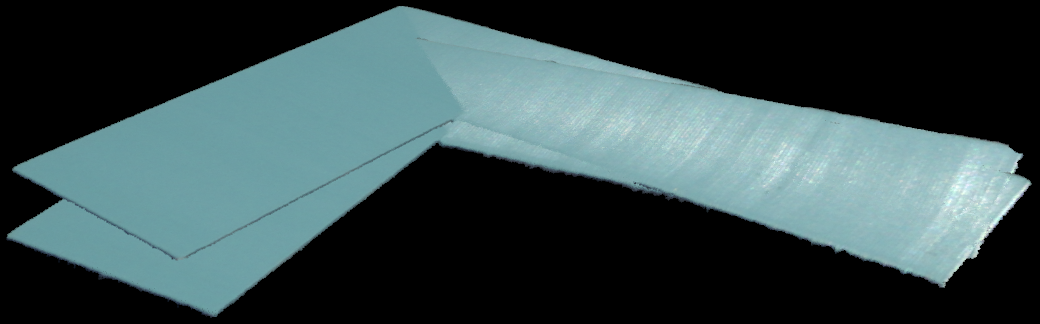
レジストレーションを高速化するために、ボクセルダウンサンプリングを適用して点の数を減らします。次に、 Experimental::Toolbox::localPointCloudRegistration() を使用して、2 つの点群間の変換行列を計算します。2 番目の点群は、得られた変換を使用して変換され、最終的な点群(最初の点群を含む UnorganizedPointCloud オブジェクト)に追加されます。ステッチングを完了するために、ステッチングされた点群にボクセルダウンサンプリングを適用し、結果を表示します。
std::cout << "Estimating transformation between point clouds" << std::endl;
const auto unorganizedPointCloud1LPCR = unorganizedPointCloud1.voxelDownsampled(1.0, 3);
const auto unorganizedPointCloud2LPCR = unorganizedPointCloud2.voxelDownsampled(1.0, 3);
const auto registrationParams = Zivid::Experimental::LocalPointCloudRegistrationParameters{};
const auto localPointCloudRegistrationResult = Zivid::Experimental::Toolbox::localPointCloudRegistration(
    unorganizedPointCloud1LPCR, unorganizedPointCloud2LPCR, registrationParams);

if(!localPointCloudRegistrationResult.converged())
{
    throw std::runtime_error("Registration did not converge...");
}

const auto pointCloud1ToPointCloud2Transform = localPointCloudRegistrationResult.transform();
const auto unorganizedPointCloud2Transformed =
    unorganizedPointCloud2.transformed(pointCloud1ToPointCloud2Transform.toMatrix());

std::cout << "Stitching and displaying painted point clouds to evaluate stitching quality" << std::endl;
Zivid::UnorganizedPointCloud finalPointCloud;
finalPointCloud.extend(unorganizedPointCloud1);
finalPointCloud.extend(unorganizedPointCloud2Transformed);

Zivid::UnorganizedPointCloud paintedFinalPointCloud;
paintedFinalPointCloud.extend(unorganizedPointCloud1.paintedUniformColor(Zivid::ColorRGBA{ 255, 0, 0, 255 }));
paintedFinalPointCloud.extend(
    unorganizedPointCloud2Transformed.paintedUniformColor(Zivid::ColorRGBA{ 0, 255, 0, 255 }));
visualizePointCloud(paintedFinalPointCloud);

std::cout << "Voxel-downsampling the stitched point cloud" << std::endl;
finalPointCloud = finalPointCloud.voxelDownsampled(2.0, 1);
std::cout << "Visualize the overlapped point clouds" << std::endl;
visualizePointCloud(finalPointCloud);
Console.WriteLine("Estimating transformation between point clouds");
var unorganizedPointCloud1LPCR = unorganizedPointCloud1.VoxelDownsampled(1.0f, 3);
var unorganizedPointCloud2LPCR = unorganizedPointCloud2.VoxelDownsampled(1.0f, 3);
var registrationParams = new Zivid.NET.Experimental.LocalPointCloudRegistrationParameters();

var identityPose = new Pose(Zivid.NET.Matrix4x4.Identity());
var localPointCloudRegistrationResult = PointCloudRegistration.LocalPointCloudRegistration(
    unorganizedPointCloud1LPCR,
    unorganizedPointCloud2LPCR,
    registrationParams,
    identityPose);

if (!localPointCloudRegistrationResult.Converged)
{
    throw new Exception("Registration did not converge...");
}

var pointCloud1ToPointCloud2Transform = localPointCloudRegistrationResult.Transform;
var unorganizedPointCloud2Transformed =
    unorganizedPointCloud2.Transform(pointCloud1ToPointCloud2Transform.ToMatrix());

Console.WriteLine("Stitching and displaying painted point clouds to evaluate stitching quality");
var finalPointCloud = new Zivid.NET.UnorganizedPointCloud();
finalPointCloud.Extend(unorganizedPointCloud1);
finalPointCloud.Extend(unorganizedPointCloud2Transformed);

var paintedFinalPointCloud = new Zivid.NET.UnorganizedPointCloud();
paintedFinalPointCloud.Extend(unorganizedPointCloud1.PaintedUniformColor(new Zivid.NET.ColorRGBA { r = 255, g = 0, b = 0, a = 255 }));
paintedFinalPointCloud.Extend(unorganizedPointCloud2Transformed.PaintedUniformColor(new Zivid.NET.ColorRGBA { r = 0, g = 255, b = 0, a = 255 }));
VisualizePointCloud(paintedFinalPointCloud);

Console.WriteLine("Voxel-downsampling the stitched point cloud");
finalPointCloud = finalPointCloud.VoxelDownsampled(2.0f, 1);
Console.WriteLine("Visualize the overlapped point clouds");
VisualizePointCloud(finalPointCloud);
print("Estimating transformation between point clouds")
unorganized_point_cloud_1_lpcr = unorganized_point_cloud_1.voxel_downsampled(voxel_size=1.0, min_points_per_voxel=3)
unorganized_point_cloud_2_lpcr = unorganized_point_cloud_2.voxel_downsampled(voxel_size=1.0, min_points_per_voxel=3)
registration_params = LocalPointCloudRegistrationParameters()
local_point_cloud_registration_result = local_point_cloud_registration(
    target=unorganized_point_cloud_1_lpcr, source=unorganized_point_cloud_2_lpcr, parameters=registration_params
)
assert local_point_cloud_registration_result.converged(), "Registration did not converge..."

point_cloud_1_to_point_cloud_2_transform = local_point_cloud_registration_result.transform()
unorganized_point_cloud_2_transformed = unorganized_point_cloud_2.transformed(
    point_cloud_1_to_point_cloud_2_transform.to_matrix()
)

print("Stitching and displaying painted point clouds to evaluate stitching quality")
final_point_cloud = zivid.UnorganizedPointCloud()
final_point_cloud.extend(unorganized_point_cloud_1)
final_point_cloud.extend(unorganized_point_cloud_2_transformed)

painted_final_point_cloud = zivid.UnorganizedPointCloud()
painted_final_point_cloud.extend(unorganized_point_cloud_1.painted_uniform_color([255, 0, 0, 255]))
painted_final_point_cloud.extend(unorganized_point_cloud_2_transformed.painted_uniform_color([0, 255, 0, 255]))

display_pointcloud(painted_final_point_cloud)

print("Voxel-downsampling the stitched point cloud")
final_point_cloud = final_point_cloud.voxel_downsampled(voxel_size=2.0, min_points_per_voxel=1)
display_pointcloud(final_point_cloud)
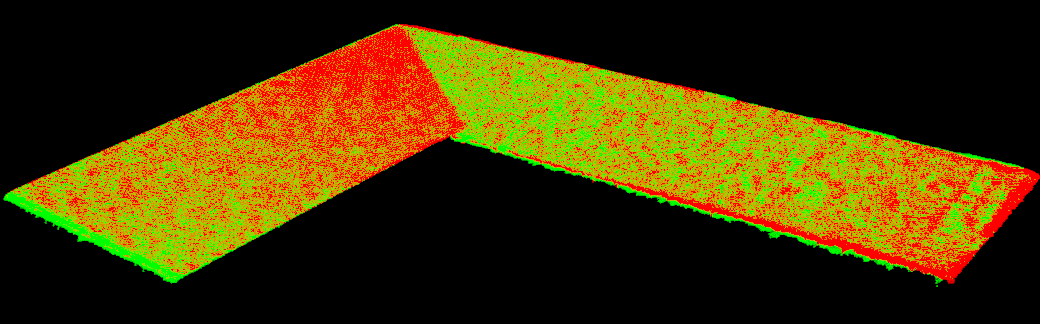
個々の点群を結合する前に、均一な色を塗りつぶすことで、位置合わせの品質を視覚化できる。
回転テーブルを使用したステッチング
この例では、回転テーブル上に置かれたオブジェクトの点群をステッチングする方法を示します。この方法でステッチングするには、次の手順が必要です。
Zivid カメラに接続します。
関心領域(ROI)を指定してカメラ設定を読み込みます。
物体が回転する際に、複数の点群をキャプチャする。
各キャプチャデータを非構造化点群に変換し、ダウンサンプリングする。
新しいフレームを、成長中のモデルに対して登録します。
成長したモデルを新しいフレームに縫い付けます。
ダウンサンプリング、表示を行い、最終結果をポリゴンファイル形式(.ply)にエクスポートします。
注釈
この例では、回転テーブルは約 25 秒で 360 度回転します。各サイクルには 250 ミリ秒以上かかるため(キャプチャ、転送、処理、スティッチングを含む)、キャプチャ間に 1 秒の遅延を追加しました。これにより、対象物の周囲に均等に分布した角度から約 20 枚のキャプチャ画像が得られます。
まず、カメラに接続し、定義された ROI を持つキャプチャ設定を読み込みます。ROI は、回転テーブル上の物体を含むように定義されます。テーブル自体の点をキャプチャしないようにするのが理想的ですが、物体が十分に大きい場合は、テーブルの点が多少含まれていても一般的に問題ありません。
std::cout << "Connecting to camera" << std::endl;
auto camera = app.connectCamera();

std::cout << "Loading settings from file: " << settingsPath << std::endl;
const auto settings = Zivid::Settings(settingsPath);
Console.WriteLine("Connecting to camera");
using (var camera = zivid.ConnectCamera())
{
    Console.WriteLine("Loading settings from file: " + settingsPath);
    var settings = new Zivid.NET.Settings(settingsPath);
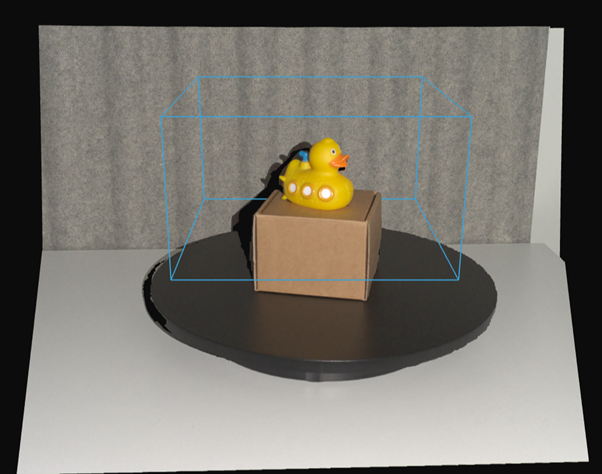 点群における関心領域の配置のデモンストレーション。
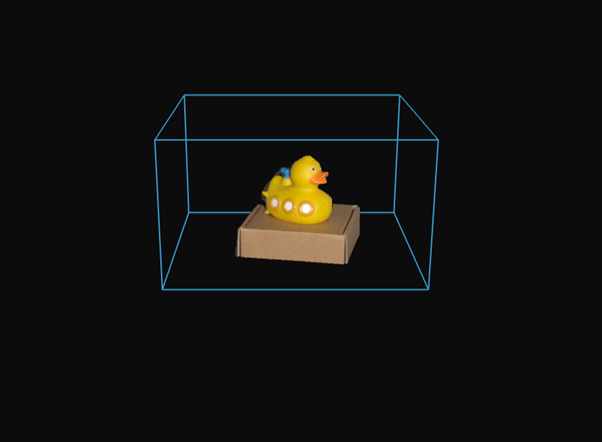 点群における関心領域の配置結果。
次に、回転する物体の点群を取得し、ローカル点群レジストレーションを適用して位置合わせを行います。新しく取得された各点群が基準フレームとなり、以前に合成されたモデルはその基準フレームに変換されます。
最新のキャプチャではなく、ステッチされたモデルを変換する理由は? 最新のキャプチャを固定されたワールドフレームに変換するには、以前のすべての変換を適用する必要があり、誤差が蓄積されてしまうからです。既存のモデルを常に最新のフレームに変換することで、誤差は局所化され、管理しやすくなります。
Zivid::UnorganizedPointCloud unorganizedStitchedPointCloud;
auto registrationParams = Zivid::Experimental::LocalPointCloudRegistrationParameters{};
auto previousToCurrentPointCloudTransform = Zivid::Matrix4x4::identity();

for(int numberOfCaptures = 0; numberOfCaptures < 20; ++numberOfCaptures)
{
    std::this_thread::sleep_for(std::chrono::seconds(1));
    auto frame = camera.capture2D3D(settings);
    const auto unorganizedPointCloud = frame.pointCloud().toUnorganizedPointCloud().voxelDownsampled(1.0, 2);

    if(numberOfCaptures != 0)
    {
        if(unorganizedStitchedPointCloud.size() < 4 || unorganizedPointCloud.size() < 4)
        {
            std::cout << "Not enough points for registration, skipping stitching..." << std::endl;
            continue;
        }

        const auto registrationResult = Zivid::Experimental::Toolbox::localPointCloudRegistration(
            unorganizedStitchedPointCloud,
            unorganizedPointCloud,
            registrationParams,
            previousToCurrentPointCloudTransform);

        if(!registrationResult.converged())
        {
            std::cout << "Registration did not converge..." << std::endl;
            continue;
        }

        previousToCurrentPointCloudTransform = registrationResult.transform().toMatrix();
        unorganizedStitchedPointCloud.transform(previousToCurrentPointCloudTransform.inverse());
    }

    unorganizedStitchedPointCloud.extend(unorganizedPointCloud);
    std::cout << "Captures done: " << numberOfCaptures << std::endl;
}

std::cout << "Voxel-downsampling the stitched point cloud" << std::endl;
unorganizedStitchedPointCloud = unorganizedStitchedPointCloud.voxelDownsampled(0.75, 2);

visualizePointCloud(unorganizedStitchedPointCloud);
var unorganizedStitchedPointCloud = new Zivid.NET.UnorganizedPointCloud();
var registrationParams = new Zivid.NET.Experimental.LocalPointCloudRegistrationParameters();
var previousToCurrentPointCloudTransform = new Pose(Zivid.NET.Matrix4x4.Identity());

var captureCount = 20;
for (int numberOfCaptures = 0; numberOfCaptures < captureCount; ++numberOfCaptures)
{
    Thread.Sleep(TimeSpan.FromSeconds(1));

    using (var frame = camera.Capture2D3D(settings))
    {
        var unorganizedPointCloud = frame.PointCloud.ToUnorganizedPointCloud().VoxelDownsampled(1.0f, 2);

        if (numberOfCaptures != 0)
        {
            if (unorganizedStitchedPointCloud.Size < 4 || unorganizedPointCloud.Size < 4)
            {
                Console.WriteLine("Not enough points for registration, skipping stitching...");
                continue;
            }

            var registrationResult = PointCloudRegistration.LocalPointCloudRegistration(
                unorganizedStitchedPointCloud,
                unorganizedPointCloud,
                registrationParams,
                previousToCurrentPointCloudTransform);

            if (!registrationResult.Converged)
            {
                Console.WriteLine("Registration did not converge, skipping this frame...");
                continue;
            }

            previousToCurrentPointCloudTransform = registrationResult.Transform;
            var previousToCurrentMatrix = new Zivid.NET.Matrix4x4(previousToCurrentPointCloudTransform.ToMatrix());
            unorganizedStitchedPointCloud.Transform(previousToCurrentMatrix.Inverse());
        }

        unorganizedStitchedPointCloud.Extend(unorganizedPointCloud);
        Console.WriteLine("Captures done: " + (numberOfCaptures + 1));
    }
}

Console.WriteLine("Voxel-downsampling the stitched point cloud");
unorganizedStitchedPointCloud = unorganizedStitchedPointCloud.VoxelDownsampled(0.75f, 2);

VisualizePointCloud(unorganizedStitchedPointCloud);
previous_to_current_point_cloud_transform = np.eye(4)
unorganized_stitched_point_cloud = zivid.UnorganizedPointCloud()
registration_params = LocalPointCloudRegistrationParameters()

for number_of_captures in range(20):
    time.sleep(1)
    frame = camera.capture_2d_3d(settings)
    unorganized_point_cloud = (
        frame.point_cloud().to_unorganized_point_cloud().voxel_downsampled(voxel_size=1.0, min_points_per_voxel=2)
    )

    if number_of_captures != 0:
        local_point_cloud_registration_result = local_point_cloud_registration(
            target=unorganized_stitched_point_cloud,
            source=unorganized_point_cloud,
            parameters=registration_params,
            initial_transform=previous_to_current_point_cloud_transform,
        )
        if not local_point_cloud_registration_result.converged():
            print("Registration did not converge...")
            continue
        previous_to_current_point_cloud_transform = local_point_cloud_registration_result.transform().to_matrix()

        unorganized_stitched_point_cloud.transform(np.linalg.inv(previous_to_current_point_cloud_transform))
    unorganized_stitched_point_cloud.extend(unorganized_point_cloud)

    print(f"Captures done: {number_of_captures}")

print("Voxel-downsampling the stitched point cloud")
unorganized_stitched_point_cloud = unorganized_stitched_point_cloud.voxel_downsampled(
    voxel_size=0.75, min_points_per_voxel=2
)

display_pointcloud(unorganized_stitched_point_cloud)
注釈
回転テーブルは一定の角速度で回転するため、連続する点群間の変換は類似しているはずです。したがって、前回の変換を次回の位置合わせの初期推定値として使用できます。
最後に、結合された結果はさらにボクセル単位でダウンサンプリングされ、表示されます。以下に、結合された点群の結果を示します。
事前位置合わせを伴う点群ステッチング
キャプチャ間の相対姿勢を事前に推定する方法がある場合、その事前位置合わせをローカル点群レジストレーションと組み合わせて結果を微調整できます。事前位置合わせの変換はさまざまなソースから得られ、適切な選択はセットアップによって異なります。
ロボットアームの使用(ハンドアイキャリブレーション) : カメラと物体間の相対運動がロボットによって提供される場合です。カメラがロボットに搭載されて静止した物体の周囲を移動する(Eye-in-Hand)か、カメラが固定されていてロボットがその前で物体を移動させる(Eye-to-Hand)かのいずれかです。
マルチカメラキャリブレーションの使用(複数の固定カメラ) : 複数の固定カメラが異なる角度から同じシーンを観察する場合です。
別のソースから既知の変換を使用する場合(例:ターンテーブルの姿勢、Zivid キャリブレーションボード、または ArUco マーカー):ステッチング前にこのような変換を適用する方法については、 変換によるステッチ を参照してください。
ロボットアームの使用(ハンドアイキャリブレーション)
このセクションでは、ハンドアイキャリブレーションデータとローカル点群レジストレーションを使用して、カメラと物体間の異なる相対姿勢から取得した点群をステッチングするプロセスについて説明します。同じアプローチが両方のハンドアイ構成に適用されます。
Eye-in-Hand:カメラはロボットに搭載され、静止した物体の周囲を移動します。
Eye-to-Hand:カメラは固定されており、ロボットが物体を保持してその前で移動させます。
このセクションの残りの部分では、Eye-in-Hand 構成を実例として使用します。ワークフローと数学的計算は Eye-to-Hand でも同様です。この場合、ロボットの姿勢はカメラの姿勢ではなく、物体の姿勢を表します。
概要と要件
このステッチング手法では、ロボットアームでカメラをオブジェクトの周囲に移動させることで、オブジェクトの完全な 3D 点群を生成できます。特に次のような場合に役立ちます。
その物体はカメラの視野よりも大きい。
検査、モデリング、または操作を行うには、対象物を複数の角度から撮影する必要がある。
この方法を使用するには、有効な ハンドアイキャリブレーション 結果が必要です。これは通常 hand_eye_transform.yaml として提供され、ロボットのエンドエフェクタ座標系とカメラの座標系間の変換を定義します。この変換は、異なるカメラ姿勢から取得したキャプチャを関連付けるために使用され、点群を共通の座標系に変換して、複数のビュー間で正確な位置合わせを可能にします。
必要なもの:
キャプチャされた Zivid 点群のセット(
capture_*.zdf)対応するロボットのポーズのセット(
robot_pose_*.yaml)—キャプチャごとに 1 つハンドアイキャリブレーション手順が正常に完了して得られた
hand_eye_transform.yaml
これらの要素を組み合わせることで、個々のキャプチャ画像を共通の座標系に事前に位置合わせすることができます。
ステッチングワークフロー
縫製工程は主に以下の手順で行われます。
異なるロボット姿勢で取得した複数の点群を読み込む。
各ポーズ(
robot_pose_*.yaml)と手と目のキャリブレーション(hand_eye_transform.yaml)を読み込みます。手と目の変換機能を使用して、各ロボットのポーズをカメラのポーズに変換します。
点群をカメラの座標系からロボットのベース座標系に変換することで、事前に位置合わせを行う。
ベースフレーム内にワークスペース ROI ボックスを適用し、すべての視点から背景を除外します。
処理速度を向上させ、ノイズを低減するために、各点群(ボクセルグリッド)をダウンサンプリングします。
ローカル点群レジストレーションを使用して、拡大していくステッチングされた点群と新しい点群との間の位置合わせを微調整します。
必要に応じて、元の高解像度雲を再読み込みし、推定された変換を適用して、それらを高解像度で結合します。
最終結果を、ステッチされた.ply 点群ファイルとしてエクスポートします。
[Robot Arm (Pose A)] -> capture_1.zdf
[Robot Arm (Pose B)] -> capture_2.zdf
...
[Robot Arm (Pose N)] -> capture_N.zdf

Each capture is paired with:
    - robot_pose_*.yaml
    - hand_eye_transform.yaml

Apply:
    - Pre-alignment using robot pose and hand-eye calibration
    - Workspace ROI box filtering in robot base frame
    - Local point cloud registration for refinement

Output:
    - Combined and visualized point cloud
    - Optionally reload original captures for full-resolution stitching

Export:
    - Final stitched point cloud as a PLY file
ワークスペース ROI ボックスはロボットのベースフレーム内で定義され、各点群がベースフレームに変換された後に後処理として適用されます。これにより、キャプチャごとに ROI を設定する必要なく、すべての視点から背景をフィルタリングできます。
const auto smallWorkspaceRoiBox = Zivid::Settings::RegionOfInterest::Box{
    Zivid::Settings::RegionOfInterest::Box::Enabled::yes,
    Zivid::Settings::RegionOfInterest::Box::PointO{ -150, 300, 50 },
    Zivid::Settings::RegionOfInterest::Box::PointA{ -150, 600, 50 },
    Zivid::Settings::RegionOfInterest::Box::PointB{ 150, 300, 50 },
    Zivid::Settings::RegionOfInterest::Box::Extents{ -75, 40 },
};
    auto pointCloud = frame.pointCloud();
    pointCloud.transform(baseToCameraTransform);
    pointCloud.maskByRegionOfInterest(workspaceRoiBox);
var smallWorkspaceRoiBox = new Zivid.NET.Settings.RegionOfInterestGroup.BoxGroup
{
    Enabled = true,
    PointO = new Zivid.NET.PointXYZ { x = -150, y = 300, z = 50 },
    PointA = new Zivid.NET.PointXYZ { x = -150, y = 600, z = 50 },
    PointB = new Zivid.NET.PointXYZ { x = 150, y = 300, z = 50 },
};
smallWorkspaceRoiBox.Extents = new Zivid.NET.Range<double>(-75, 40);
    var pointCloud = frame.PointCloud;
    pointCloud.Transform(baseToCameraTransform);
    pointCloud.MaskByRegionOfInterest(workspaceRoiBox);
small_workspace_roi_box = zivid.Settings.RegionOfInterest.Box(
    enabled=True,
    point_o=[-150, 300, 50],
    point_a=[-150, 600, 50],
    point_b=[150, 300, 50],
    extents=(-75, 40),
)
    point_cloud = frame.point_cloud()
    point_cloud.transform(base_to_camera_transform)
    point_cloud.mask_by_region_of_interest(workspace_roi_box)
地方登録の仕組み
ロボットとハンドアイの姿勢を用いた初期位置合わせの後、わずかな姿勢の不正確さを補正するために、さらに微調整が必要です。ローカル点群レジストレーションは、ダウンサンプリングされた各点群を、成長中の点群(以前に結合された点群)に位置合わせすることで精度を向上させます。
位置合わせを適用する前に、すべての点群はボクセルダウンサンプリングされます。このステップは、スティッチング処理にとって重要です。なぜなら、次の点群がダウンサンプリングされるからです。
センサーノイズを低減し、より信頼性の高い位置合わせを実現します。
登録を妨げる可能性のある外れ値を除去するのに役立ちます
構造の詳細を損なうことなく点の数を減らすことで、処理速度を向上させる。
ユーザーは処理開始前にステッチング戦略を選択します。ただし、実際のステッチングはすべての変換が推定された後にのみ実行されます。
低解像度スティッチング:ダウンサンプリングされた点群(アライメント時に準備されたもの)を使用します。
高解像度スティッチング:元の高解像度点群を再読み込みし、推定された変換を適用して、詳細な最終点群を作成します。
注釈
ボクセルダウンサンプリングなしのスティッチング( --full-resolution )は、より詳細な画像を生成しますが、より多くのメモリと計算時間を必要とします。
注釈
ローカルレジストレーションを実行する際には、点群が事前アライメントの段階で既に十分にアライメントされていることが重要です。初期アライメントのずれが大きすぎると、アルゴリズムが収束しなかったり、不正確な結果が生成されたりする可能性があります。
max_correspondence_distance パラメータは、ソースクラウドとターゲットクラウド間の対応点を見つけるための検索半径を定義します。値は次のようになります。
通常の点間隔よりも広い(正確なマッチングを可能にするため)
しかし、アライメントの品質を低下させる可能性のある誤った対応関係が含まれるほど大きくあってはならない。
auto registrationParameters = Zivid::Experimental::LocalPointCloudRegistrationParameters{
    Zivid::Experimental::LocalPointCloudRegistrationParameters::MaxCorrespondenceDistance{ 2 }
};
var registrationParameters = new Zivid.NET.Experimental.LocalPointCloudRegistrationParameters();
registrationParameters.MaxCorrespondenceDistance = 2.0f;
以下に、カメラの視野よりも大きいため複数回の撮影が必要となった物体について、点群を合成した結果を示します。
Zivid SDK のサンプル
ロボットに搭載されたカメラを使用したステッチングの完全なサンプルコードをご覧ください。
ロボット搭載カメラによるステッチング点群の正確度
ロボットに搭載されたカメラから取得したステッチング点群の正確度は、個々の静止キャプチャにおける誤差と、ロボットおよびステッチングパイプラインによって生じる誤差によって決まります。主な要因は次のとおりです。
カメラの寸法真度誤差 — カメラモデルごとに規定される、単一の静止キャプチャにおける系統的なスケーリング誤差です。定義とデータシート値の読み方については、 Zivid 仕様に関する用語 を参照してください。
ハンドアイキャリブレーション誤差 — ロボットフランジ上のカメラの姿勢が、ロボットのエンドエフェクタに対してどの程度正確に把握されているか、つまりカメラ座標系からロボットフランジ座標系への変換の正確さです。これは ハンドアイキャリブレーション によって決まり、マウントの剛性に敏感です( ロボットの取り付けに関する機械的考慮事項 を参照)。
ロボットのマスタリング誤差 — ロボット自体が関節のゼロ位置とリンク形状をどの程度正確に把握しているかです。これはロボットの特性であり、メーカー、モデル、および個々の機体によって異なります。
ロボットの繰り返し精度と絶対正確度 — 指令されたロボット姿勢と実際の姿勢との差です。繰り返し精度は通常ロボットメーカーによって公開されていますが、絶対正確度は通常繰り返し精度よりも劣り、公開されることはほとんどありません。
ステッチングアルゴリズム誤差 — ロボット姿勢による事前位置合わせと、ローカル点群レジストレーションによる微調整の後に残る位置ずれです。これは、重なり具合、シーンのテクスチャ、およびレジストレーションパラメータに依存します。
注釈
Zivid は、ロボット搭載カメラによるステッチング点群の全体的な正確度仕様を公開していません。これは、カメラ以外の要因がメーカー、セットアップ、および状況に大きく依存するためです。
カメラ以外の要因を最小限に抑えるには:
剛性が高く振動の少ないマウントを使用し、負荷や動作中でもカメラからフランジへの変換が一定に保たれるようにします。剛性の高い材料と短くコンパクトなブラケットは、どちらもたわみを軽減し、この変換を一定に保つのに役立ちます。 ロボットの取り付けに関する機械的考慮事項 を参照してください。
ウォームアップ 、 Infield Correction 、および ハンドアイキャリブレーション を慎重に実行し、機械的な変更を加えた後は必ず再検証してください。
移動中ではなく、静止した状態で(露光中はロボットを停止させて)キャプチャします。
隣接するキャプチャ間に十分な重なりを確保し、ローカル点群レジストレーションが残存する位置ずれを補正できるようにします。
マルチカメラキャリブレーションの使用(複数の固定カメラ)
複数の Zivid カメラがシーンの周囲に固定位置で設置されている場合、一度相互にキャリブレーションを行えば、以降はその結果得られた変換行列を使用してすべてのキャプチャをステッチングできます。これは次のような場合に適した選択肢です。
カメラがシーンに対して固定されている。
1 台のカメラを移動させるのではなく、すべての視点を同時に(あるいは短時間で連続して)キャプチャしたい場合。
このワークフローは 2 つの部分から構成されます。
カメラ同士を相互にキャリブレーションします。詳細は マルチカメラキャリブレーション を参照してください。
得られた変換行列を使用して点群をステッチングします。詳細は 変形によるステッチチュートリアル を参照してください。
必要に応じて、ローカル点群レジストレーションを使用して位置合わせを微調整します。詳細は ステッチングワークフロー を参照してください。
バージョン履歴
SDK |
変更点 |
|---|---|
2.17.0 |
C# でのローカル点群レジストレーションのサポートを追加しました。 |