Install Zivid + HALCON for Windows
Zivid는 HALCON과의 인터페이싱을 위한 두 가지 방법을 제공합니다.
Zivid SDK를 통해 HALCON에서 사용 가능한 C++/C# 라이브러리를 활용합니다. Zivid는 C++ 및 C# 샘플을 제공합니다. (권장)
Zivid Software 와 함께 제공되는 GenICam GenTL 제작자를 통해 직접 설치합니다.
두 번째 옵션을 사용하려면 아래 단계를 따르세요. 권장 옵션을 사용하려면 선호하는 프로그래밍 언어의 샘플을 따르세요.
Install Zivid SDK
Install Zivid SDK by following the instruction on this page: Software Installation.
참고
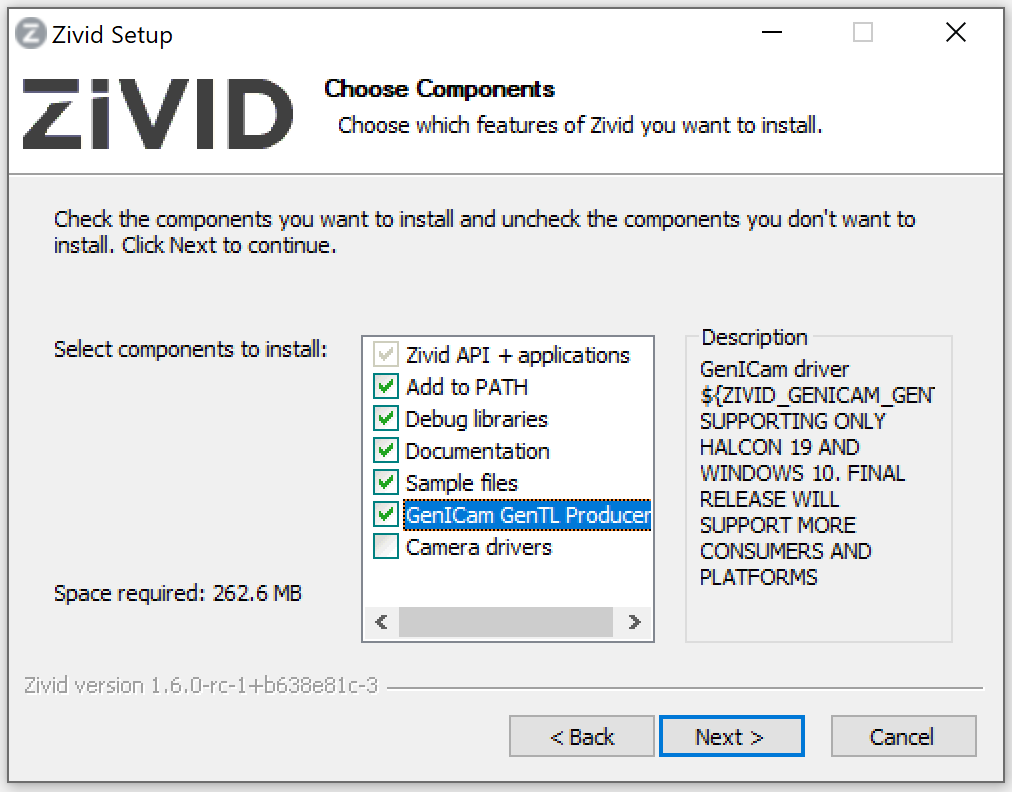
Make sure to check the GenICam GenTL Producers box when choosing which components to install. This installs the GenTL Producer that HALCON needs to see the camera.
Install HALCON
Visit MVTec download page and sign in to download the MVTec Software Manager. Use the Software Manager to select HALCON, pick a version, and install it for Windows. We recommend that you use a HALCON version that has been tested by Zivid.
중요
Select the GenICamTL image acquisition package (GenTL Consumer) in the Software Manager.
The package is optional, and installing a newer HALCON version does not carry it over from an older one.
Without it, HALCON detects only the File and DirectFile interfaces and the Zivid camera stays hidden.
See Only the File and DirectFile interfaces are detected.
Get started!
이제 저희 HALCON samples 을 시험해 볼 준비가 되었습니다!
경고
HALCON Image Acquisition Assistant를 사용할 때 USB3Vision 인터페이스를 사용하여 Zivid 카메라에 연결하지 마세요. 이렇게 하면 일반 HALCON USB 드라이버가 설치되고 Zivid USB 드라이버가 무시됩니다. GenICamTL 인터페이스로 연결하십시오.