Debug in HALCON
Read detailed error messages in the Output Console
Hdevelop에서 프로그램을 디버깅하는 것은 오류 메시지가 항상 이해하기 쉬운 것은 아니기 때문에 어려울 수 있습니다. 이 경우 Output Console 명령을 사용하면 더 자세한 정보를 얻을 수 있습니다.
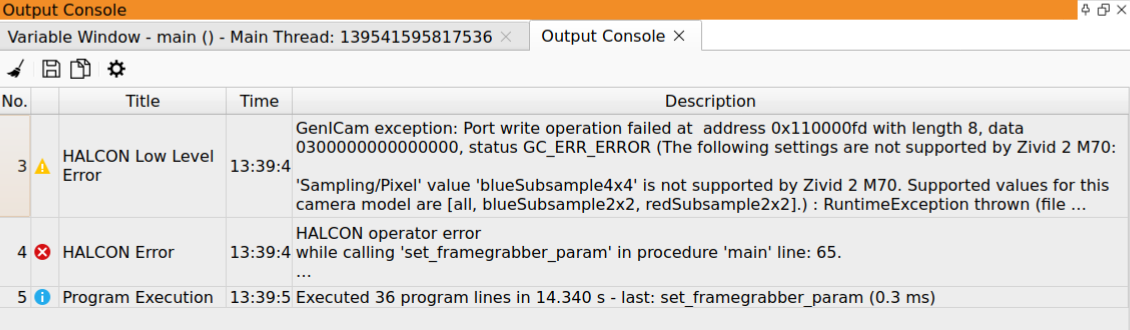
예를 들어, Zivid Two M70 카메라의 경우 SamplingPixel blueSubsample4x4 로 설정하면 다음과 같은 오류 메시지가 표시됩니다.
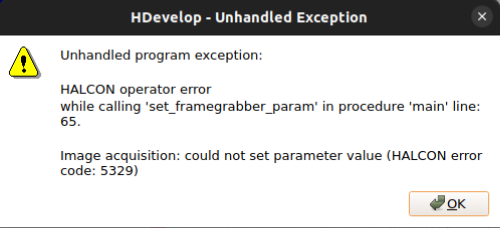
Zivid 2 M70에서 blueSubsample4x4가 지원되지 않습니다. 그리고 Output Console 을 보면 보다 자세한 오류 메시지를 확인할 수 있습니다:
The Zivid camera is not listed in HALCON
Zivid 카메라를 HALCON에 연결하려면 각 공급업체의 구성 요소 두 가지가 필요합니다.
공급업체 |
구성 요소 |
설치 주체 |
|---|---|---|
Zivid |
GenTL Producer |
Zivid SDK 설치 프로그램, GenICam GenTL Producers 구성 요소 |
HALCON |
GenTL Consumer |
HALCON 설치 프로그램, GenICamTL 이미지 취득 패키지 |
두 구성 요소가 모두 필요합니다. 둘 중 하나라도 없으면 카메라가 HALCON에 표시되지 않습니다.
Only the File and DirectFile interfaces are detected
HALCON Image Acquisition Assistant에서 자동 인터페이스 감지 시 File 및 DirectFile 만 반환됩니다. GenICamTL 인터페이스가 없으므로 Zivid 카메라를 선택할 수 없습니다.
이는 HALCON GenICamTL 이미지 취득 패키지가 설치되어 있지 않다는 의미입니다. 이 패키지는 HALCON 설치의 선택적 구성 요소입니다. 최신 버전의 HALCON을 설치해도 이전 버전에서 이 패키지가 자동으로 이전되지 않습니다.
이 문제를 해결하려면 MVTec Software Manager에서 GenICamTL 이미지 취득 인터페이스를 추가하세요. HALCON을 전체 재설치할 필요는 없습니다. HDevelop을 재시작한 후 인터페이스 감지를 다시 실행하세요.
참고
이 증상은 통합 과정에서 HALCON 측의 문제임을 나타냅니다. 동일한 카메라가 동일한 컴퓨터에서 동일한 Zivid SDK 버전으로 다른 HALCON 버전에서는 정상적으로 작동한다면, Zivid GenTL Producer는 올바르게 설치되어 있는 것입니다.