Unsatisfactory Hand-Eye Calibration Results (Multi-Marker ArUco Target: Good Translation, NaN or Extreme Rotation)
Problem
The hand-eye calibration results are unsatisfactory, and you are using a custom target with more than one ArUco marker (for example, a cross or grid layout). The results look like the following combination:
Hand-Eye Transform |
Hand-Eye Residuals |
Projection Verification |
Touch Test |
|---|---|---|---|
Reasonable |
Bad (rotation: |
Not done |
Not done |
If you are using a multi-marker ArUco target and see good translation with a NaN or extreme rotation residual, check for duplicate poses and marker occlusion, then repeat the hand-eye calibration (see Potential Solution below).
Example of bad hand-eye calibration results
The translation part of the Hand-Eye Transformation Matrix looks reasonable, but the rotation part does not.
Translation residuals are good, averaging around 0.3-0.5 mm regardless of how many markers are used.
Rotation residuals are
NaNwhen the calibration is restricted to only 1-2 of the 4 ArUco markers.Rotation residuals are valid but extreme when 3 or all 4 markers are used, ranging from about 11° to 177° instead of the well under 1° this dataset produces once cleaned up.
The table below comes from a controlled test: the same 13-pose dataset was re-run through the calibration once for each marker count shown (1, then 2, then 3, then 4). Each row is a single run, not a repeat. Each run changed only how many of the 4 ArUco markers it was restricted to use. It did not change how many markers were actually detected per pose, which is a separate, real occlusion pattern shown further below.
Markers used |
Rotation residual |
Translation residual |
|---|---|---|
1 |
NaN (all poses) — undefined, not enough points |
0.24-0.82 mm |
2 |
NaN (all poses) — undefined, not enough points |
0.24-0.84 mm |
3 |
26°-177° (avg 114°) — defined, but still bad |
0.24-0.74 mm |
4 (all markers) |
11°-153° (avg 74°) — defined, but still bad |
0.21-0.76 mm |
Takeaway: the NaN-vs-extreme split is purely a function of how many markers happen to be usable, not a difference between two datasets.
The residual staying extreme even with all 4 markers used is what points to the real cause: duplicate poses and marker occlusion, explained below.
Separately from that experiment, the two images below show why fewer than 4 markers are sometimes detected in the first place, using the unmodified 13-pose dataset with all 4 marker IDs allowed.
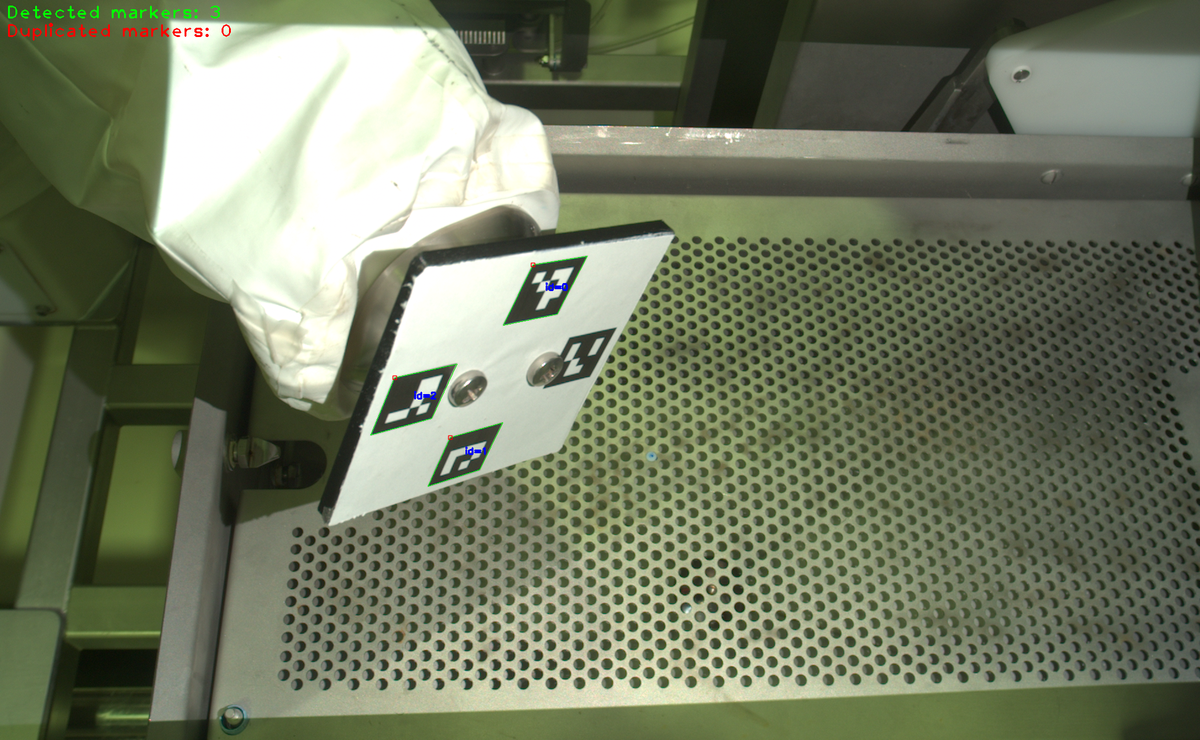
One of the 13 captured poses, where only 3 of the 4 markers are detected because a mounting screw physically blocks the camera’s view of marker id 3 from this angle, not because any marker ID is excluded from the calibration.
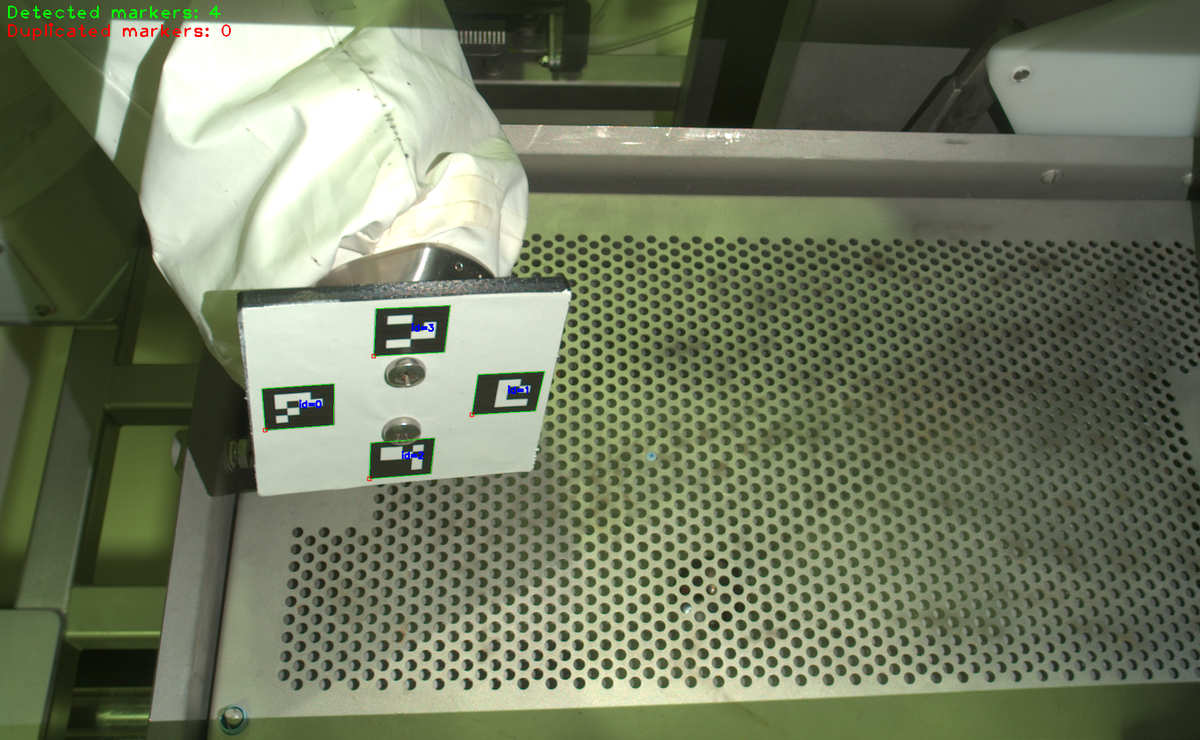
A different captured pose, viewed from an angle where the mounting screw does not block any marker, so all 4 are detected.
Key recognition pattern: good translation combined with poor (NaN or extreme) rotation, using a target with multiple ArUco markers.
Potential Cause
ArUco-based pose estimation behaves differently from checkerboard-based calibration. A checkerboard provides many corner observations with strong redundancy. A single ArUco marker only contributes one point (its centre) per pose, so each pose gives the rotation residual much less geometric information to work with.
The rotation residual needs more points than the translation residual to be meaningful. With fewer than 3 non-collinear marker centres in a pose, the rotation residual is not defined and is reported as
NaN. With 3 or more, it can still be dominated by point noise rather than by the actual quality of the calibration, especially when the markers used are close together or nearly in a line.The rotation residual does not use the same points as the calibration itself. It is a diagnostic computed after calibration, from marker detections in the dataset. It does not necessarily see every pose or every marker the calibration used. If marker visibility changes from pose to pose because of occlusion, the rotation residual can end up unreliable even though the underlying calibration used all the available information.
In practice, this pattern has been traced back to two root causes that can occur together:
Duplicate or near-duplicate robot poses in the dataset. If the robot barely moved (or did not move at all) between two captures, those pose-image pairs add no new geometric constraint. They are still counted as independent poses.
Partial occlusion of one or more markers by mounting hardware. Screws, brackets, clamps, or cables can block the line of sight to specific markers from specific viewing angles. This does not necessarily cause a hard failure. The calibration can silently proceed using only the markers that were detected in each pose, quietly reducing how many poses are actually fully constrained.
Potential Solution
Inspect the dataset pose by pose rather than relying on the aggregate result. For each pose, note which ArUco marker IDs were detected and which were missing. The Hand-Eye GUI is the recommended tool for this, but any workflow that lets you review per-pose detections works.
Check for duplicate or near-duplicate robot poses. Compare the robot pose values (not just the images) across all captures.
Check for physical occlusion of any marker. Look for mounting hardware (screws, brackets, clamps, cables) that could block line of sight to a marker from some viewing angles but not others. This is easy to miss because it may not trigger a hard failure.
Remove duplicate or near-duplicate poses first, since they add no new geometric constraint no matter how many markers they show. Partial marker visibility on its own is normal and expected, as covered in Zivid Calibration Object, so keep poses with one marker occluded rather than discarding every one of them. As a rule of thumb, losing 1 of 4 markers still leaves 3, the minimum needed for the rotation residual to be defined at all (see “Potential Cause” above). Only trim further if you are specifically troubleshooting a bad or
NaNrotation residual and still have enough fully-visible poses to spare: in that situation, prefer the poses with all markers visible, since they give the rotation residual the most points to work with. Confirm you still have at least the minimum of 6 poses required by the Hand-Eye GUI, and ideally 10-20 clean poses.If you are at risk of dropping below the minimum number of clean poses, capture a new, larger dataset instead of reusing a marginal one.
Repeat the hand-eye calibration using the cleaned dataset.
Verify the hand-eye calibration results (transform, residuals, projection).
Run the touch test (if the hand-eye calibration results are good).
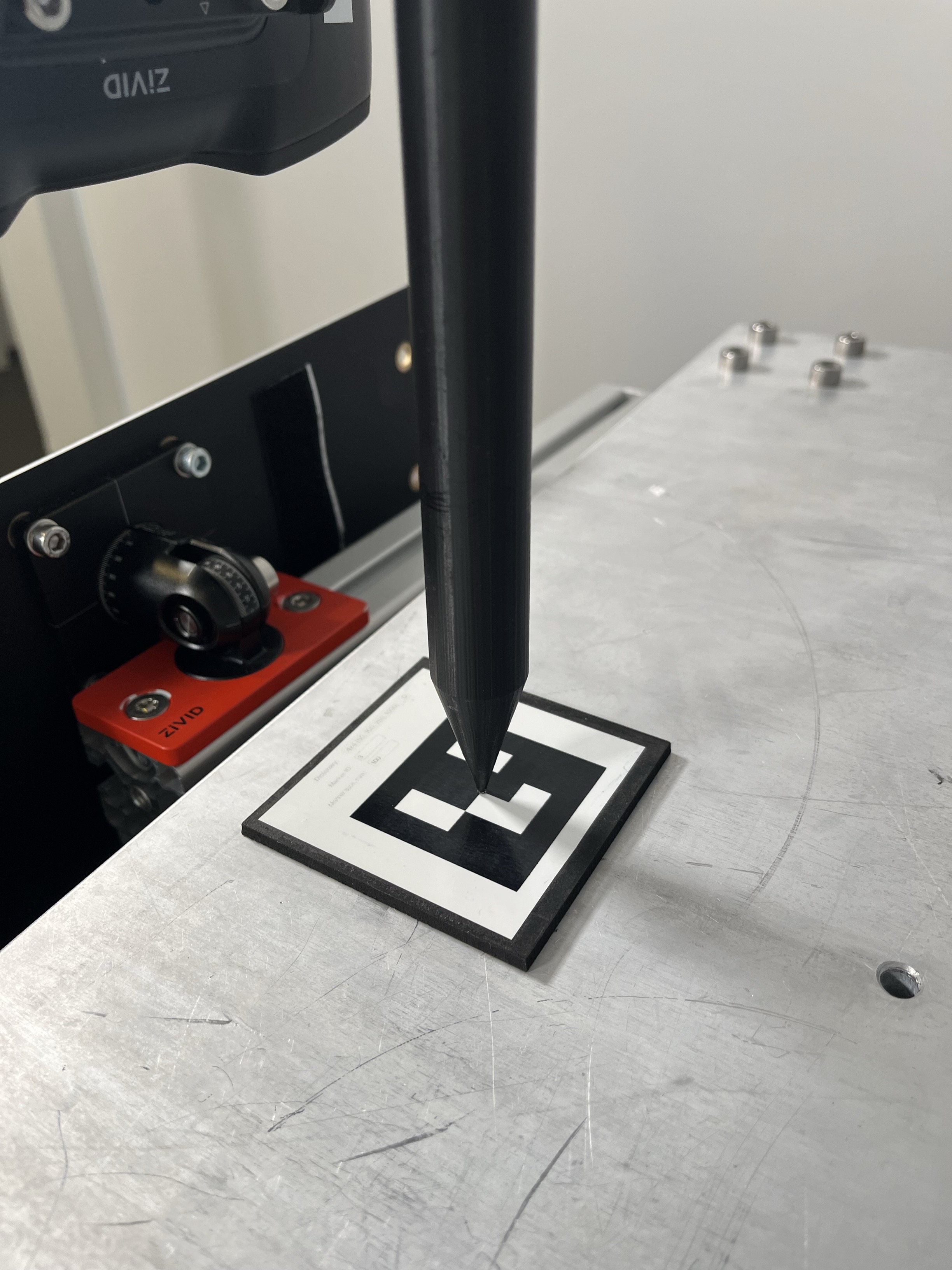
Reproducing the issue (multi-marker ArUco target, good translation, bad rotation)
Setup
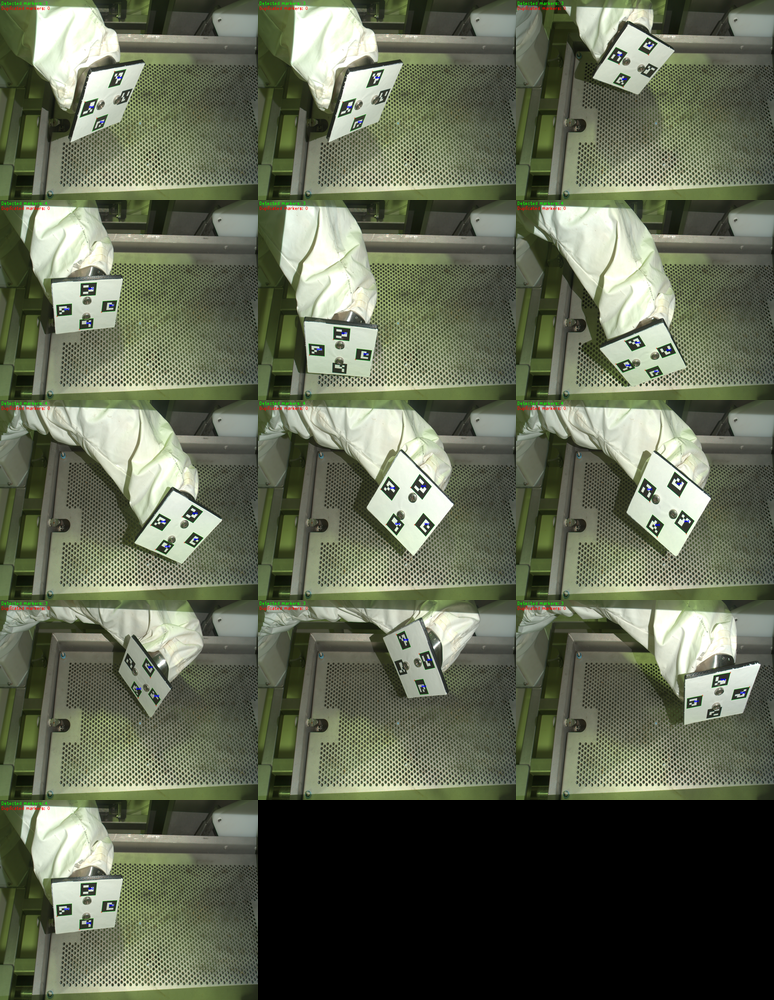
An eye-to-hand hand-eye calibration was attempted on a Zivid 2 M70 using a custom 4-marker ArUco cross target mounted on the robot flange, shown across all 13 captured poses with the ArUco detection result for each below.
What ruled out the more common causes
The following were checked and ruled out before the actual root causes were found:
Marker size versus working distance. The M70 had enough spatial resolution to detect the 25 mm markers at 400 mm. See the minimum marker size guidance for your camera model and working distance.
Marker layout collinearity. Verified from a photo using an ArUco detector. The 4 markers formed a cross pattern rather than a line, and any 3-of-4 subset still spanned real 2D area.
Marker orientation consistency. All four markers were mounted with consistent orientation.
Root causes found
Duplicate poses: two pairs of poses in the 13-pose dataset were identical (poses 1 and 2, and poses 4 and 13).
Marker occlusion by a mounting fastener: two fasteners secured the ArUco target to the robot, as shown above in the example images.
Depending on the viewing angle, those fasteners blocked line of sight to one of the 4 markers in 7 of the 13 poses (always leaving 3 of the 4 markers visible, never fewer). Which specific marker got occluded changed with the viewing angle.
Only 6 of the 13 poses had all 4 markers visible, and one of those 6 (pose 13) was a duplicate of another (pose 4). That leaves 5 unique poses with all 4 markers visible, below the Hand-Eye GUI’s minimum of 6 poses.
Bad Dataset (13 poses, all 4 markers requested)
The Hand-Eye Transformation Matrix appears reasonable and is consistent with what one would expect from rough manual measurements.
0.998 |
-0.001 |
0.056 |
558.764 |
-0.027 |
-0.891 |
0.454 |
-707.493 |
0.049 |
-0.454 |
-0.889 |
641.606 |
0 |
0 |
0 |
1 |
The calibration residuals are noticeably larger than expected, especially for rotation.
N (Poses) |
Rot. avg (°) |
Rot. max (°) |
Trans. avg (mm) |
Trans. max (mm) |
|---|---|---|---|---|
13 |
74.16 |
153.43 |
0.455 |
0.755 |
Complete Residuals
Pose |
Rotation (°) |
Translation (mm) |
|---|---|---|
1 |
11.62 |
0.612 |
2 |
77.95 |
0.547 |
3 |
38.86 |
0.713 |
4 |
52.00 |
0.230 |
5 |
113.56 |
0.432 |
6 |
153.43 |
0.566 |
7 |
13.07 |
0.523 |
8 |
134.97 |
0.247 |
9 |
85.63 |
0.345 |
10 |
30.97 |
0.755 |
11 |
39.78 |
0.210 |
12 |
124.46 |
0.441 |
13 |
88.29 |
0.294 |
Attempting a touch test on this result would have been unsafe given how extreme the rotation residuals were, so it was not performed.
Cleaned Dataset (7 poses, duplicates removed)
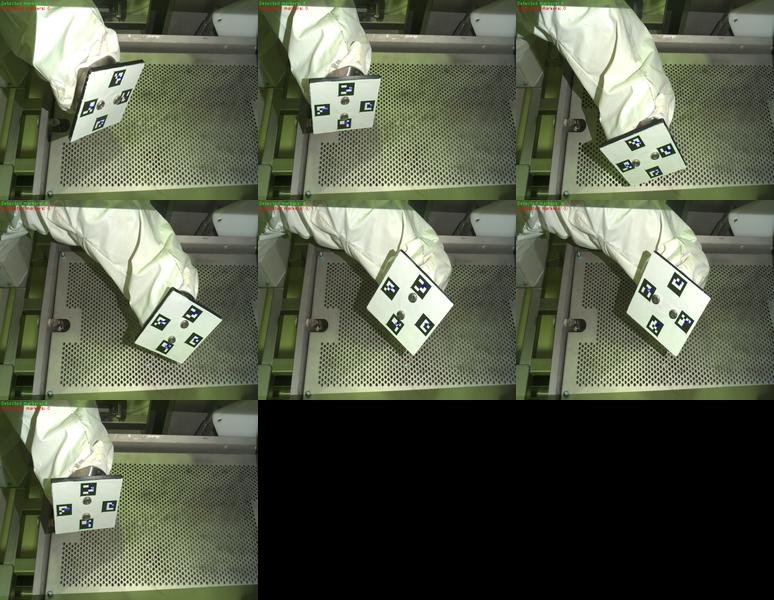
The 7 poses kept after removing duplicates: the 5 unique poses with all 4 markers visible, plus 2 more duplicate-free poses (one of which still has only 3 of the 4 markers detected).
The Hand-Eye Transformation Matrix is very close to the bad-dataset result above.
0.998 |
0.001 |
0.056 |
558.773 |
-0.025 |
-0.891 |
0.453 |
-707.074 |
0.050 |
-0.453 |
-0.890 |
641.879 |
0 |
0 |
0 |
1 |
The calibration residuals are within an acceptable range, indicating that the optimization has converged consistently.
N (Poses) |
Rot. avg (°) |
Rot. max (°) |
Trans. avg (mm) |
Trans. max (mm) |
|---|---|---|---|---|
7 |
0.274 |
0.408 |
0.314 |
0.673 |
Complete Residuals
Pose |
Rotation (°) |
Translation (mm) |
|---|---|---|
1 |
0.202 |
0.673 |
2 |
0.260 |
0.074 |
3 |
0.142 |
0.496 |
4 |
0.299 |
0.472 |
5 |
0.374 |
0.199 |
6 |
0.408 |
0.248 |
7 |
0.239 |
0.036 |
A touch test was not attempted on this dataset either, since it was reproduced independently from the original case to verify the residual numbers, not to repeat the full verification workflow.
Comparisons
The results between the hand-eye calibration matrices (translation values) and residuals are compared in the tables below.
Dataset |
X (mm) |
Y (mm) |
Z (mm) |
|---|---|---|---|
Bad (13 poses) |
558.764 |
-707.493 |
641.606 |
Cleaned (7 poses) |
558.773 |
-707.074 |
641.879 |
Δ (Cleaned - Bad) |
0.009 |
0.419 |
0.272 |
Dataset |
N |
Rot. avg (°) |
Rot. max (°) |
Trans. avg (mm) |
Trans. max (mm) |
|---|---|---|---|---|---|
Bad (13 poses) |
13 |
74.16 |
153.43 |
0.455 |
0.755 |
Cleaned (7 poses) |
7 |
0.274 |
0.408 |
0.314 |
0.673 |
The translation part of the matrix and its residual barely move between the two datasets, while the rotation residual goes from wildly unstable to consistently low.
Note
The rotation residual measures how well the individual poses agree with each other, not how close the resulting transform is to the true hand-eye calibration.
A large or NaN value is a reliable sign that something in the dataset needs fixing (as in this case), but a small value is not on its own proof that the transform is accurate, and its exact size is not comparable to a dataset with a different marker layout.
Here, the two matrices (before and after cleanup) were only compared against each other, not against independent ground truth: a touch test or projection verification on the 13-pose result would have been unsafe to attempt given how extreme its rotation residuals were, so no independent accuracy check was available for that matrix.
Verification by projection or touch test remains the way to confirm the transform itself is accurate.
The longer-term plan was to redesign the target mount to avoid marker occlusion entirely and recapture a larger dataset with 15+ clean poses, in line with the general recommendation of 10-20 poses.
Recommendations for Custom Multi-Marker ArUco Target Design
Avoid placing mounting hardware where it can occlude a marker from some viewing angles.
Arrange markers in a genuine 2D pattern, such as a cross or grid, not a single line.
Verify marker size against the minimum marker size guidance for your camera model and working distance.
Review per-pose residuals during data collection instead of relying only on the final aggregate result. The Hand-Eye GUI is the recommended tool for this.
Track which ArUco marker IDs are detected in each pose, and record which pose numbers are missing which markers. This makes an occlusion pattern visible instead of hiding it in the aggregate result.
Check for duplicate or near-duplicate robot poses whenever rotation residuals look suspicious.
Capture more than the minimum required number of poses, so that any compromised samples can be safely discarded.
Do not rely on the rotation residual alone to judge accuracy. Confirm the result with projection verification or a touch test, since the rotation residual only reflects how well the poses agree with each other.