OpenCL Crashes (SEGFAULT)
Problem
Zivid SDK crashes or behaves unstably in environments with multiple OpenCL platforms. A common pattern is that a CPU OpenCL platform is selected unintentionally instead of a supported GPU platform.
Note
CPU is an unsupported compute device mode in Zivid.
Possible cause
A mixed-platform setup contains both GPU and CPU OpenCL platforms, for example:
Intel GPU OpenCL platform
CPU OpenCL platform from another Installable Client Driver (ICD) provider
When ComputeDevice is explicitly pinned to CPU, this can cause unstable behavior, including crashes.
Solution
Unintentional CPU usage
Preferred resolution when CPU usage is not intentional.
List OpenCL platforms and devices:
Windows
Download the clinfo Windows binary file.
Launch the Command Prompt by pressing Win + R keys on the keyboard, then type
cmdand press Enter.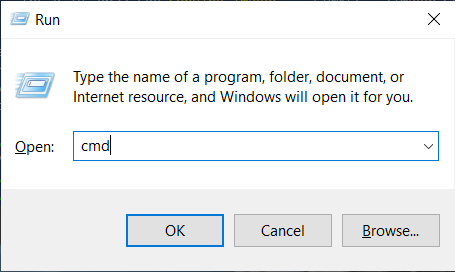
Navigate to the directory that contains the downloaded file (clinfo.exe) and execute the following command:
clinfo.exe -l
Ubuntu
Open a terminal window by pressing Ctrl + Alt + T keys on the keyboard and install
clinfo.sudo apt install -y clinfo
Run
clinfo -lto list all OpenCL platforms.clinfo -l
Verify whether CPU platforms are present and whether they might take precedence in your setup.
Inspect your Configuration file and check
ComputeDevicevalues.If CPU usage is not intentional, pin Zivid to a supported GPU in Configuration file:
__version__:
    serializer: 1
    data: 19
Configuration:
    ComputeDevice:
        Type: GPU
        Vendor: Intel
Use
Vendor: Nvidiaif that is your intended GPU.Remove or disable conflicting CPU ICDs where appropriate for your environment.
Re-run
clinfo -land verify that the resulting platform/device setup matches your intended configuration.
Intentional CPU usage
If CPU usage is intentional (unsupported mode), make this explicit by setting the compute device Type, Vendor, and AllowUnsupported.
__version__:
    serializer: 1
    data: 19
Configuration:
    ComputeDevice:
        Type: CPU
        Vendor: Intel
        AllowUnsupported: yes
Warning
CPU is an unsupported compute device mode. Capture time will be greatly increased when using CPU and this setup is not recommended for most applications. In mixed OpenCL platform setups, CPU selection can also cause unstable behavior, including crashes.