预热
介绍
To warm up a Zivid camera, capture point clouds in a loop for 10 minutes with a capture cycle and settings matching the deployed application, so the camera reaches thermal equilibrium before it starts producing 3D data that matters. Allowing the camera to warm up and reach thermal equilibrium can improve the overall accuracy and success of an application. In this article, we explain why and how to warm up the Zivid camera.
为什么需要预热
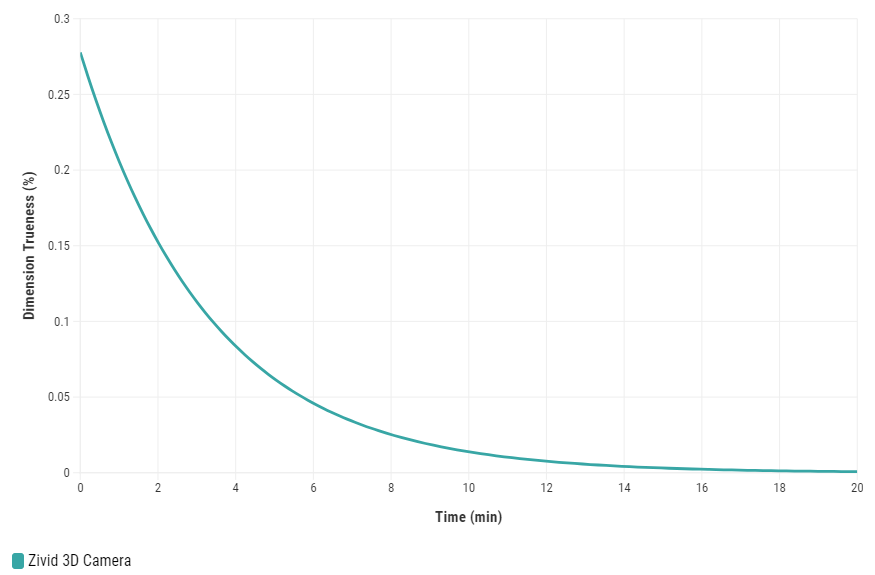
Zivid 相机内部含有主动电子元件(例如投影仪),在使用过程中会产生热量。内部升温会导致这些元件在温度变化时发生机械形变。
这些机械变化会导致基本光学组件发生微小的位移,从而在计算点云中点的位置时影响三角测量精度。由于每个内部组件可能处于许多未知的可能温度状态,因此相机的 3D 标定在加热或冷却阶段会不太准确。我们称这种现象为*预热漂移*。
建议控制相机温度并留出足够时间让所有组件达到稳定温度(热平衡)。因此,Zivid 3D 标定可以识别并准确预测相机的物理状态并生成正确的点云。
备注
Zivid 相机使用 Thermal Stabilization(热稳定功能) 来保持稳定的温度,并减少预热的需要。
温度变化 - 相机 vs. 环境
预热测试表明,在最快的捕获周期(实时模式)下,Zivid 相机的内部温度可能会临时以每分钟 1.5 °C 的速度变化(10 分钟内升高 15 °C)。对于更典型的捕获周期,例如每 5 秒捕获一次,内部温度变化速度会慢两到三倍(每分钟 0.5 - 1 °C)。
另一方面,气温变化最快可达 0.03 °C/min(例如 6 小时内增加 10 °C)。这比预热期间相机中的临时温度变化慢两个数量级。
Zivid 相机采用了浮动温度标定技术,能够补偿环境温度的变化,从而在推荐的温度范围内确保性能稳定。经过充分预热并正确使用的相机,在整个规定的环境温度范围内均能保持稳定的性能表现。
何时进行预热
建议在以下情况下预热相机:
对误差要求很严格的应用,例如:
对于小于 5 毫米/距相机 1 米距离的抓取应用。
准确度误差要求 < 0.5% 的检测应用。
达到中等捕获周期(快于每 10 秒捕获一次)的应用。
在现场标定之前。
在手眼标定之前。
在运行生产之前。
相机还未连接到电源时,例如安装相机后。
当相机已开机但在过去 20 分钟内未捕获点云时,例如早上启动生产单元时。
如何进行预热
对相机进行预热时,请以固定的捕获周期连续捕获点云 10 分钟。
连接
第一步是连接相机。

Zivid::Application zivid;

std::cout << "Connecting to camera" << std::endl;
auto camera = zivid.connectCamera();
var zivid = new Zivid.NET.Application();

Console.WriteLine("Connecting to camera");
var camera = zivid.ConnectCamera();
设定捕获周期和设置
在预热期间,捕获周期应尽可能与实际应用中的捕获周期相似(料箱拾取、拆垛等)。
如果部署的相机每 5 秒进行一次捕获,它应该在预热阶段以相同的间隔进行捕获。如果生产中的相机没有稳定的捕获周期,那么预热阶段的捕获周期应该在极值之间,例如,如果它在实际应用中每 5 到 11 秒捕获一次,则应该在预热时每 8 秒捕获一次。如果实际应用中捕获之间的间隔超过 10 秒,则无需预热相机。
预热期间使用的相机设置也应尽可能与实际应用中的设置相似(预先配置,从 YML 文件或捕获助手加载)
const auto warmupTime = std::chrono::minutes(10);
const auto captureCycle = std::chrono::seconds{ captureCycleSeconds };
const auto settings = loadOrDefaultSettings(settingsPath);
var warmupTime = TimeSpan.FromMinutes(10);
var captureCycle = opts.CaptureCycle.HasValue ? TimeSpan.FromSeconds(opts.CaptureCycle.Value) : TimeSpan.FromSeconds(5);
var settings = LoadOrDefaultSettings(opts.SettingsPath);
加载或建议设置
Zivid::Settings loadOrDefaultSettings(const std::string &settingsPath)
{
if(!settingsPath.empty())
{
std::cout << "Loading settings from file" << std::endl;
return Zivid::Settings(settingsPath);
}
std::cout << "Using default 3D settings" << std::endl;
auto settings = Zivid::Settings{ Zivid::Settings::Acquisitions{ Zivid::Settings::Acquisition{} } };
return settings;
static Zivid.NET.Settings LoadOrDefaultSettings(string settingsPath)
{
if (settingsPath != null)
{
Console.WriteLine("Loading settings from file");
return new Zivid.NET.Settings(settingsPath);
}
Console.WriteLine("Using default 3D settings");
var settings = new Zivid.NET.Settings
{
Acquisitions = { new Zivid.NET.Settings.Acquisition { } }
};
return settings;
}
def _load_or_default_settings(settings_path: str) -> zivid.Settings:
"""Load settings from YML file or use default settings.
Args:
settings_path: Path to the YML file that contains camera settings
Returns:
Camera Settings
"""
if settings_path:
print("Loading settings from file")
return zivid.Settings.load(Path(settings_path))
print("Using default 3D settings")
settings = zivid.Settings(acquisitions=[zivid.Settings.Acquisition()])
return settings
备注
这种预热方法利用投影仪作为加热元件,在稳定的捕获周期中对相机进行预热。投影仪开启时间与整个周期时间的比值称为占空比(duty cycle)。占空比不仅影响相机升温的速度,也决定了预热阶段结束后相机最终达到的稳态温度。
预热相机
要预热相机,请循环捕获 3D 点云 10 分钟,直到温度稳定。
std::cout << "Starting warm up for: " << warmupTime.count() << " minutes" << std::endl;
const auto beforeWarmup = SteadyClock::now();
while(SteadyClock::now() - beforeWarmup < warmupTime)
{
const auto beforeCapture = SteadyClock::now();
// Use the same capture method as you would use in production
// to get the most accurate results from warmup
camera.capture3D(settings);
const auto afterCapture = SteadyClock::now();
const auto captureTime = afterCapture - beforeCapture;
if(captureTime < captureCycle)
{
std::this_thread::sleep_for(captureCycle - captureTime);
}
else
{
std::cout << "Your capture time is longer than your desired capture cycle."
<< "Please increase the desired capture cycle." << std::endl;
}
const auto remainingTime = warmupTime - (SteadyClock::now() - beforeWarmup);
const auto remainingTimeMinutes = std::chrono::duration_cast<std::chrono::minutes>(remainingTime);
const auto remainingTimeSeconds =
std::chrono::duration_cast<std::chrono::seconds>(remainingTime - remainingTimeMinutes);
std::cout << "Remaining time: " << remainingTimeMinutes.count() << " minutes, "
<< remainingTimeSeconds.count() << " seconds." << std::endl;
}
std::cout << "Warm up completed" << std::endl;
DateTime beforeWarmup = DateTime.Now;
Console.WriteLine("Starting warm up for: {0} minutes", warmupTime.Minutes);
while (DateTime.Now.Subtract(beforeWarmup) < warmupTime)
{
var beforeCapture = DateTime.Now;
// Use the same capture method as you would use in production
// to get the most accurate results from warmup
using (camera.Capture3D(settings)) { }
var afterCapture = DateTime.Now;
var captureTime = afterCapture.Subtract(beforeCapture);
if (captureTime < captureCycle)
{
Thread.Sleep(captureCycle.Subtract(captureTime));
}
else
{
Console.WriteLine(
"Your capture time is longer than your desired capture cycle. Please increase the desired capture cycle.");
}
var remainingTime = warmupTime.Subtract(DateTime.Now.Subtract(beforeWarmup));
var remainingMinutes = Math.Floor(remainingTime.TotalMinutes);
var remainingSeconds = Math.Floor(remainingTime.TotalSeconds) % 60;
Console.WriteLine("Remaining time: {0} minutes, {1} seconds.", remainingMinutes, remainingSeconds);
}
Console.WriteLine("Warm up completed");
before_warmup = datetime.now()
print(f"Starting warmup for {warmup_time} minutes")
while (datetime.now() - before_warmup) < warmup_time:
before_capture = datetime.now()
# Use the same capture method as you would use in production
# to get the most accurate results from warmup
camera.capture_3d(settings)
after_capture = datetime.now()
duration = after_capture - before_capture
if duration.seconds <= capture_cycle.seconds:
sleep(capture_cycle.seconds - duration.seconds)
else:
print(
"Your capture time is longer than your desired capture cycle. \
Please increase the desired capture cycle."
)
remaining_time = warmup_time - (datetime.now() - before_warmup)
remaining_time_minutes = remaining_time.seconds // 60
remaining_time_seconds = remaining_time.seconds % 60
print(f"Remaining time: {remaining_time_minutes} minutes, {remaining_time_seconds} seconds.")
print("Warmup completed")
有关实现的示例,请参阅下面的完整预热代码示例。
/*
Short example of a basic way to warm up the camera with specified time and capture cycle.
For more information on warming up the camera, check out this tutorial:
https://support.zivid.com/en/latest/camera/academy/camera/warmup.html
*/
#include <Zivid/Zivid.h>
#include <clipp.h>
#include <chrono>
#include <iostream>
#include <thread>
using SteadyClock = std::chrono::steady_clock;
using Duration = std::chrono::nanoseconds;
namespace
{
Zivid::Settings loadOrDefaultSettings(const std::string &settingsPath)
{
if(!settingsPath.empty())
{
std::cout << "Loading settings from file" << std::endl;
return Zivid::Settings(settingsPath);
}
std::cout << "Using default 3D settings" << std::endl;
auto settings = Zivid::Settings{ Zivid::Settings::Acquisitions{ Zivid::Settings::Acquisition{} } };
return settings;
}
} // namespace
int main(int argc, char **argv)
{
try
{
std::string settingsPath;
size_t captureCycleSeconds = 5;
auto settingsOption = clipp::option("--settings-path")
& clipp::value("Path to the YML file that contains camera settings", settingsPath);
auto captureCycleOption =
clipp::option("--capture-cycle") & clipp::value("Capture cycle in seconds", captureCycleSeconds);
auto cli = (settingsOption, captureCycleOption);
if(!parse(argc, argv, cli))
{
auto fmt = clipp::doc_formatting{}.alternatives_min_split_size(1).surround_labels("\"", "\"");
std::cout << clipp::usage_lines(cli, "Warmup", fmt) << std::endl;
throw std::runtime_error{ "Invalid usage" };
}
Zivid::Application zivid;
std::cout << "Connecting to camera" << std::endl;
auto camera = zivid.connectCamera();
const auto warmupTime = std::chrono::minutes(10);
const auto captureCycle = std::chrono::seconds{ captureCycleSeconds };
const auto settings = loadOrDefaultSettings(settingsPath);
std::cout << "Starting warm up for: " << warmupTime.count() << " minutes" << std::endl;
const auto beforeWarmup = SteadyClock::now();
while(SteadyClock::now() - beforeWarmup < warmupTime)
{
const auto beforeCapture = SteadyClock::now();
// Use the same capture method as you would use in production
// to get the most accurate results from warmup
camera.capture3D(settings);
const auto afterCapture = SteadyClock::now();
const auto captureTime = afterCapture - beforeCapture;
if(captureTime < captureCycle)
{
std::this_thread::sleep_for(captureCycle - captureTime);
}
else
{
std::cout << "Your capture time is longer than your desired capture cycle."
<< "Please increase the desired capture cycle." << std::endl;
}
const auto remainingTime = warmupTime - (SteadyClock::now() - beforeWarmup);
const auto remainingTimeMinutes = std::chrono::duration_cast<std::chrono::minutes>(remainingTime);
const auto remainingTimeSeconds =
std::chrono::duration_cast<std::chrono::seconds>(remainingTime - remainingTimeMinutes);
std::cout << "Remaining time: " << remainingTimeMinutes.count() << " minutes, "
<< remainingTimeSeconds.count() << " seconds." << std::endl;
}
std::cout << "Warm up completed" << std::endl;
}
catch(const std::exception &e)
{
std::cerr << "Error: " << Zivid::toString(e) << std::endl;
std::cout << "Press enter to exit." << std::endl;
std::cin.get();
return EXIT_FAILURE;
}
return EXIT_SUCCESS;
}
}
catch (Exception ex)
{
Console.WriteLine("Error: " + ex.ToString());
return 1;
}
return 0;
}
static Zivid.NET.Settings LoadOrDefaultSettings(string settingsPath)
{
if (settingsPath != null)
{
Console.WriteLine("Loading settings from file");
return new Zivid.NET.Settings(settingsPath);
}
Console.WriteLine("Using default 3D settings");
var settings = new Zivid.NET.Settings
{
Acquisitions = { new Zivid.NET.Settings.Acquisition { } }
};
return settings;
}
/*
Short example of a basic way to warm up the camera with specified time and capture cycle.
For more information on warming up the camera, check out this tutorial:
https://support.zivid.com/en/latest/camera/academy/camera/warmup.html
*/
using CommandLine;
using System;
using System.Runtime.InteropServices;
using System.Threading;
using Duration = Zivid.NET.Duration;
class Program
{
public class Options
{
[Option('s', "settings-path", Required = false, HelpText = "Path to the YML file that contains camera settings.")]
public string SettingsPath { get; set; }
[Option('c', "capture-cycle", Required = false, HelpText = "Capture cycle in seconds.")]
public int? CaptureCycle { get; set; }
}
static int Main(string[] args)
{
return Parser.Default.ParseArguments<Options>(args)
.MapResult(
(Options opts) => RunWarmupWithOptionsAndReturnExitCode(opts),
errs => 1);
}
static int RunWarmupWithOptionsAndReturnExitCode(Options opts)
{
try
{
var zivid = new Zivid.NET.Application();
Console.WriteLine("Connecting to camera");
var camera = zivid.ConnectCamera();
var warmupTime = TimeSpan.FromMinutes(10);
var captureCycle = opts.CaptureCycle.HasValue ? TimeSpan.FromSeconds(opts.CaptureCycle.Value) : TimeSpan.FromSeconds(5);
var settings = LoadOrDefaultSettings(opts.SettingsPath);
DateTime beforeWarmup = DateTime.Now;
Console.WriteLine("Starting warm up for: {0} minutes", warmupTime.Minutes);
while (DateTime.Now.Subtract(beforeWarmup) < warmupTime)
{
var beforeCapture = DateTime.Now;
// Use the same capture method as you would use in production
// to get the most accurate results from warmup
using (camera.Capture3D(settings)) { }
var afterCapture = DateTime.Now;
var captureTime = afterCapture.Subtract(beforeCapture);
if (captureTime < captureCycle)
{
Thread.Sleep(captureCycle.Subtract(captureTime));
}
else
{
Console.WriteLine(
"Your capture time is longer than your desired capture cycle. Please increase the desired capture cycle.");
}
var remainingTime = warmupTime.Subtract(DateTime.Now.Subtract(beforeWarmup));
var remainingMinutes = Math.Floor(remainingTime.TotalMinutes);
var remainingSeconds = Math.Floor(remainingTime.TotalSeconds) % 60;
Console.WriteLine("Remaining time: {0} minutes, {1} seconds.", remainingMinutes, remainingSeconds);
}
Console.WriteLine("Warm up completed");
}
"""
Short example of a basic way to warm up the camera with specified time and capture cycle.
For more information on warming up the camera, check out this tutorial:
https://support.zivid.com/en/latest/camera/academy/camera/warmup.html
"""
import argparse
from datetime import datetime, timedelta
from pathlib import Path
from time import sleep
import zivid
def _options() -> argparse.Namespace:
"""Function to read user arguments.
Returns:
Arguments from user
"""
parser = argparse.ArgumentParser(description=__doc__)
parser.add_argument(
"--settings-path",
required=False,
help="Path to the YML file that contains camera settings",
)
parser.add_argument(
"--capture-cycle",
required=False,
type=float,
default=5.0,
help="Capture cycle in seconds",
)
return parser.parse_args()
def _load_or_default_settings(settings_path: str) -> zivid.Settings:
"""Load settings from YML file or use default settings.
Args:
settings_path: Path to the YML file that contains camera settings
Returns:
Camera Settings
"""
if settings_path:
print("Loading settings from file")
return zivid.Settings.load(Path(settings_path))
print("Using default 3D settings")
settings = zivid.Settings(acquisitions=[zivid.Settings.Acquisition()])
return settings
def _main() -> None:
user_options = _options()
app = zivid.Application()

print("Connecting to camera")
camera = app.connect_camera()
warmup_time = timedelta(minutes=10)
capture_cycle = timedelta(seconds=user_options.capture_cycle)
settings = _load_or_default_settings(user_options.settings_path)
before_warmup = datetime.now()

print(f"Starting warmup for {warmup_time} minutes")
while (datetime.now() - before_warmup) < warmup_time:
    before_capture = datetime.now()

    # Use the same capture method as you would use in production
    # to get the most accurate results from warmup
    camera.capture_3d(settings)

    after_capture = datetime.now()

    duration = after_capture - before_capture

    if duration.seconds <= capture_cycle.seconds:
        sleep(capture_cycle.seconds - duration.seconds)
    else:
        print(
            "Your capture time is longer than your desired capture cycle. \
             Please increase the desired capture cycle."
        )

    remaining_time = warmup_time - (datetime.now() - before_warmup)
    remaining_time_minutes = remaining_time.seconds // 60
    remaining_time_seconds = remaining_time.seconds % 60
    print(f"Remaining time: {remaining_time_minutes} minutes, {remaining_time_seconds} seconds.")

print("Warmup completed")
if __name__ == "__main__":
_main()
如需预热相机,您可以运行我们的代码示例,同时需要提供循环时间和相机参数设置文件的路径。
示例: warmup.py
python /path/to/warmup.py --settings-path /path/to/settings.yml --capture-cycle 6.0