Install Zivid on Windows
Windows에 Zivid를 설치하려면 Zivid 설치 프로그램을 다운로드하여 실행하고, 사용 중인 GPU에 맞는 GPU 컴퓨팅 백엔드를 선택하세요.
최신 Zivid Software 설치 프로그램을 다운로드하여 실행합니다.
Zivid와 함께 사용할 GPU에 따라 설치할 GPU 컴퓨팅 백엔드를 선택하세요.
GPU
CUDA
OpenCL
Intel
아니요
예
NVIDIA
최적
예
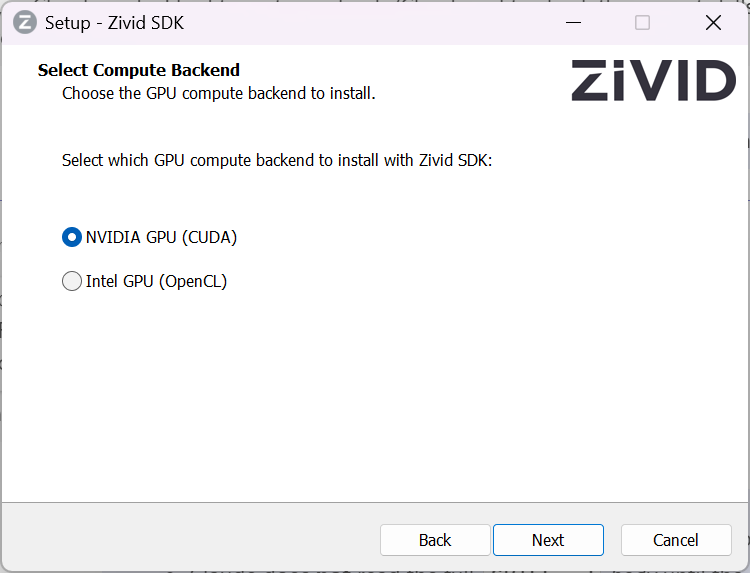
참고
NVIDIA GPU에 OpenCL을 설치하면 Config.yml 파일을 수정하여 명시적으로 허용하기 전까지 SDK가 시작되지 않습니다. 자세한 내용은 NVIDIA Compute Devices Are Not Supported by the OpenCL Version 를 참고하세요.
HALCON을 사용하는 경우 GenICam GenTL Producer(실험적) 설치 옵션을 선택하세요.

조심
GenICam/HALCON 지원은 experimental입니다.
Zivid Studio 를 열고 오류가 발생하지 않는지 확인하여 설치가 성공적으로 완료되었는지 확인하세요.
참고
문제가 발생하면 GPU drivers 를 설치하거나 업데이트해야 할 수도 있습니다.
Network Configuration 으로 이동하세요.