Select Specific GPU for Zivid Software
이 문서는 Zivid 소프트웨어의 연산 장치를 지정하는 방법을 보여줍니다. GPU가 여러 개 있고 특정 GPU를 사용하려는 경우 이 문서가 유용합니다. 이는 통합 GPU 하나와 전용 GPU 하나 이상이 있는 경우에 해당할 수 있습니다.
참고
Zivid의 GPU requirements 충족되는지 확인하세요. CPU 또는 AMD GPU를 사용하여 Zivid SDK를 실행하려는 경우, opt in to run the SDK with an unsupported compute device 을 확인하세요.
GPU를 지정하려면 Zivid Config file 을 업데이트하면 됩니다. 파일이 이미 존재하고 Windows의 경우 %LOCALAPPDATA%ZividAPI 에, Ubuntu의 경우 "${XDG_CONFIG_HOME-$HOME/.config}"/Zivid/API 에 위치해 있다면, 아래의 ComputeDevice 파라미터 편집 부분으로 건너뛰세요.
파일이 존재하지 않는 경우:
Config.yml파일을 다운로드 합니다.config 파일에는 다음 정보가 포함되어 있습니다:
__version__: 4
Configuration:
    ComputeDevice:
        SelectionFilter: ""
        Type: GPU
        Vendor: Nvidia
config 파일을 다음 디렉터리에 배치합니다:
Windows
mkdir %LOCALAPPDATA%\Zivid\API
move %HOMEPATH%\Downloads\Config.yml %LOCALAPPDATA%\Zivid\API\
Ubuntu
mkdir --parents "${XDG_CONFIG_HOME-$HOME/.config}"/Zivid/API
mv ~/Downloads/Config.yml "${XDG_CONFIG_HOME-$HOME/.config}"/Zivid/API/
조심
기존의 모든 구성 파일이 덮어쓰여집니다.
조심
Zivid configuration 파일은 .yaml이 아닌 .yml 파일 확장자를 사용해야 합니다.
원하는 GPU(알려진 경우)를 config 파일의
ComputeDevice파라미터를 변경하여 할당됩니다.공급업체당 단일 GPU가 있는 경우(예: 통합 Intel GPU 및 전용 NVIDIA GPU)
TypeGPU로,VendorNVIDIA또는Intel로 변경합니다.ComputeDevice: SelectionFilter: "" Type: GPU Vendor: Nvidia
동일한 공급업체의 GPU가 여러 개 있는 경우(예: Nvidia GPU 2개),
SelectionFilter에 사용할 GPU를 지정해야 합니다. 먼저 정확한 장치 이름을 확인하세요. SDK의 OpenCL 버전을 사용하는 경우clinfo -l을 실행하여 모든 연산 장치를 나열하고, CUDA 버전을 사용하는 경우에는 대신nvidia-smi -L을 실행하세요.Type과Vendor는Any로 두고,SelectionFilter는 장치 이름 중 고유한 부분으로 설정합니다. 예를 들어 NVIDIA GeForce RTX 3060의 경우:ComputeDevice: SelectionFilter: "RTX 3060" Type: Any Vendor: Any
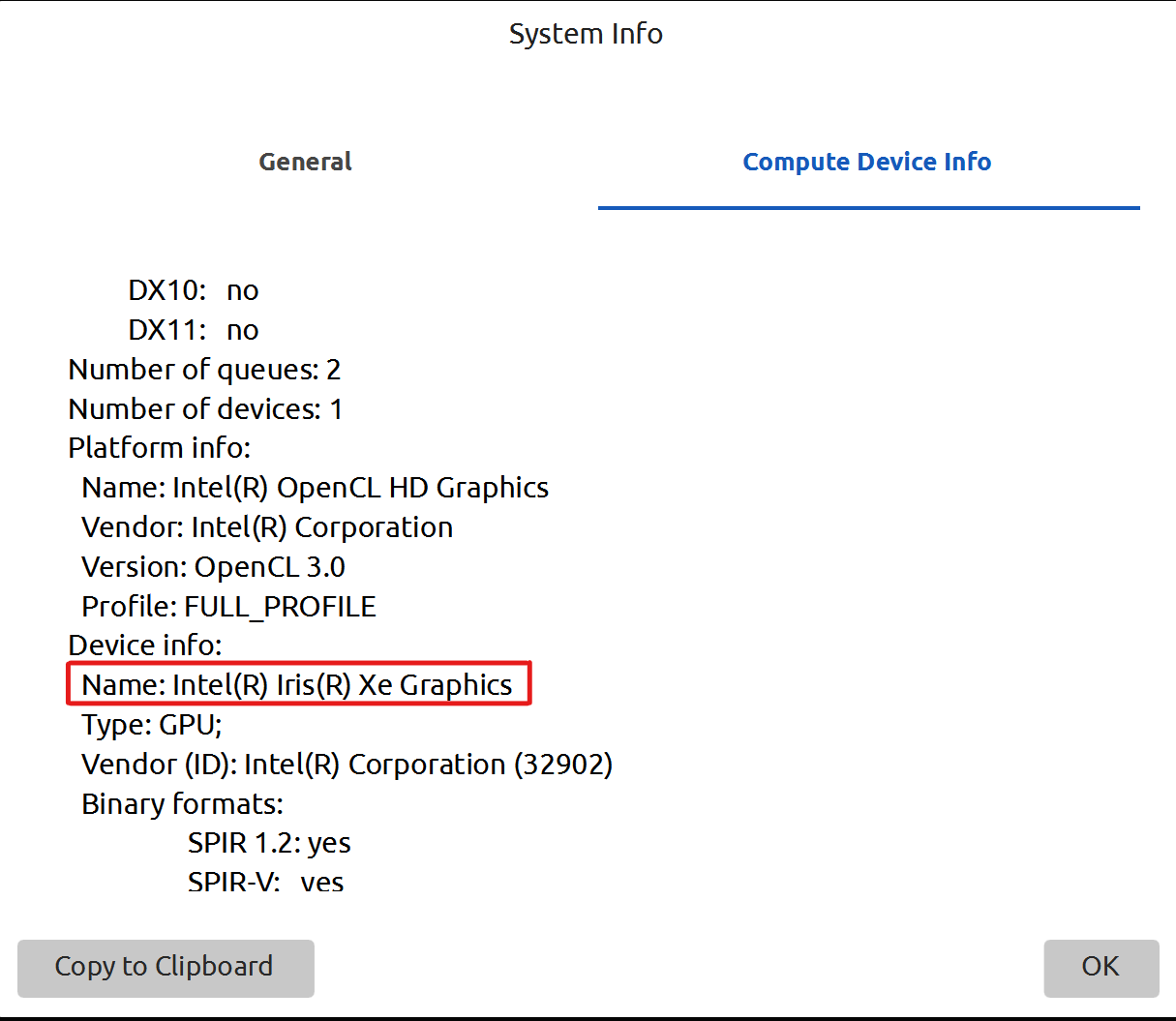
변경 사항을 확인하려면 Zivid Studio를 다시 실행하고 Help → About Zivid Studio → System Info → Compute Device Info 로 이동하십시오. 선택한 장치는 Device info 에서 확인할 수 있습니다.
Version History
SDK |
Changes |
|---|---|
2.11.0 |
AMD는 더 이상 권장되지 않습니다. SDK에서 공식 지원이 중단되었습니다. 자세한 내용은 Enable Unsupported Compute Device for Zivid Software 를 참조하세요. CPU에서만 SDK를 실행하라는 지침이 제거되었습니다. |