Zivid ソフトウェア用の特定の GPU を選択する
This article demonstrates how to specify a computational device for Zivid Software. This is relevant if you have multiple GPUs and want to use a specific one. This can be one integrated GPU and one or more dedicated GPUs.
注釈
Zivid の GPU 要件 が満たされていることを確認してください。 CPU または AMD GPU を使用して Zivid SDK を実行しようとしている場合は、 サポートされていないコンピューティングデバイスで SDK を実行するためのオプトイン の方法を確認してください。
Specifying GPU is done by updating the Zivid Config file.
If the file already exists and it's located in %LOCALAPPDATA%ZividAPI for Windows or "${XDG_CONFIG_HOME-$HOME/.config}"/Zivid/API for Ubuntu, skip ahead to editing the ComputeDevice parameters below.
ファイルが存在しない場合:
Config.ymlファイルをダウンロードします。設定ファイルには次の情報が含まれています。
__version__: 4
Configuration:
    ComputeDevice:
        SelectionFilter: ""
        Type: GPU
        Vendor: Nvidia
設定ファイルを次のディレクトリに配置します。
Windows
mkdir %LOCALAPPDATA%\Zivid\API
move %HOMEPATH%\Downloads\Config.yml %LOCALAPPDATA%\Zivid\API\
Ubuntu
mkdir --parents "${XDG_CONFIG_HOME-$HOME/.config}"/Zivid/API
mv ~/Downloads/Config.yml "${XDG_CONFIG_HOME-$HOME/.config}"/Zivid/API/
注意
既存の設定ファイルは上書きされます。
注意
Zivid 設定ファイルは、.yml ファイル拡張子(.yaml ではない)を使用する必要があります。
必要な GPU (既知の場合)は、設定ファイルの
ComputeDeviceパラメータを変更することで割り当てられます。ベンダーごとに 1 つの GPU (例: 統合 Intel GPU と専用 NVIDIA GPU)がある場合は、
TypeをGPUに、VendorをNVIDIAまたはIntelに変更します。例:ComputeDevice: SelectionFilter: "" Type: GPU Vendor: Nvidia
If you have multiple GPUs of the same vendor (e.g. two Nvidia GPUs),
SelectionFiltermust specify which GPU to use. Find the exact device name first: with the OpenCL version of the SDK, runclinfo -lto list all compute devices; with the CUDA version, runnvidia-smi -Linstead. LeaveTypeandVendorasAny, and setSelectionFilterto any unique part of the device name, e.g. for an NVIDIA GeForce RTX 3060:ComputeDevice: SelectionFilter: "RTX 3060" Type: Any Vendor: Any
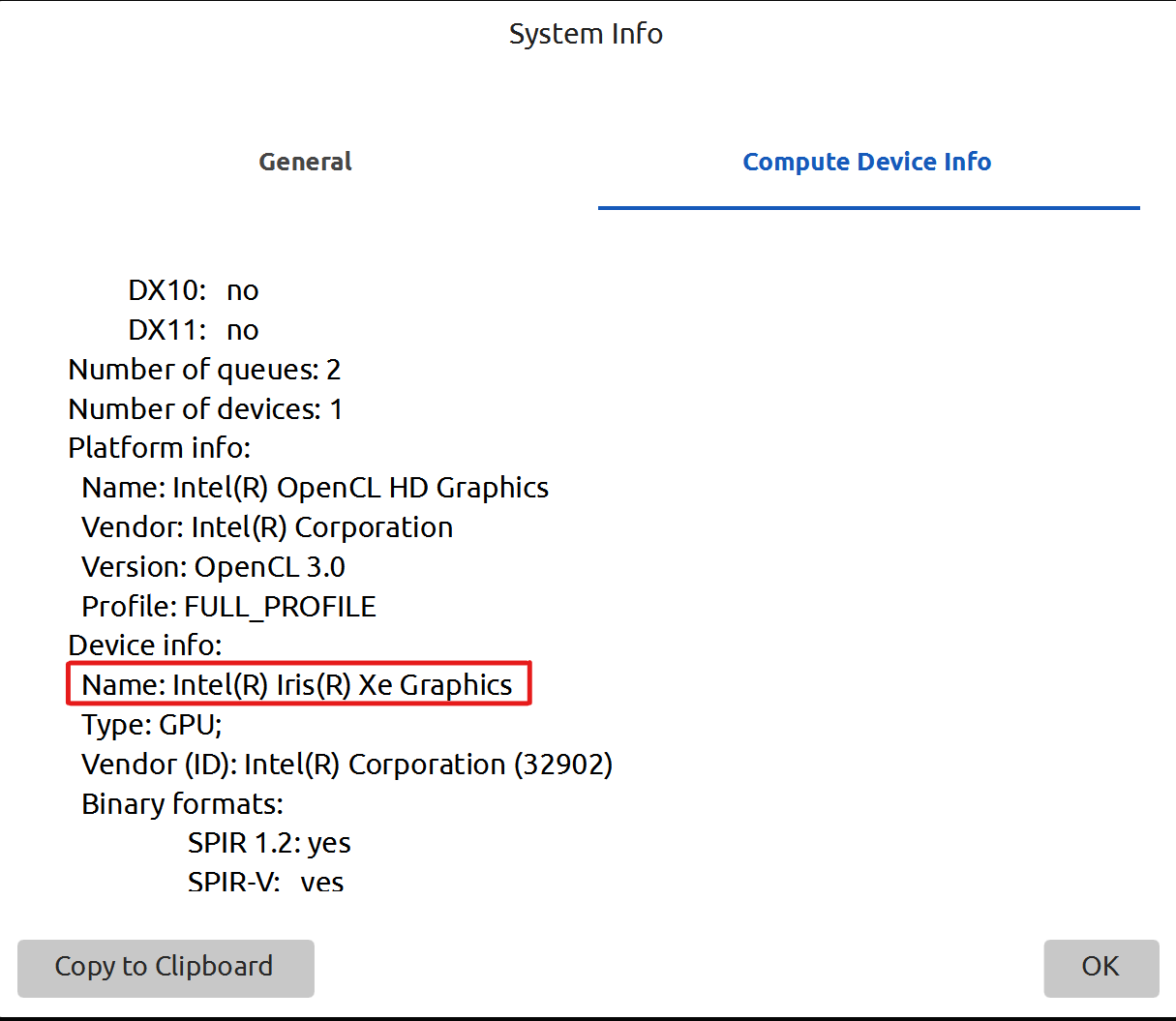
変更を確認するには、 Zivid Studio を再起動し、 Help → About Zivid Studio → System Info → Compute Device Info に移動します。選択したデバイスは Device info の下に表示されます。
Version History
SDK |
変更点 |
|---|---|
2.11.0 |
AMD は推奨されなくなりました。 SDK では公式サポートが削除されました。 Zivid ソフトウェア用にサポートされていないコンピューティングデバイスを有効にする を参照してください。 SDK を CPU のみで実行するための手順を削除しました。 |