Debug in HALCON
Read detailed error messages in the Output Console
Debugging your program in Hdevelop may be challenging, as the error message is not always easy to understand. In that case, Output Console may provide more details.
For example, if you set SamplingPixel to blueSubsample4x4 for a Zivid Two M70 camera, you will get the following error message:
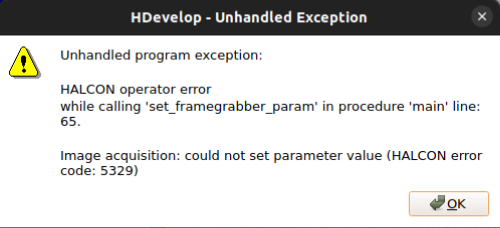
It is not necessarily straightforward to understand that blueSubsample4x4 is not supported by Zivid 2 M70. However, looking at Output Console will give you a more detailed error message:
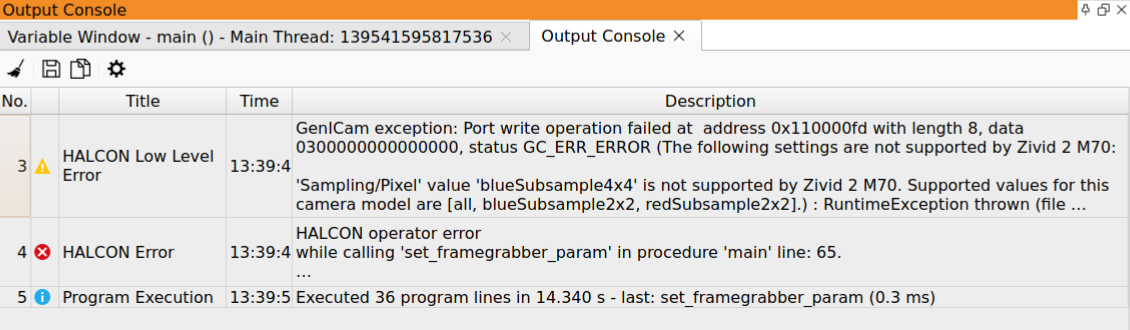
The Zivid camera is not listed in HALCON
Connecting a Zivid camera to HALCON requires two components, one from each vendor.
Vendor |
Component |
Installed by |
|---|---|---|
Zivid |
GenTL Producer |
Zivid SDK installer, GenICam GenTL Producers component |
HALCON |
GenTL Consumer |
HALCON installer, GenICamTL image acquisition package |
Both components are required. The camera does not show up in HALCON if either one is missing.
Only the File and DirectFile interfaces are detected
In the HALCON Image Acquisition Assistant, automatic interface detection returns only File and DirectFile.
The GenICamTL interface is absent, so you cannot select the Zivid camera.
This means the HALCON GenICamTL image acquisition package is not installed. The package is an optional component of the HALCON installation. Installing a newer HALCON version does not carry the package over from an older one.
To fix this, add the GenICamTL image acquisition interface from the MVTec Software Manager. A full HALCON reinstall is not required. Restart HDevelop and run the interface detection again.
Note
This symptom points to the HALCON side of the integration. If the same camera works in another HALCON version on the same machine with the same Zivid SDK version, then the Zivid GenTL Producer is installed correctly.