clinfo Does Not Print Anything
If clinfo prints nothing on Ubuntu, add your user to the required groups, then run clinfo -l again; if it still reports zero platforms, install the OpenCL drivers.
Note
This is an Ubuntu issue only.
Requirements
On Ubuntu, you may need to add your user as part of the render and/or video groups for OpenCL to work.
Ubuntu 26.04
OpenCL will not work if your user is not part of the render group and the video group.
Open a terminal window by pressing Ctrl + Alt + T keys on the keyboard, then add your user to the correct group:
sudo gpasswd -a $USER render
sudo gpasswd -a $USER video
Ubuntu 24.04
OpenCL will not work if your user is not part of the render group and the video group.
Open a terminal window by pressing Ctrl + Alt + T keys on the keyboard, then add your user to the correct group:
sudo gpasswd -a $USER render
sudo gpasswd -a $USER video
Ubuntu 22.04
OpenCL will not work if your user is not part of the render group and the video group.
Open a terminal window by pressing Ctrl + Alt + T keys on the keyboard, then add your user to the correct group:
sudo gpasswd -a $USER render
sudo gpasswd -a $USER video
Ubuntu 20.04
OpenCL will not work if your user is not part of the render group.
Open a terminal window by pressing Ctrl + Alt + T keys on the keyboard, then add your user to the correct group:
sudo gpasswd -a $USER render
Ubuntu 18.04
Note
Support for Ubuntu 18.04 was removed in SDK 2.10. To view its setup instructions, switch the Knowledge Base to a previous version in the top left corner; they are also preserved in Knowledge Base versions for SDK 2.9 and earlier.
Restart your PC:
sudo reboot
Open a terminal window by pressing Ctrl + Alt + T keys on the keyboard, then execute the following commands:
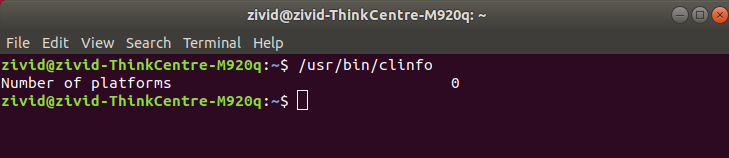
/usr/bin/clinfo -l
This will print all available information about all OpenCL platforms on the system and the devices they expose.
Alternatively, if you do not want to add your user to the render/video groups, you can use sudo:
sudo /usr/bin/clinfo -l
In case the number of platforms is equal to 0 you need to install OpenCL drivers.